Threat Research
Phished By Yourself: The DMARC p=none Loophole
15 phishing emails bypassed Proofpoint because the customer's DMARC was at p=none. Anatomy of self-to-self spoofing, AiTM, and attacker-enrolled MFA.
By ZeroBEC Team · April 22, 2026 · 9 min read
ZeroBEC's AI-native detection engine identified a high-volume credential-harvesting campaign targeting one of our manufacturing customers between April 17 and April 20, 2026. Close to 15 well-crafted phishing emails reached user inboxes despite a premium secure email gateway, Proofpoint, sitting in front of the mailbox. Every message shared a single root cause: the customer's DMARC policy was set to p=none, and the attacker built the entire campaign around that one configuration gap.
The DMARC Record That Told the Whole Story
A public DNS lookup of the customer's DMARC record returns:
v=DMARC1; p=none; fo=1; rua=mailto:[email protected]; ruf=mailto:[email protected]
Two facts jump out:
- Proofpoint Email Fraud Defense is configured. The
ruaandrufaddresses point to Proofpoint's managed DMARC aggregation service. The customer is paying for DMARC visibility. - The policy action is
p=none. In plain terms: tell me about spoofing, but do not act on it. No quarantine, no reject. Spoofed mail is delivered.
DMARC reporting is not DMARC enforcement. This is the most common misconfiguration we see on mid-market domains: organizations deploy a premium DMARC visibility service, receive the aggregate reports, and never move the policy past p=none, usually out of fear of breaking legitimate mail from third-party senders (marketing platforms, ticketing systems, HRIS). The attacker who built this campaign knew exactly what that posture looks like on the wire.
The Kill-Chain
Step 1: The Spoof Lands Because the Customer Configured It To
The attacker sent each message from an external IP (104.161.36.39, PTR therdpsdaddy[.]store) with the From:, Return-Path:, and Message-ID domain forged to the customer's own domain. Microsoft Exchange Online evaluated the message and stamped exactly what you would expect for an unauthorized spoof:
spf=softfail: the sending IP is not in the customer's SPF recorddkim=none: the message carries no DKIM signaturedmarc=fail: the message fails DMARC alignmentaction=none: the customer's published policy tells Microsoft to take no action on that failurecompauth=pass reason=703: Composite Authentication passed despite the alignment failures, consistent with an explicit allow-list or safe-sender override at the tenant level
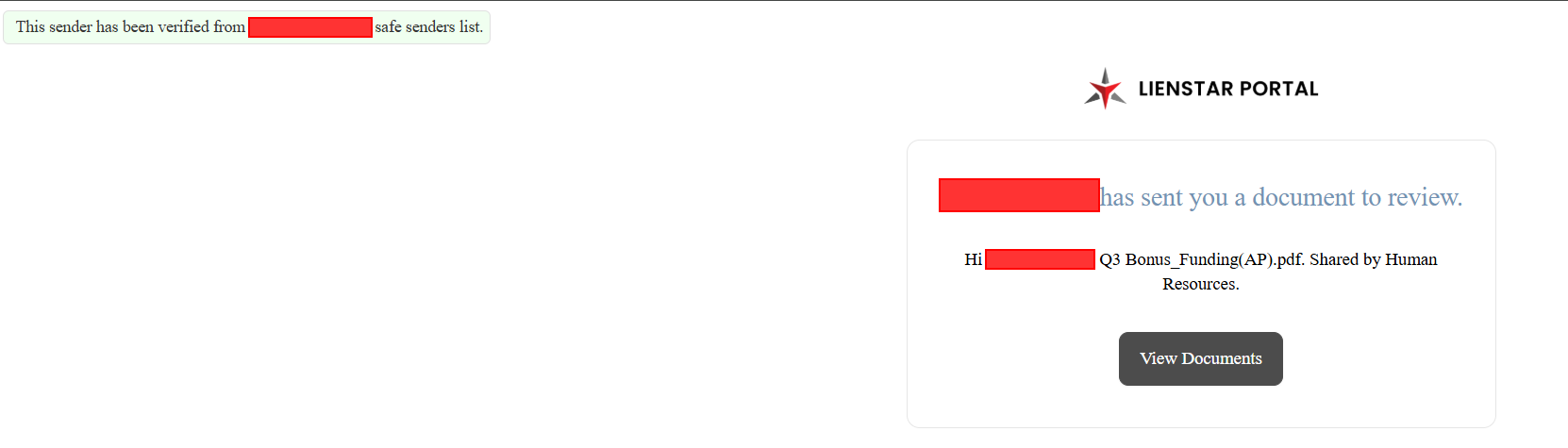
The result: the message lands in the user's inbox with a green "This sender has been verified from [organization] safe senders list" banner. The customer's own gateway, the customer's own DMARC policy, and the customer's own safe-sender list all actively worked in the attacker's favor.
Step 2: Self-to-Self Spoofing
The majority of the campaign followed one pattern: the From: address was the same as the recipient's own address. A typical header:
- From:
[email protected] - To:
[email protected] - Subject:
ATTN: Mailbox Login Expire today, 4/17/2026 - f39726b1b5d2d6e02bbe1181cdfcbb25aef0943b
A message from yourself, about your own mailbox, passing through your own gateway. The recipient's first reaction is not "is this phishing." It is "what is this I sent myself." The self-to-self pattern exploits both the trust model (internal sender) and the mental model (I must have triggered this).
Step 3: A Different Lure for Every Target
The campaign rotated through at least five visual themes, each crafted to match a familiar M365 interaction:
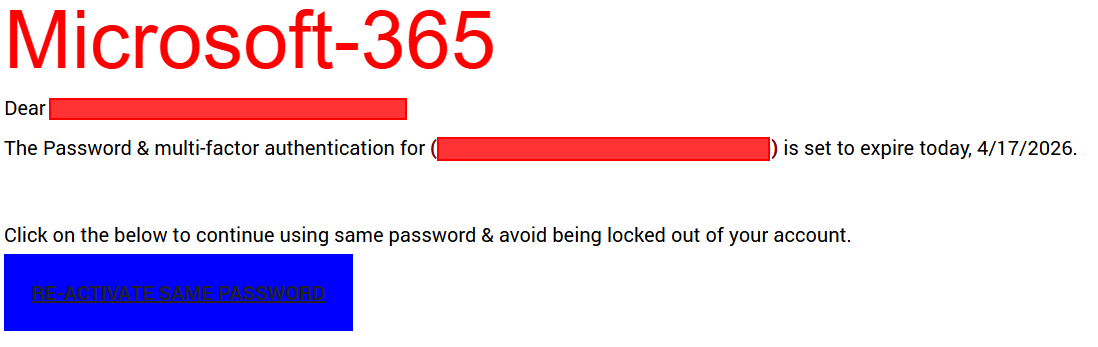
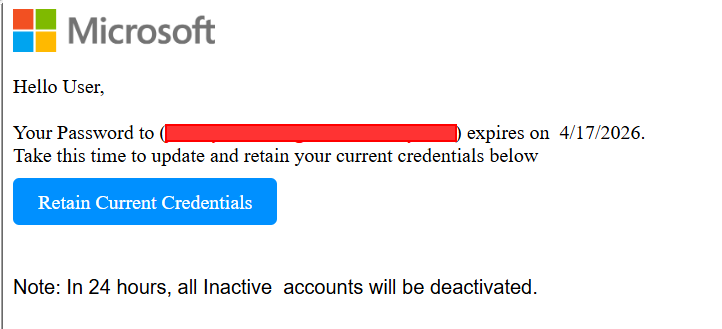
- Microsoft 365 password expiry with a "RE-ACTIVATE SAME PASSWORD" or "Retain Current Credentials" button
- Trello "Esigns Document Notice" with a "View Document" CTA
- Payment receipt confirmation with a "View Receipt" CTA
- DocuSign / HR Q3 Bonus approval with a hex-token reference ID
- LienStar Portal document share with a "View Documents" CTA
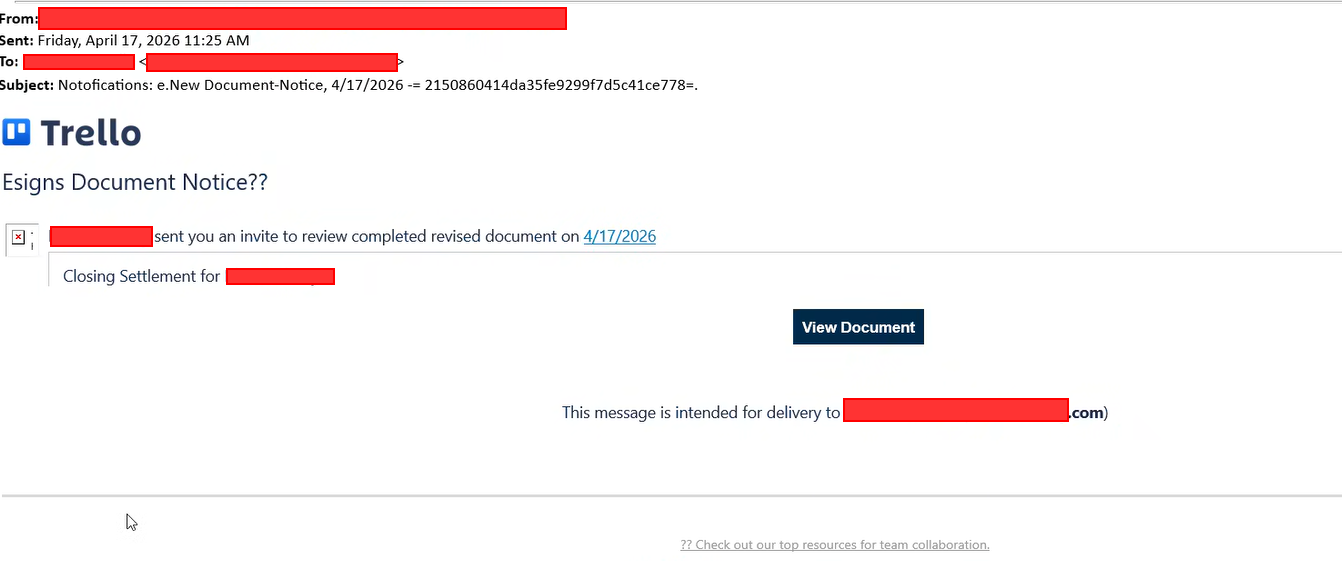
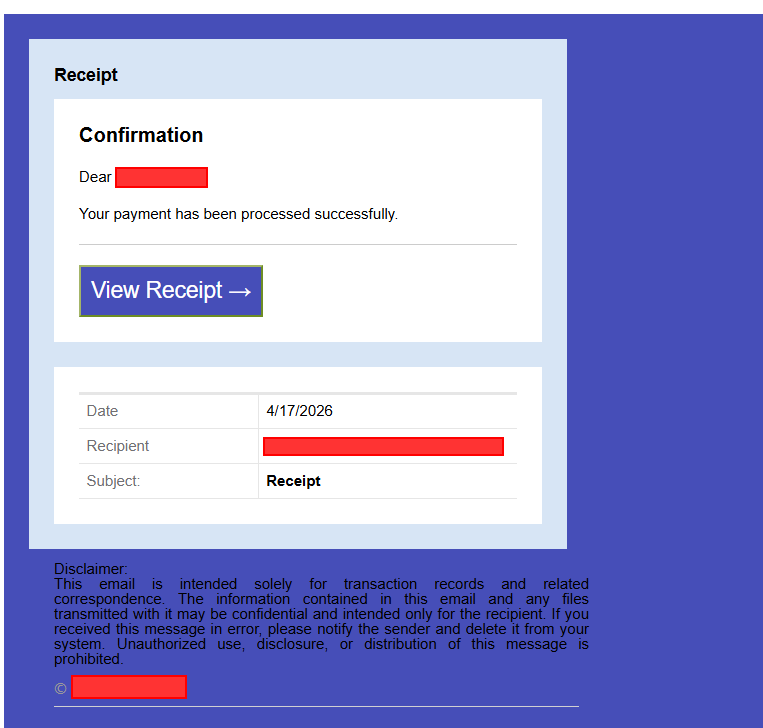
Every subject line carried a unique 40-character hex token. Examples from this campaign include f39726b1b5d2d6e02bbe1181cdfcbb25aef0943b, aac2d5ec9f746b786f5fa521cbf50805bd053a63, and 9ecf88818da1212423b4906fbd5cb8c9335c8ce7. The token is not cosmetic; it serves three attacker goals:
- Defeats signature-based clustering. No two messages carry the same subject line, so gateways that cluster similar emails see 15 one-offs, not one campaign.
- Defeats simple SOC hunts. Analysts cannot pivot on "the subject" because there is no subject to pivot on.
- Keys per-target state on the credential-harvesting backend. The token maps each victim to a specific server-side session, so the backend can serve a customized lure (the victim's real email address pre-populated on the final form) and track who has engaged.
Step 4: The Link Laundering Chain
Clicking the CTA never went straight to a credential-harvesting page. Every link routed through a chain of legitimate URL-rewriting or redirection services that most gateways classify as safe:
- Google redirectors:
www.google[.]com/url?q=...,www.google[.]it/url?q=...,maps.google[.]cl/... - Trend Micro URL protect:
cas5-0-urlprotect.trendmicro[.]com/... - Inky shared-link domain:
shared.outlook.inky[.]com/link?domain=... - EdgePilot:
link.edgepilot[.]com/...(wrapped inside an Inky link) - Esvalabs URL sandbox:
urlsand.esvalabs[.]com/?u=... - Cognito Forms:
cognitoforms[.]com/.../Q3BonusFundingRequestWasApproved - Monday.com tracker:
trackingservice.monday[.]com/tracker/link?token=... - Independent redirectors:
gateway.exwa[.]org/jump.php?c=...
None of these services are malicious. The attacker is exploiting the reputation of legitimate vendors, including other email-security vendors whose URL wrapping is implicitly trusted by Proofpoint. When a URL-reputation check encounters shared.outlook.inky[.]com, it sees an email-security competitor's domain and categorizes it as benign.
Step 5: CAPTCHA and Out-of-Band Codes Defeat Sandbox Detonation
The link chain eventually lands on an attacker-controlled domain: microsoftsecure.splnappliances[.]com in one observed case, cdr.websitescare[.]com in another, hairsystemlab[.]com in a third. But before the credential-harvesting page renders, the victim is funneled through one or two interstitial pages designed specifically to defeat automated analysis:
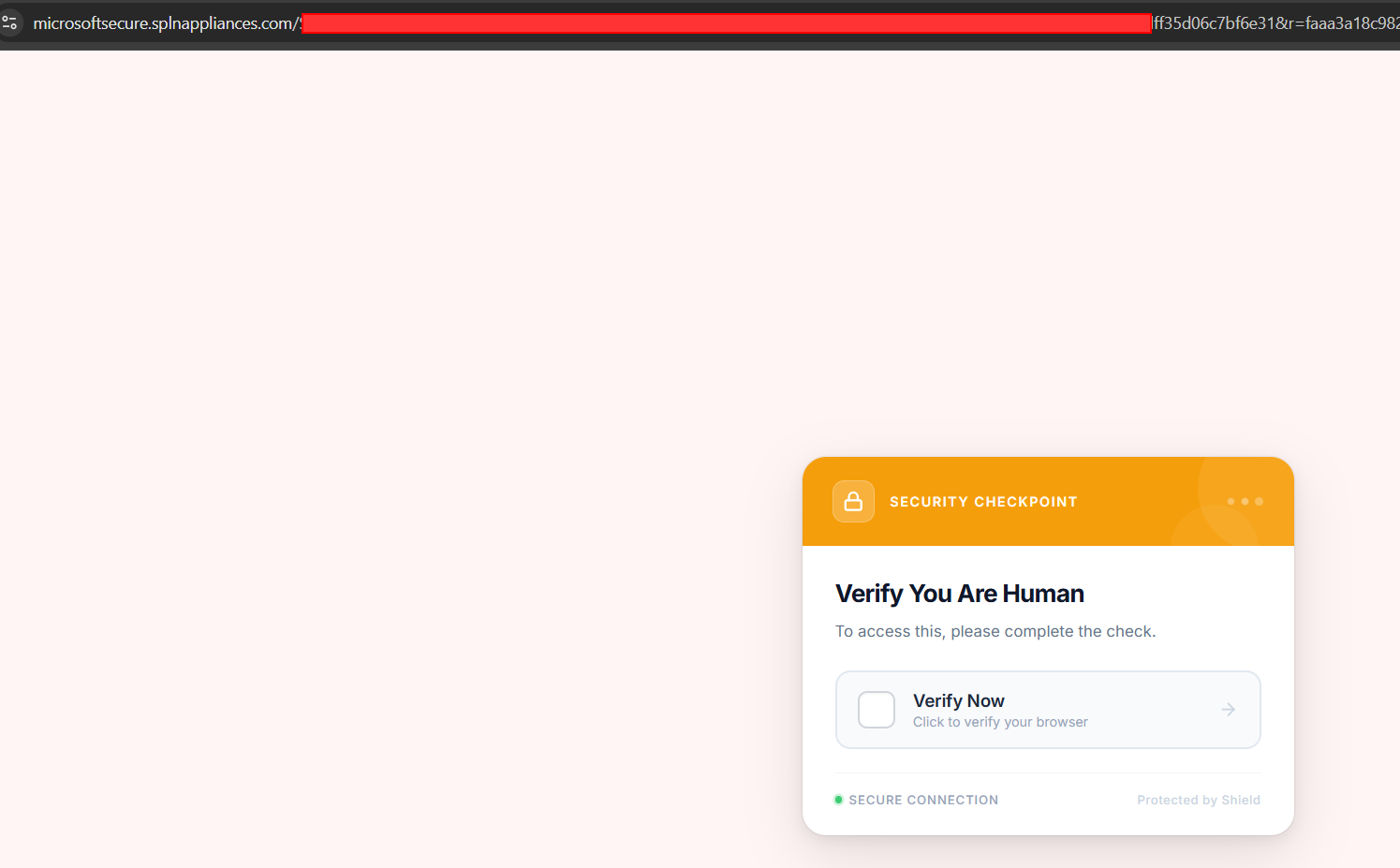
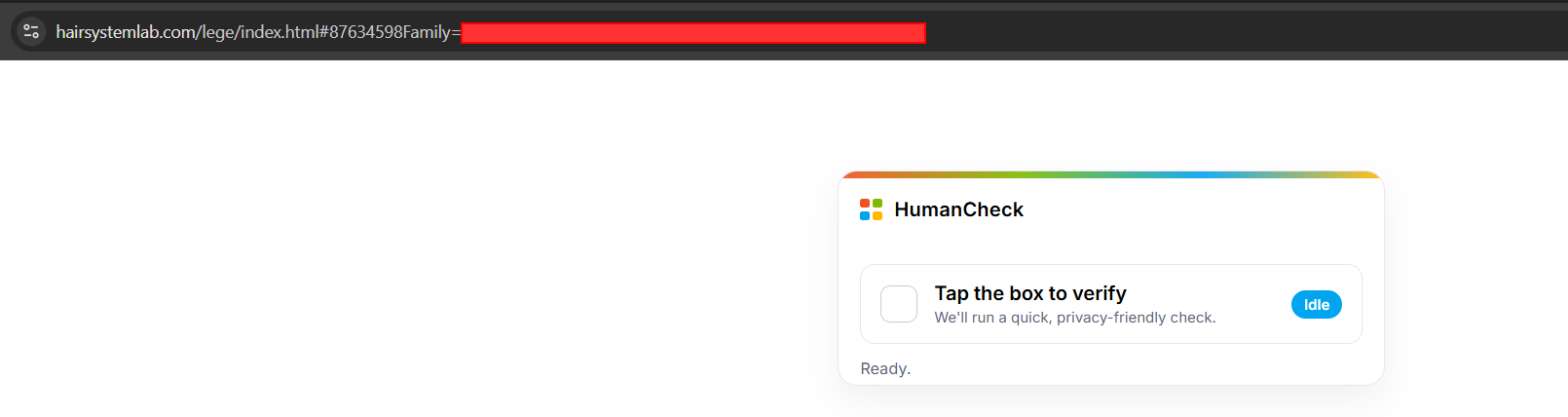
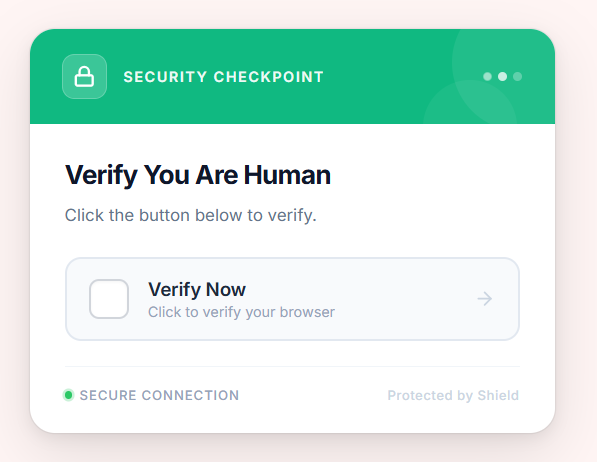
- CAPTCHA challenge ("Security Checkpoint: Verify You Are Human"). This alone blocks URL detonation sandboxes across the market. Proofpoint, Microsoft Defender, Mimecast, Abnormal: none of them solve CAPTCHAs at scale.
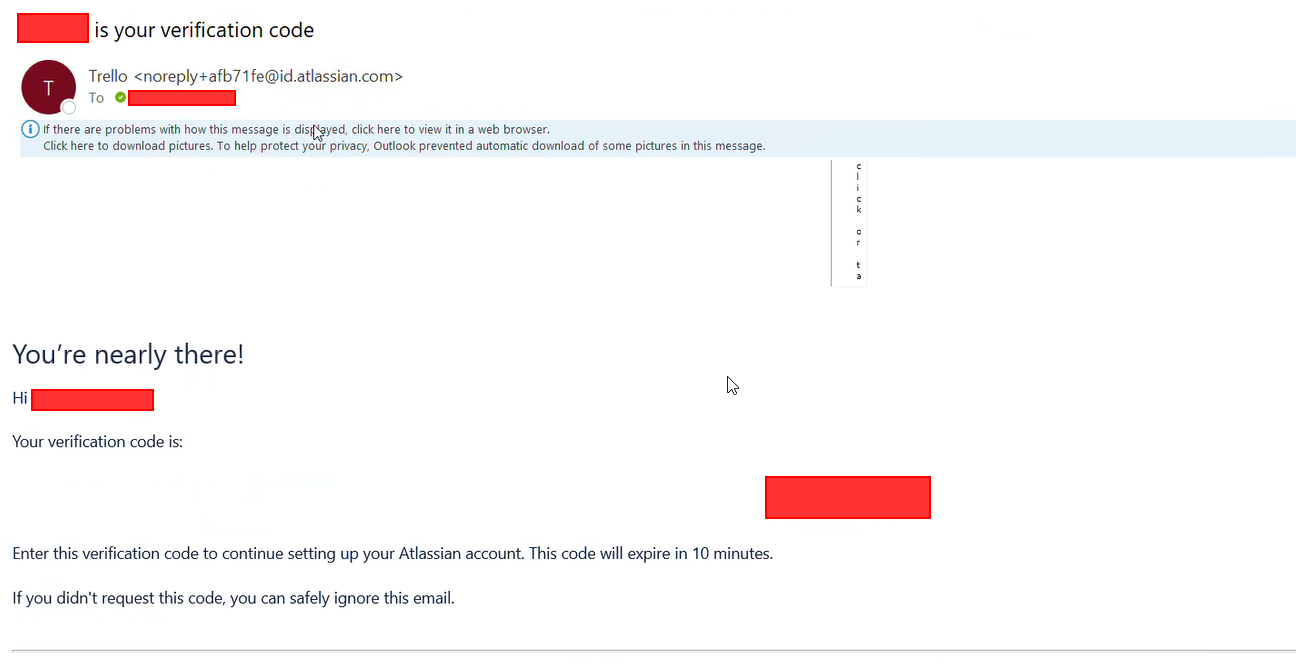
- Out-of-band verification code, delivered by a legitimate service. On some variants, after CAPTCHA completion, the phishing backend triggers a real signup flow on a legitimate platform (in this campaign, Atlassian/Trello) using the victim's own email address. The legitimate platform then sends a verification code email to the victim's actual mailbox. The phishing page demands the victim enter that code before rendering the login form. This is a remarkable design choice: the attacker runs no out-of-band infrastructure of their own. They borrow Atlassian's. The result for defenders is the same. Sandbox detonation is impossible in principle, because the email is delivered by a legitimate service to the victim's real inbox, not to the sandbox.
Step 6: The AiTM Credential Harvest
After the victim solves the CAPTCHA and (where required) enters the OOB code, the final page renders: a pixel-perfect Microsoft "Enter password" form, pre-populated with the victim's email address.
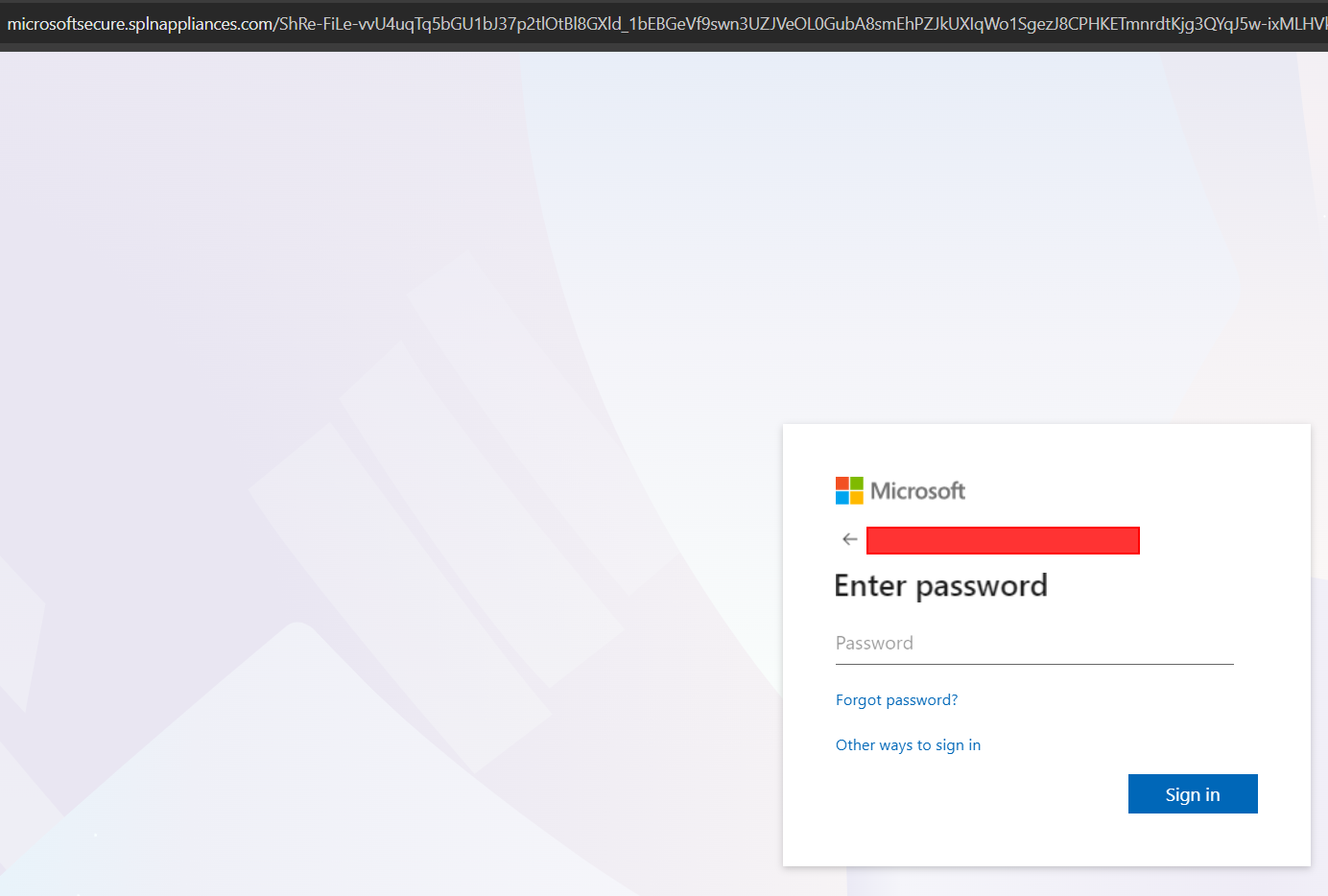
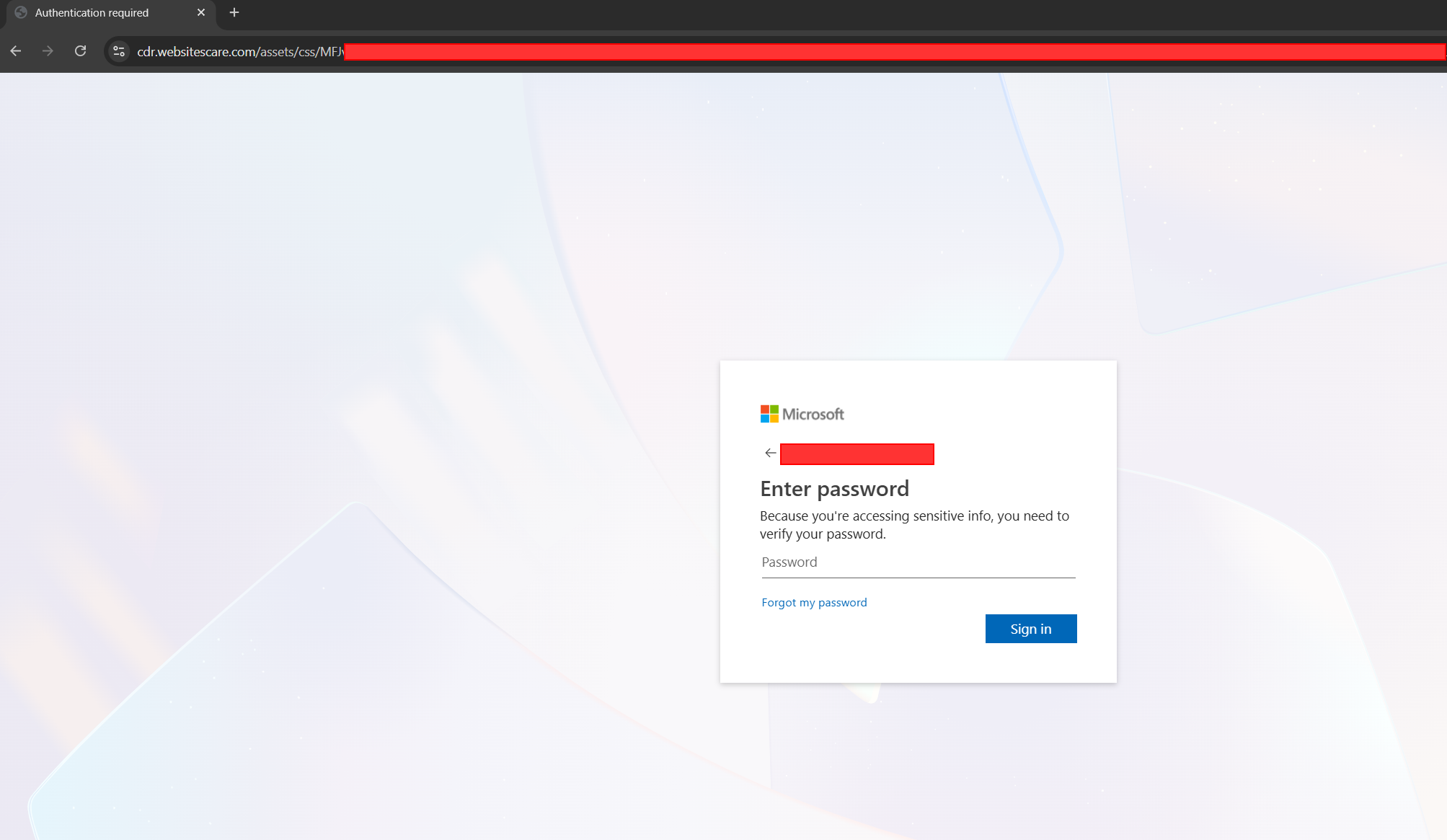
The page is an Adversary-in-the-Middle (AiTM) proxy: credentials entered flow through the attacker's backend to the real Microsoft login, MFA is satisfied by the victim on their own device, and the authenticated session token is captured. MFA is not bypassed. It is proxied. The attacker walks away with a valid, MFA-completed session cookie.
In this campaign, one of the fifteen targets made it through every gate. What happened in the next ten seconds is a case study in modern AiTM persistence.
Step 7: Attacker-Enrolled MFA for Persistence
The attacker's first action after a successful AiTM login was not email exfiltration or inbox-rule creation. It was to register their own phone-app authenticator as an MFA method on the victim's account.
This is the modern AiTM persistence move, and it matters for three reasons:
- The session cookie expires. The enrolled MFA method does not. Once the attacker controls a registered authenticator on the account, they can re-authenticate at any time with the victim's password plus the attacker-controlled second factor. The victim's own MFA device becomes irrelevant.
- Password resets do not evict the attacker. The standard SOC playbook treats "reset the user's password" as the remediation for a compromised account. It is not enough. If the attacker's authenticator is still registered, the attacker recovers access the moment they know the new password, or, in many cases, triggers a self-service password reset using the MFA method they control.
- MFA enrollment is a low-noise event that most organizations do not alert on. New MFA methods are added every day by legitimate users. Without a behavioral baseline, an attacker-registered authenticator looks like a user who just got a new phone.
Full tenant eviction of an AiTM compromise requires all three of: a password reset, revocation of every active refresh token and session cookie on the account, and audit-and-removal of every MFA method registered during the attacker window. Miss any one of these and the attacker retains access.
Why Proofpoint Didn't Stop It
A premium SEG is not a silver bullet, and this campaign is a concise demonstration of why. Four independent evasion techniques stack:
- The customer's own DMARC policy (
p=none) told every DMARC-aware filter to take no enforcement action on spoof failures. Proofpoint respected the customer's published policy, as it is designed to. The single most effective anti-spoof signal was disarmed by the customer's own configuration. - Per-target hex tokens defeated bulk clustering. Every message was unique; reputation-based gateways saw 15 one-offs, not a campaign.
- Link laundering through trusted redirector vendors (Google, Trend Micro, Inky, EdgePilot, esvalabs, Cognito Forms, monday.com) carried the phishing URL through reputation checks that, by design, treat those vendors as safe.
- CAPTCHA and OOB verification codes at the final landing page made URL-detonation sandboxes physically unable to reach the credential-harvesting form.
Any one of these on its own is defeatable. All four together defeat nearly every email-gateway category on the market, Proofpoint included, and by extension every other premium SEG operating under the same design assumptions.
Why Behavioral Detection Is the Answer
Gateway-layer defenses inspect the message. In this campaign, the message was engineered specifically to look clean at the gateway layer. No message-level signal is reliably malicious in isolation. The signals only correlate into a campaign when you look at the behavior of the affected mailboxes over time.
ZeroBEC flagged this campaign because it watches layers the gateway cannot:
- Self-to-self anomaly on the user principal.
From == To == same mailboxfrom an external IP, without matching SPF/DKIM, is a high-confidence behavioral signal. Legitimate self-to-self mail is rare and has a specific cadence; attacker-generated self-to-self arrives in bursts. - Cross-mailbox campaign awareness. Fifteen targets inside one tenant received structurally identical messages with rotating hex tokens, rotating lure templates, and overlapping redirector infrastructure. No gateway inspects across mailboxes this way. ZeroBEC does.
- Post-click behavioral baselines. Even for a user who makes it through CAPTCHA and enters credentials, ZeroBEC's behavioral engine on the M365 principal detects the AiTM session the moment the attacker authenticates from an unfamiliar IP, at an unusual time, or starts enumerating the mailbox.
- MFA method enrollment anomaly. A new authenticator registration from the same IP and user-agent as an in-progress login, minutes after an unfamiliar-location sign-in, is a near-certain indicator of attacker-driven persistence. ZeroBEC surfaces this sequence as a single incident timeline, not three disconnected events.
Recommendations (Prioritised)
- Move your DMARC policy from
p=nonetop=reject. This is the single highest-leverage change on this list. Phased rollout: start atp=quarantine; pct=10, raisepctweekly while reviewing Proofpoint EFD aggregate reports for legitimate-sender failures, then graduate top=reject. Includesp=rejectfor subdomains. Had this campaign hit ap=rejecttenant, every single message would have been rejected at the MX, not delivered to the inbox. - Audit your M365 safe-sender and allow-list configuration.
compauth=pass reason=703overrides almost every other signal. Any safe-sender or allow-list entry covering your own domain is an attacker gift. Remove them. - Deploy phishing-resistant MFA (FIDO2 / passkeys). AiTM works because MFA is proxied. FIDO2 binds the authentication to the origin, so the attacker's proxy cannot replay the challenge.
- Hunt for hex-token subjects in your mail flow. A 40-character hex suffix in an inbound subject line is a high-confidence phishing indicator with essentially no legitimate use. Alert on the pattern
[0-9a-f]{40}in inbound subject lines. - Alert on MFA method registration as a high-severity event. A new authenticator added within minutes of a sign-in from an unfamiliar IP, device, or geolocation is a near-certain compromise indicator. Any remediation must include auditing and removing every MFA method registered during the attacker window. A password reset alone does not evict an AiTM attacker who has enrolled their own second factor.
- Treat DMARC reporting as a starting point, not a destination. If your DMARC record still ends in
p=noneafter twelve months of visibility, the reports are serving the attacker more than they are serving you. - Deploy ZeroBEC for continuous behavioral analysis across your tenant. ZeroBEC works alongside Proofpoint or any other gateway with no MX record changes and deploys in under 60 minutes. It catches the cross-mailbox patterns that per-message gateway inspection is architecturally unable to see.
Indicators of Compromise (Defanged)
- Sender IP:
104.161.36.39(PTR:therdpsdaddy[.]store) - Final credential-harvesting domains:
microsoftsecure.splnappliances[.]com,cdr.websitescare[.]com,hairsystemlab[.]com - Independent redirectors:
gateway.exwa[.]org - Subject-line pattern: inbound messages with a 40-character hex token in the subject
- Header pattern:
From:header equalsTo:header, withspf=softfail(orspf=fail),dkim=none, anddmarc=fail action=none
Bottom Line
This campaign is a textbook demonstration of an old truth rewritten in new infrastructure: a premium gateway can only act on the signals the customer's own configuration allows it to act on. DMARC at p=none tells every filter in the delivery chain to stand down on spoof failures. Proofpoint stood down. Microsoft stood down. The safe-sender banner reinforced the deception. Fifteen targets received fifteen unique messages. One clicked. Seconds later, the attacker held a valid session cookie and had enrolled their own authenticator on the victim's account, with durable persistence that a password reset alone would not evict. The only thing standing between the customer and sustained attacker control was the behavioral layer watching after the gateway handoff.
At ZeroBEC, our AI-native platform watches what your gateway cannot see: the cross-mailbox patterns, the self-to-self anomalies, the post-click session behavior. Ready to close the gap? Start free or contact us.