Threat Research
OneDrive Spear Phishing by the Book: How a PDF Stager Breaks the Audit Trail
A textbook OneDrive spear phishing attack weaponized a compromised account to deliver a PDF stager that redirected to an AiTM credential-harvesting page. By disconnecting the phishing URL from the original email, the attacker broke the audit trail completely.
By ZeroBEC Team · February 23, 2026 · 7 min read
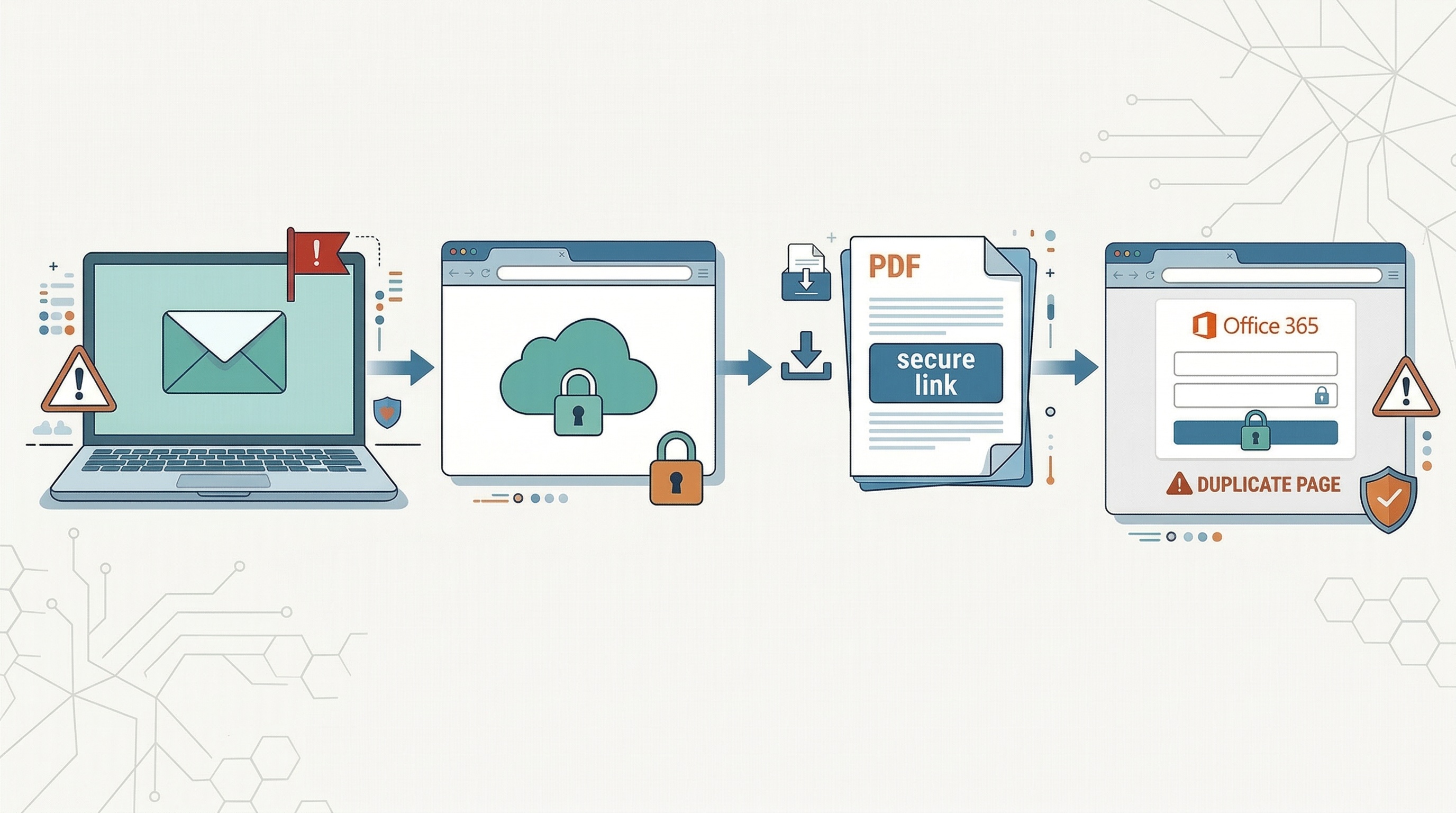
ZeroBEC's AI-native detection engine flagged this attack for one of our customers. On the surface, it looked completely routine: J. Owens at Hutchens Industries, a domain the customer's organization communicates with regularly, shared a file via OneDrive. A legitimate sender, a legitimate platform, a legitimate link. But behind the familiar interface was a textbook OneDrive spear phishing playbook, executed step by step.
The Kill-Chain
Step 1: The Trusted Email
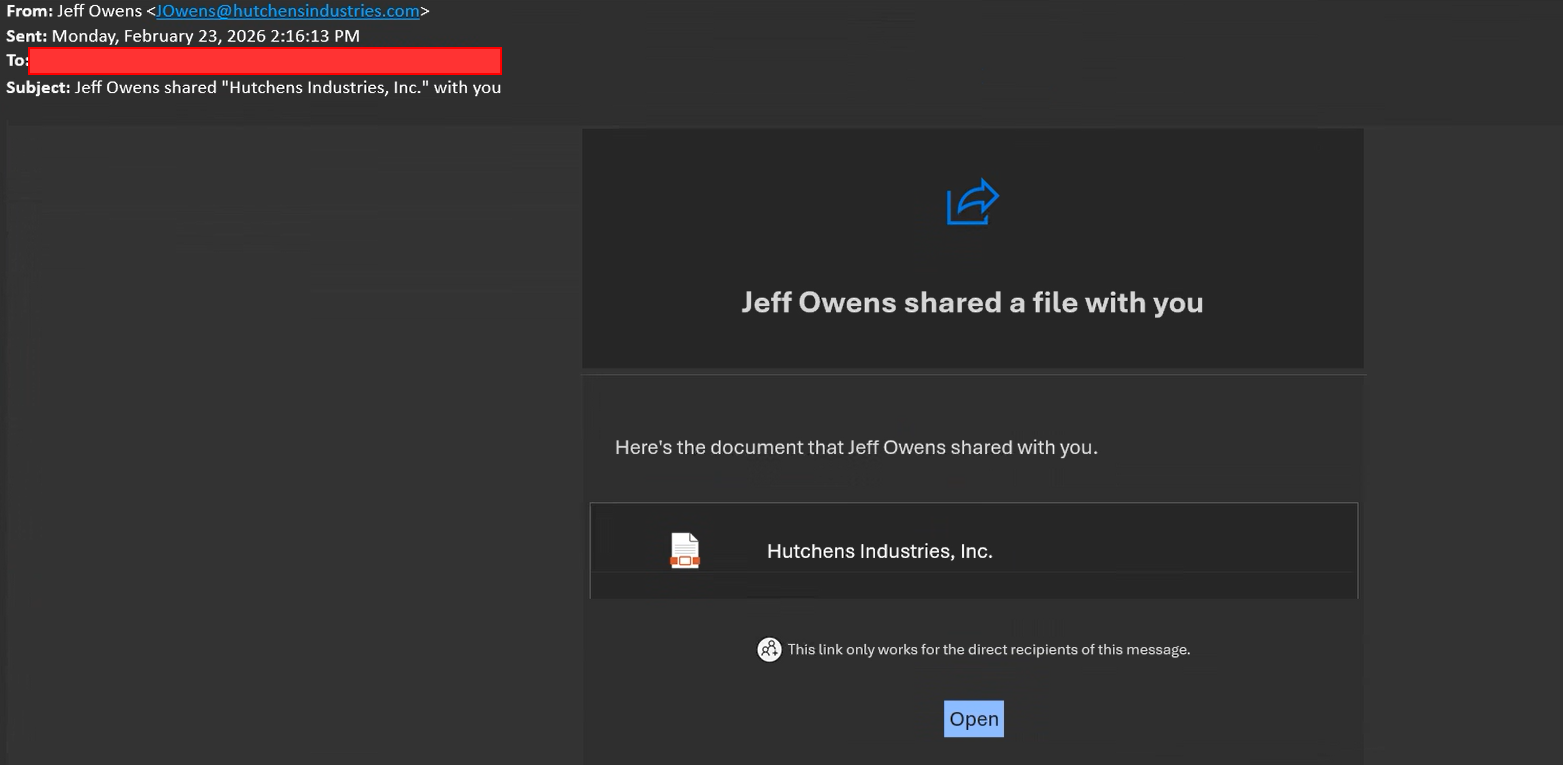
The attack begins with a genuine OneDrive sharing notification sent from [redacted]@hutchensindustries.com. The email states that J. Owens has shared a file called "Hutchens Industries, Inc." and includes a note: "This link only works for the direct recipients of this message." This is not a spoofed email. The attacker has already compromised J. Owens' account and is using it to send targeted, one-to-one file shares to specific victims.
Step 2: The Legitimate OneDrive Page
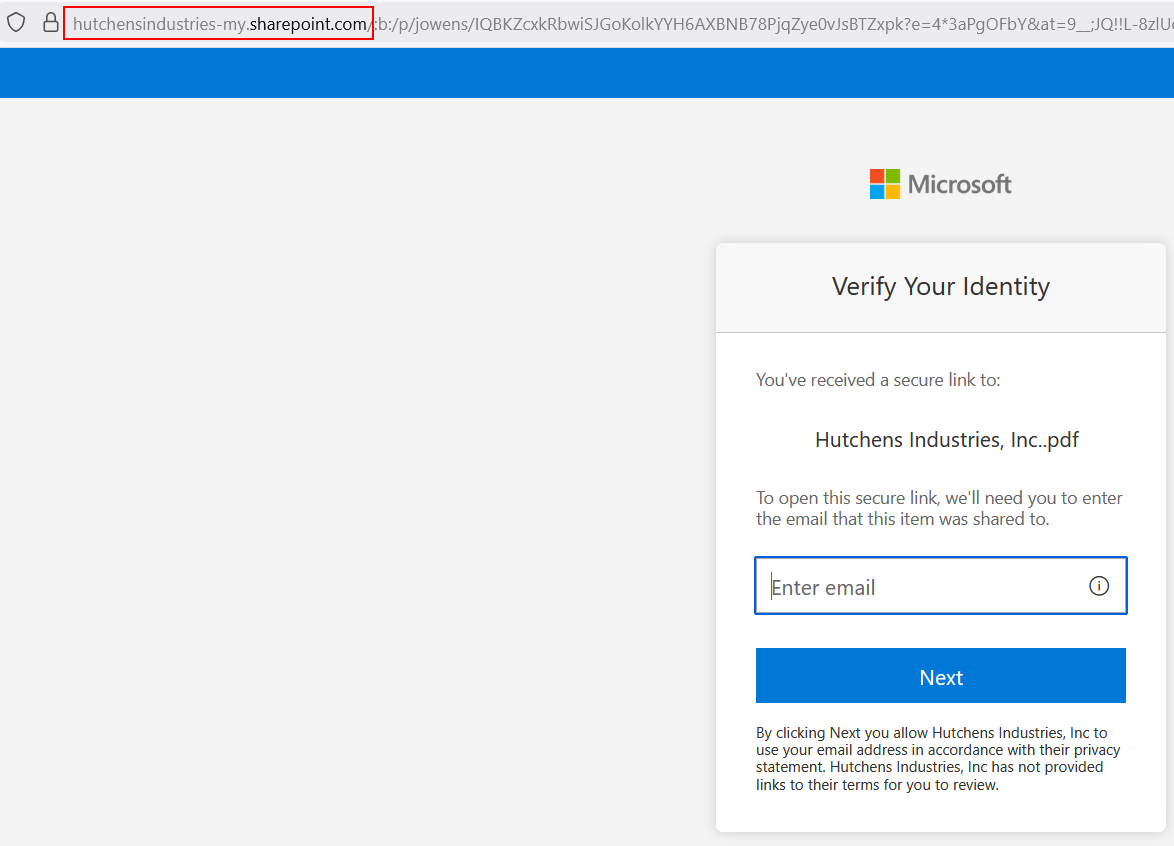
Clicking "Open" in the email takes the victim to hutchensindustries-my.sharepoint.com, a legitimate Microsoft domain belonging to Hutchens Industries. As soon as the page loads, a one-time verification code is sent to the victim's email. The victim enters this code to prove their identity and access the shared file. This is a standard Microsoft secure sharing practice, which makes the interaction feel entirely normal and trustworthy.
Step 3: The PDF Stager
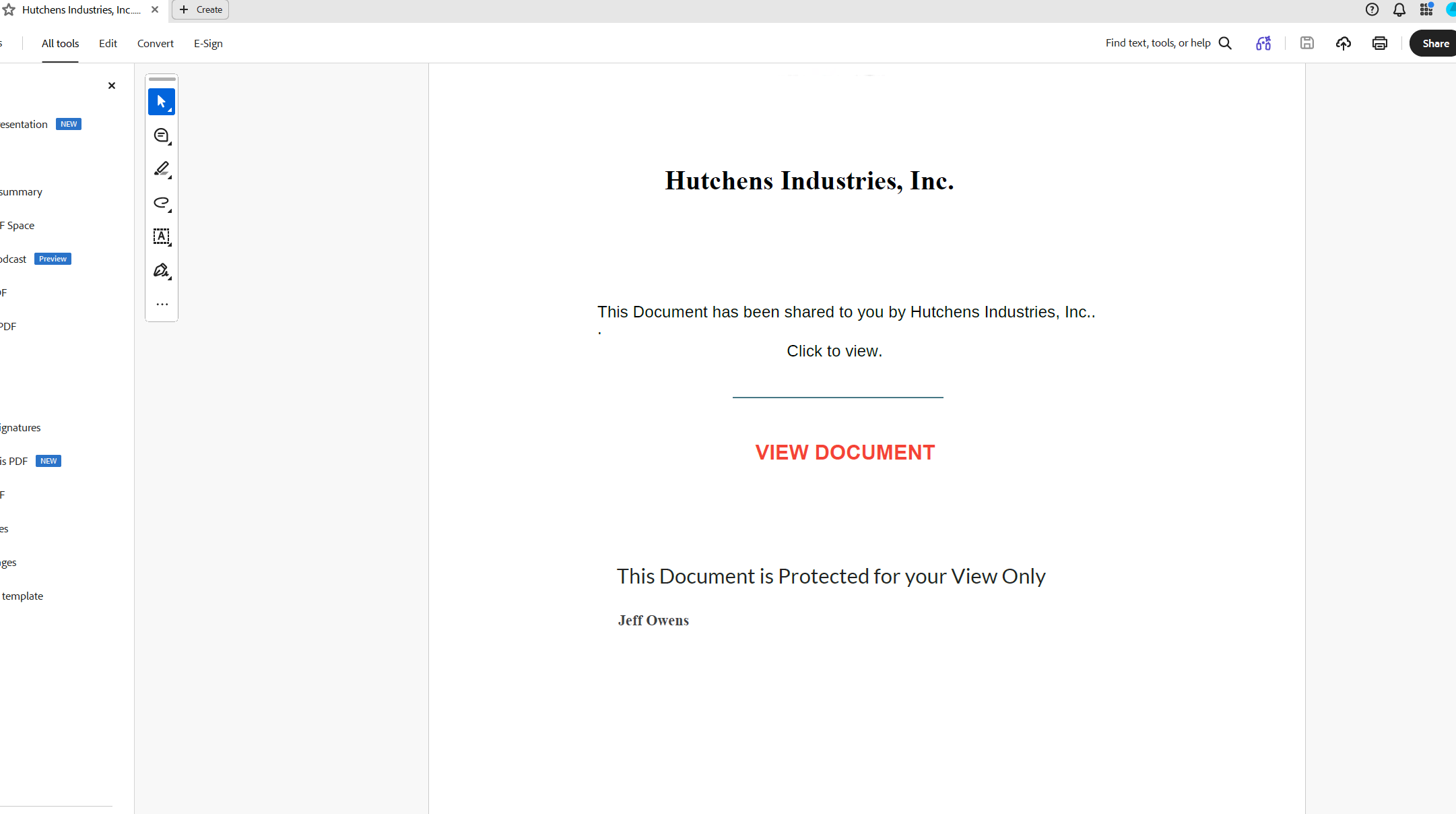
After verification, a PDF file is downloaded: "Hutchens Industries, Inc..pdf". The PDF is deliberately minimal. It states the document has been shared and includes a prominent red "VIEW DOCUMENT" link. This PDF is not the payload. It is the stager: a stateless intermediary whose sole purpose is to disconnect the phishing URL from the original email.
Step 4: The Credential Harvest
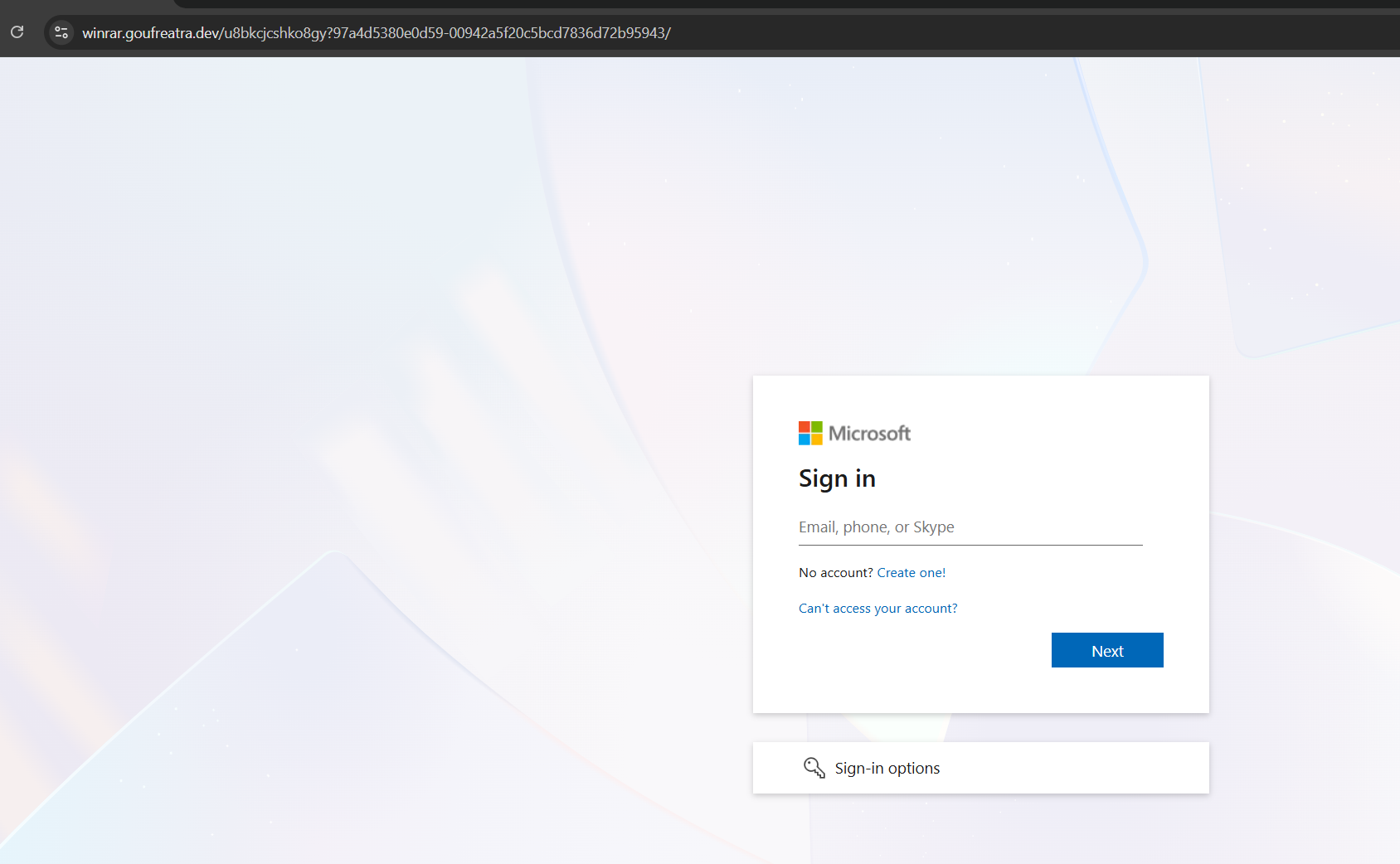
Clicking "VIEW DOCUMENT" opens a browser tab to a malicious domain disguised as a Microsoft sign-in page. The URL is clearly not Microsoft (hosted on goufreatra[.]dev), but the page is a pixel-perfect replica of the real sign-in flow. This page supports Adversary-in-the-Middle (AiTM) session hijacking: it proxies the victim's credentials to the real Microsoft login, captures the authenticated session token, and bypasses MFA entirely.
Why This Attack Is So Effective
- The sender is real and trusted: The email comes from a compromised account at a domain the victim's organization communicates with regularly. No spoofing, no look-alike domains. Email authentication (SPF, DKIM, DMARC) all pass.
- The OneDrive link is on a legitimate Microsoft domain: The URL points to hutchensindustries-my.sharepoint.com. URL scanners, email gateways, and safe-link rewriting all see a clean Microsoft URL. There is nothing to block.
- The identity verification adds false confidence: The standard Microsoft one-time code verification feels like a security measure. It is also an anti-analysis measure: the code is sent only to the targeted victim's email, preventing security sandboxes and analysts from retrieving the payload.
- The link is scoped to one recipient: By sharing the file with only the intended victim, the attacker ensures that automated detonation chambers and SOC analysts cannot simply click the link to investigate. The file-sharing scope is a deliberate evasion technique.
- The PDF stager breaks the audit trail: This is the most critical element. The phishing URL does not exist in the email. It does not exist on the OneDrive page. It exists only inside the downloaded PDF, which the victim opens in a local application. The moment the victim clicks "VIEW DOCUMENT" in the PDF, the attack leaves the email ecosystem entirely and moves to a browser session that has no connection to the original email event.
The Audit Trail Gap
This is where most security tools lose visibility. Here is what happens to the audit trail at each stage:
- Email audit logs capture the OneDrive sharing notification. The email is clean: legitimate sender, legitimate link, no malicious payload. Nothing to flag.
- OneDrive audit logs may capture the file access event. But the file itself is a PDF, not malware. File inspection tools see a document with a hyperlink, not an exploit.
- The PDF opens locally. When the victim clicks "VIEW DOCUMENT", the browser navigates to the phishing URL. This action is not captured in email audit logs, not captured in OneDrive audit logs, and not captured in any cloud security event. The audit trail goes dark.
- The credential-harvesting page collects the victim's credentials and session token via AiTM proxying. MFA is bypassed because the attacker captures the authenticated session, not just the password.
- Hours or days later, the attacker uses the stolen session to access the victim's mailbox. Only now does the email audit trail resume: sign-ins from unfamiliar IPs, inbox rule creation, email enumeration, and potential data exfiltration.
The gap between the PDF click and the credential harvest can be seconds or minutes, but the security team has zero visibility into this phase. The attacker only gains access once the victim enters their credentials on the phishing page and completes MFA. From that moment, the attacker holds a valid session token, yet the audit trail remains dark until they use it to access the victim's mailbox, which can happen hours or even days later.
Why Behavioral AI Is the Answer
Traditional email security is designed to inspect emails. It looks at sender reputation, URL reputation, attachment signatures, and header anomalies. In this attack, every one of those signals is clean. The email is legitimate. The URL is legitimate. The attachment is a PDF with a hyperlink. There is nothing for a gateway to catch.
This is exactly the scenario ZeroBEC is built for. Instead of relying on inspecting the email, ZeroBEC implements behavioral analysis on the user principal:
- Baseline learning: ZeroBEC continuously builds a behavioral profile for every user in your organization. It tracks login patterns (time, location, device), mailbox activity cadence (reads, sends, deletes), real-time vs. delta burst activity, and correlated Azure AD events.
- Anomaly detection: When the attacker connects using the stolen session, the behavior immediately deviates from the baseline. The login comes from an unfamiliar IP or location. The session accesses mailbox items at an unusual rate. Inbox rules are created that the user has never created before. The activity pattern does not match the user's established profile.
- Distinguishing attacker from user: The critical challenge after credential theft is telling the attacker apart from the legitimate user. Both have valid sessions. Both have valid tokens. The difference is in behavior: the attacker enumerates, searches, creates forwarding rules, and exfiltrates. ZeroBEC's behavioral engine detects these patterns in real time.
- Eliminating stealthy persistence: Many BEC attackers do not act immediately. They maintain quiet access for weeks or months, reading emails, learning communication patterns, and waiting for the right moment to strike (a wire transfer request, a vendor payment change, a CEO impersonation). ZeroBEC's continuous monitoring catches these slow-burn compromises that point-in-time detection completely misses.
Recommendations (Prioritised)
- Treat all file-sharing notifications from external organizations as potentially compromised, even from known and trusted contacts.
- Implement conditional access policies that restrict OneDrive/SharePoint external sharing and require additional verification for cross-tenant file access.
- Train users: if a PDF asks you to click "VIEW DOCUMENT" via a link, it is almost certainly a phishing stager. Legitimate shared documents do not require downloading a PDF to view them.
- Deploy phishing-resistant MFA (FIDO2 security keys, passkeys) to neutralize AiTM attacks. Token theft does not work when the authentication is bound to the origin.
- Monitor for anomalous mailbox behavior post-authentication: unusual login locations, timing shifts, rapid email enumeration, inbox rule creation, and mail forwarding changes.
- Deploy ZeroBEC for continuous behavioral analysis and instant detection of compromised accounts. ZeroBEC works alongside your existing email gateway with no MX record changes and deploys in under 60 minutes.
Bottom Line
This attack is a playbook execution of one-to-one spear phishing: a targeted victim, a trusted sender, a legitimate platform, and a stateless PDF stager that severs the connection between the phishing URL and the original email. Traditional email security never sees the malicious URL because it never appears in the email.
The only way to detect this class of attack is to monitor what happens after the attacker logs in. Behavioral analysis on the user principal, tracking anomalies in time, location, activity bursts, and mailbox behavior, is the difference between catching the attacker in hours and discovering the breach months later.
At ZeroBEC, our AI-native platform closes the audit trail gap. We detect compromised accounts by the way they behave, not by the email that started the compromise.
Ready to see how ZeroBEC protects your organization? Start free or contact us.