Threat Research
From PDF Invoice Lure to Microsoft 365 AiTM: Inside a Multi-Redirect Phishing Chain
A routine-looking PDF invoice triggers a multi-redirect chain through public shorteners, SendGrid click tracking, and Cloudflare Pages, ending at a live Microsoft 365 AiTM kit that auto-clicks the stay-signed-in prompt.
By ZeroBEC Team · June 5, 2026 · 10 min read
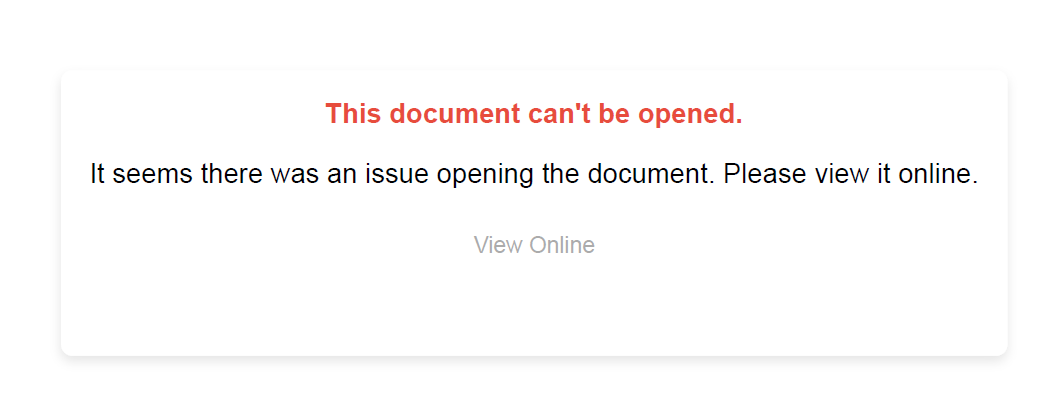
ZeroBEC identified a phishing campaign that began with what looked like a routine accounts-receivable PDF. The message was sent from a free webmail account, used a synthetic business persona in the display name, and attached a one-page PDF that claimed the document could not be opened. The user was asked to "View Online." Behind that simple click was a layered redirect chain that moved through URL shorteners, SendGrid click tracking, Cloudflare Pages, and finally a Microsoft 365 authentication lookalike hosted on a non-Microsoft domain.
The final site was not a basic credential form. It behaved like a live Microsoft 365 adversary-in-the-middle (AiTM) flow. It loaded Microsoft CDN assets, used Microsoft-style OAuth paths, validated whether the user existed, set Microsoft-like cookies on attacker-controlled domains, and injected JavaScript to prefill the victim username and auto-click the "Yes" stay-signed-in prompt.
The campaign also showed clear signs of kit-based automation. Sender personas were randomized per recipient, the PDF was generated from a repeatable template, and the final Microsoft-looking site used custom scripts to prefill the victim identity, move the user through the flow, and poll the backend for a post-capture redirect.
Why this matters. SPF, DKIM, DMARC, and link reputation alone do not tell the full story. The email authenticated as a real consumer webmail sender. The malicious URL chain included reputable infrastructure. The final page looked and behaved like Microsoft. The risk is not only password theft. It is session capture, MFA relay, and fast mailbox takeover.
Campaign Anatomy
The attack moved through six discrete stages, each chosen to launder a different signal that defenders typically inspect.
- Delivery: Authenticated email delivery through a GMX consumer webmail account. The fake business identity appeared inside the display name, while the real sender domain was
gmx[.]de. - Persona generation: The sender persona used synthetic-looking names and fake business domains, consistent with automated Faker-style generation rather than a real supplier identity.
- PDF lure: The attachment was a one-page PDF rendered from a web template. It claimed the document could not be opened and pushed the user toward a "View Online" link.
- Redirect chain: The click moved through public shorteners, SendGrid click tracking, another redirector, and Cloudflare Pages before reaching the final Microsoft 365 phishing host.
- Final stage: The destination imitated Microsoft 365 sign-in using Microsoft CDN resources, Microsoft-style OAuth paths, and custom JavaScript that manipulated the login flow.
The Sender Identities Were Generated, Not Selected
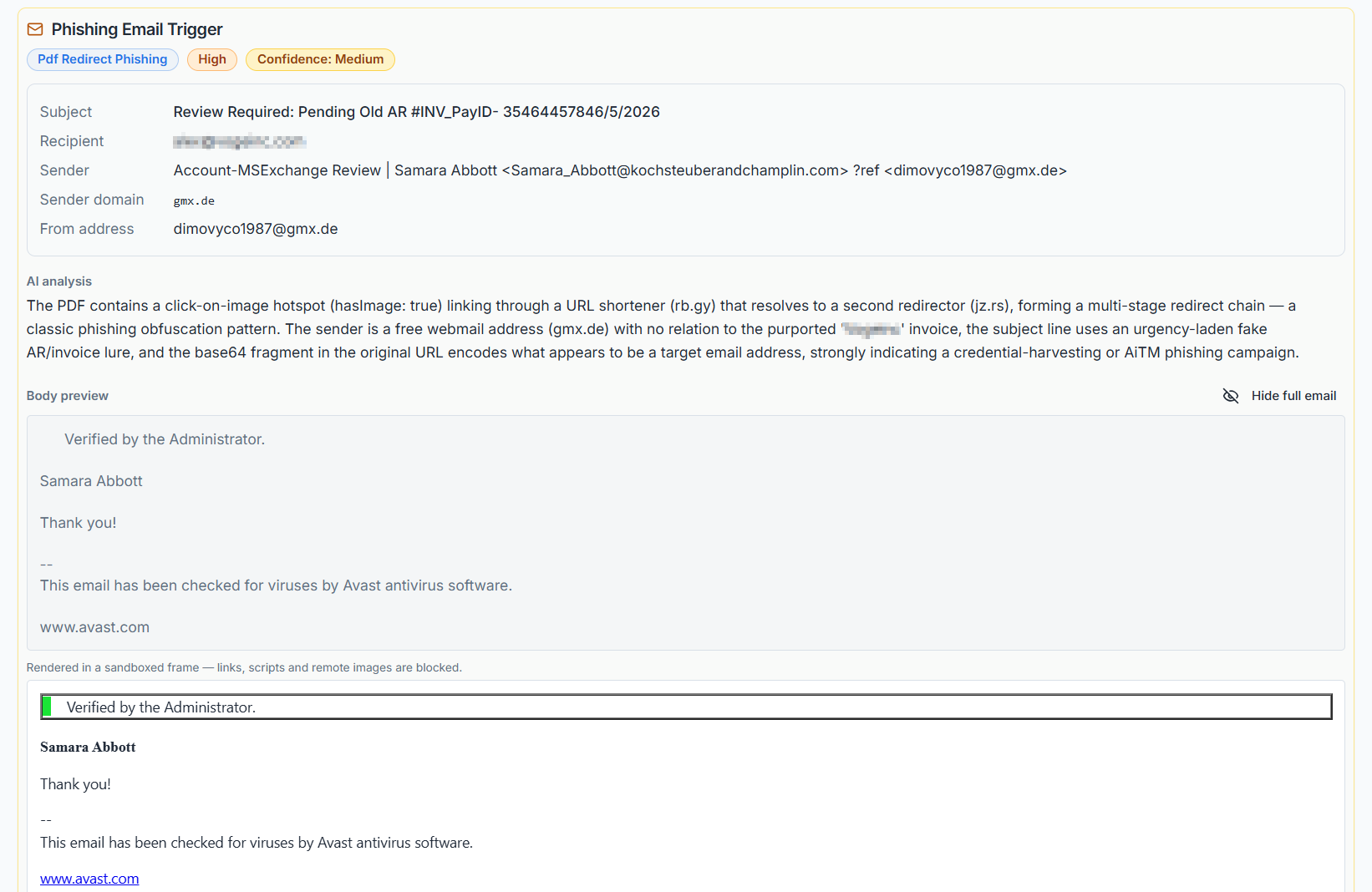
One of the most interesting aspects of this campaign was not the PDF or the redirect chain. It was the way the sender identity was built. Each targeted recipient received the same basic lure, but the visible persona changed. The name in the email body matched the name embedded in the display name, while the real authenticated sender remained a GMX webmail address.
The structure looked deliberate and repeatable:
Display name pattern: Account-MSExchange Review | <random first name> <random last name> <<randomized persona mailbox>> ?ref
Body pattern: Verified by the Administrator. <same random first name and last name> Thank you. Avast footer.
This shows the campaign was not only sending one message to many users. It was generating a unique synthetic sender persona per target. That makes clustering harder for simple rules that key only on the display name, sender name, or body text.
The names we observed lined up with open-source Faker-style name datasets. For example, the first names and surnames used in the campaign appear in public fake-data libraries such as the jaswdr/faker person.go dataset on GitHub. That does not prove the actor used that exact library, but it strongly supports automated fake identity generation rather than manual selection or real employee impersonation.
The fake domains followed the same pattern. They looked like business domains assembled from surname or company-name components, while the actual email authentication belonged to GMX. The business identity was not the authenticated sender. It was a string placed inside the display name to make the message look like it came from a business contact.
Detection opportunity. When the display name contains an email-like identity from one domain, but the actual From address is a consumer webmail domain, the message should be treated as identity-deception risk even when SPF, DKIM, and DMARC pass for the consumer mailbox.
Why We Classify This as a Phishing Kit
The landing infrastructure showed the behavior of a phishing kit, not a one-off fake page. The site reused Microsoft Entra login paths, loaded Microsoft CDN assets, validated whether a username existed, posted credentials to a Microsoft-style /common/login endpoint on a non-Microsoft domain, set Microsoft-like cookies on attacker-controlled infrastructure, and injected custom JavaScript to guide the victim through the flow.
The kit-specific JavaScript is especially revealing. One script polled a backend endpoint under /s/<64-character session ID> until the server returned a redirect_url. Another script waited for Microsoft login elements, filled the username field from the URL fragment, clicked the Next button, injected the message "Because you're accessing sensitive info you need to verify your password," and automatically clicked the "Yes" button on the stay-signed-in prompt after a delay.
That behavior is consistent with a session-oriented Microsoft 365 AiTM phishing kit. The objective is not only to capture a password. It is to keep the victim moving through a live-looking Microsoft flow, reduce friction, and improve the chance of capturing or relaying a usable authenticated session.
We are intentionally not assigning a specific public kit name without additional unique server-side fingerprints. The evidence is strong enough, however, to classify the infrastructure as a Microsoft 365 AiTM phishing kit or kit-derived deployment.
The PDF Was Not the Payload. It Was the Steering Wheel.
The attachment was designed to avoid looking like a malware document. There were no embedded executables, no macros, and no obvious exploit behavior. The PDF's job was to create a believable reason for the user to click. The visible message said the document could not be opened and provided a "View Online" action.
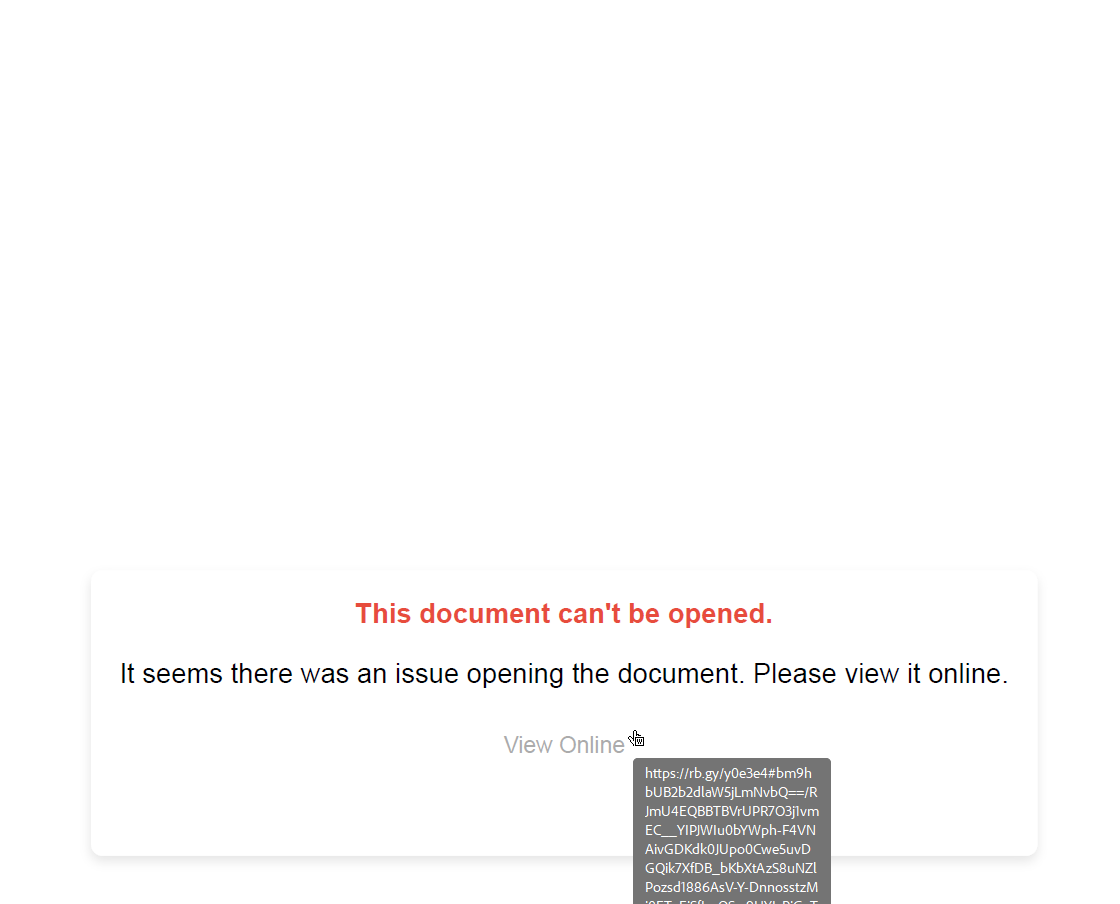
That "View Online" link carried recipient-specific data in the URL fragment. This matters because fragments are not always visible to every scanner in the same way that normal query parameters are. The fragment can be used to prefill the victim identity later in the chain, while also making every link look slightly different.
The Redirect Chain Launders Trust Before the Login Page Appears
The chain did not send the user directly to the credential page. It moved through multiple intermediaries, including public URL shorteners and SendGrid click-tracking infrastructure. This is useful to attackers because it creates reputation ambiguity. A scanner that stops too early may see a known redirect or tracking domain instead of the final phishing infrastructure.
The six observed stages:
- PDF link. Shortened URL with recipient-specific fragment.
- Public shortener. First reputation and redirect layer (
rb[.]gy). - SendGrid click tracking. Trusted ESP infrastructure used as an intermediate redirector (
ct.sendgrid[.]net/ls/click). - Second redirector. Additional scanner friction and tracking (
jz[.]rs). - Cloudflare Pages lookalike. Brand impersonation using a Microsoft-looking subdomain (
rnicros0ft-auth-serv.pages[.]dev). Note the lowercasernis used to mimic the letterm. - Final Microsoft 365 phishing host. OAuth-style path and live login flow under an attacker-controlled domain (
login.prsecauth.qzz[.]io).
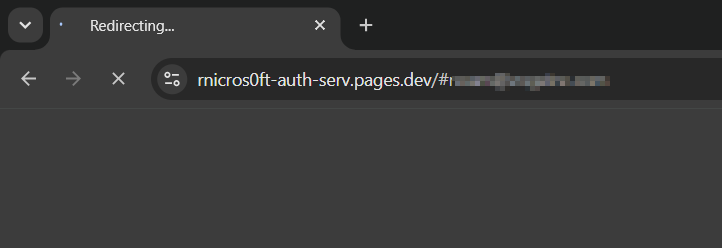
rn prefix is engineered to read as the letter m at a glance.Note on legitimate infrastructure. SendGrid and Cloudflare Pages are legitimate, widely used services. Their presence in this chain does not mean either was compromised. It means the attacker abused free or low-friction tenants on those platforms to launder reputation. Defenders should treat these as supporting context, not as standalone block targets.
The Final Page Behaved Like a Live Microsoft 365 AiTM Flow
The final sign-in host used Microsoft-style OAuth and Entra ID paths on a non-Microsoft domain. It loaded Microsoft CDN assets, mirrored paths such as /common/GetCredentialType and /common/login, and returned Microsoft-style configuration data. A non-existing account was rejected, while a real account advanced to the password screen. That behavior indicates live account validation, not a static phishing form.
The cookie behavior reinforced the finding. The site created Microsoft-like cookie names such as AADSSO, esctx, buid, fpc, uaid, stsservicecookie, and x-ms-gateway-slice, but scoped them to the attacker-controlled domain. That is a strong signal of Microsoft login impersonation or reverse-proxy behavior.
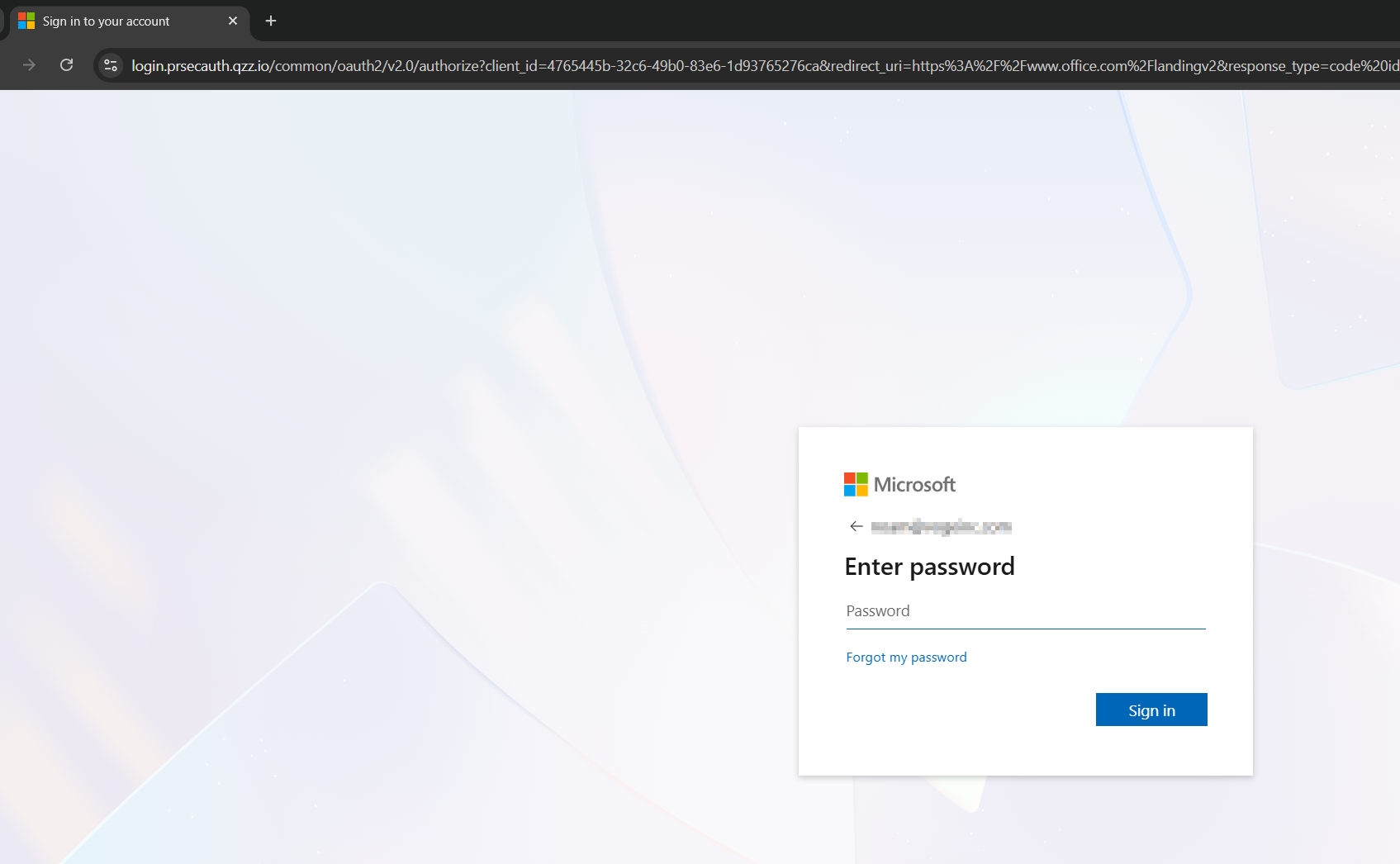
redirect_uri values in the URL bar are Microsoft-style, but the host is attacker-controlled.The Custom JavaScript Shows the Operator Intent
Two attacker-hosted JavaScript files revealed the campaign logic. One script polled a backend endpoint using a 64-character session identifier and redirected the browser when the server returned a redirect_url. The second script waited for Microsoft login elements to appear, inserted the victim email from the URL fragment, clicked the Next button, injected a password-verification message, and auto-clicked the "Yes" button on the stay-signed-in prompt.
Important behavioral signal. Auto-clicking "Yes" on the stay-signed-in prompt is not a cosmetic trick. In a session-oriented phishing flow, that step can help produce a more durable authenticated session after the victim completes login.
What Information Security Leaders Should Take From This
Authentication passed for the sender domain, but the identity was still deceptive. The message authenticated as a real GMX account. The business sender identity was only a display-name artifact.
Trusted redirect infrastructure can be used against defenders. The presence of SendGrid click tracking in the redirect chain should not automatically lower risk when the email was not actually delivered by SendGrid.
The browser page can look and behave exactly like Microsoft. Modern AiTM kits can load Microsoft assets, validate usernames, handle OAuth-style parameters, and mirror Microsoft login paths.
MFA is not the end of the story. If the user completes authentication inside an AiTM flow, the attacker may be able to capture session material or relay the login in real time.
PDF inspection must include link resolution and behavioral context. A PDF with no exploit and no malware can still be the entry point for account takeover.
Detection Opportunities
ZeroBEC recommends looking for combinations of weak signals rather than relying on a single IOC. The following patterns are high value for this campaign class:
- Free webmail sender plus a display name containing a different business email address.
- PDF attachment with document-access error language and a "View Online" action.
- PDF link that uses a shortener and carries a recipient email or Base64-encoded recipient value in the URL fragment.
- Redirect chain that includes an ESP tracking domain, such as SendGrid, even though the email was not sent by that ESP.
- URL path contains
/common/oauth2/v2.0/authorize,/common/GetCredentialType, or/common/loginon a non-Microsoft domain. - Microsoft CDN assets loaded by a page whose authentication endpoints point to a non-Microsoft host.
- Cookie names associated with Microsoft identity flows set on a non-Microsoft domain.
- JavaScript that references
#i0116,#idSIButton9,window.location.hash, or auto-clicks a "Yes" button during sign-in. - Display name contains a synthetic business persona while the actual From address belongs to a consumer webmail provider.
- Multiple users receive the same body template, but each message inserts a different randomized person name into both the body and display name.
- Phishing page serves custom
/s/<64-hex>.jsfiles and uses/s/<64-hex>as a backend-controlled redirect polling endpoint.
Response Guidance for Exposed Users
If a user clicked but did not enter credentials, treat it as exposure and monitor. If a user entered a password, approved MFA, or reached a stay-signed-in prompt, treat it as possible account compromise.
- Reset the password and revoke active sessions.
- Review Entra ID sign-in logs for unusual IPs, ASNs, geographies, devices, and
OfficeHomeapplication activity. - Check for mailbox forwarding, hidden inbox rules, suspicious OAuth consent, MFA method changes, and new device registrations.
- Search for follow-on BEC activity, including invoice threads, payment-change language, and new external recipients.
- Block the domains, shorteners, and specific redirect paths observed in the chain, but prioritize behavior-based rules because the infrastructure is disposable.
How ZeroBEC Helps
This campaign is exactly the kind of attack ZeroBEC is built to detect. The individual pieces can look ordinary: a PDF, a free webmail sender, a URL shortener, an ESP tracking link, and a Microsoft-looking login page. The risk becomes clear only when those pieces are connected into one behavioral chain.
ZeroBEC correlates sender identity, attachment behavior, redirect resolution, brand impersonation, URL fragments, AI-assisted analysis, and mailbox context to identify BEC, phishing, and account takeover attempts before users complete the chain. For organizations that need protection against modern Microsoft 365 AiTM phishing, PDF redirect lures, and reputation-laundered links, ZeroBEC provides the context that traditional authentication checks and basic URL reputation often miss.
Indicators of Compromise (Defanged)
IOC scope. Treat the legitimate platforms in this chain (SendGrid, Cloudflare Pages, the public shorteners) as supporting context, not as block targets. Block the specific attacker-controlled domains, paths, and OAuth client IDs.Network indicators:
- Sender domain:
gmx[.]deconsumer webmail account (sample sender:vervorsvemi1986@gmx[.]de). - Shortener layer:
rb[.]gy. - Tracking layer:
ct.sendgrid[.]net/ls/click. - Redirector:
jz[.]rs. - Lookalike host:
rnicros0ft-auth-serv.pages[.]dev(note the leadingrnstyled asm). - Final phishing host:
login.prsecauth.qzz[.]io. - OAuth client ID observed:
4765445b-32c6-49b0-83e6-1d93765276ca.
Mail-header hunting artifacts:
- Synthetic identity pattern:
Account-MSExchange Review | <random first name> <random last name> <<randomized business persona mailbox>> ?ref. - Body pattern:
Verified by the Administrator. <same random first name and last name> Thank you.followed by an Avast antivirus footer. - From address: consumer webmail (GMX in this campaign).
Kit behavior patterns:
- Microsoft
ConvergedSignInpage rendered under a non-Microsoft domain. - Non-Microsoft
/common/loginendpoint. /s/<64-hex>.jsscript injection and/s/<64-hex>backend redirect polling.- JavaScript that prefills
#i0116fromlocation.hashand auto-clicks#idSIButton9and the stay-signed-in "Yes" button. - Microsoft-like identity cookies (
AADSSO,esctx,buid,fpc,uaid,stsservicecookie,x-ms-gateway-slice) scoped to non-Microsoft domains.
Bottom Line
Modern AiTM phishing is no longer a static page with a brand logo. It is a small, well-engineered web application that mimics the real Microsoft login flow closely enough to keep users moving through it. The PDF, the shortener, and the SendGrid click tracking are not the payload. They are the laundering layers that get the user past perimeter inspection and onto a page that looks correct in every superficial way.
The fix is not at the email gateway alone. The fix is layered: phishing-resistant MFA (FIDO2, passkeys) at the authentication layer, Conditional Access that ties session validity to a managed device, and behavioral detection that watches sender identity, attachment behavior, redirect resolution, and post-click session anomalies across the whole tenant.
Ready to see behavioral detection in action against modern AiTM phishing chains? Start free or contact us.