Threat Research
ScreenConnect Phishing: DKIM, SPF, DMARC All Passed
A phishing email passed SPF, DKIM, and DMARC, sailed past Cisco IronPort, and dropped a ScreenConnect backdoor. Anatomy of the campaign, plus hunting queries.
By Vedant Bhalgama · May 19, 2026 · 10 min read
In May 2026, ZeroBEC's detection engine flagged a phishing campaign targeting one of our customers that had cleared every authentication checkpoint in their stack: SPF, DKIM, DMARC, and Cisco IronPort's threat scanner. On the wire, the message looked like legitimate mail from a legitimate domain.
The payload wasn't a credential-harvesting page. The attacker's goal was simpler: silently install an RMM tool on the target's endpoint and maintain persistent, legitimate-looking remote access.
Abusing trusted email infrastructure to deliver RMM backdoors instead of phishing links is an emerging pattern. Securonix documented a related campaign (VENOMOUS#HELPER) where SSA-impersonation lures dropped SimpleHelp and ScreenConnect on over 80 US organizations. The campaign we analyzed had a different lure, different platform, and different C2 infrastructure, but the same operational logic: skip the credential theft, walk in through the front door.
The Lure
The customer received a message with the subject "New Secured Document" from a sender styled as "Adobe-Docsend". The actual sender address: [email protected].
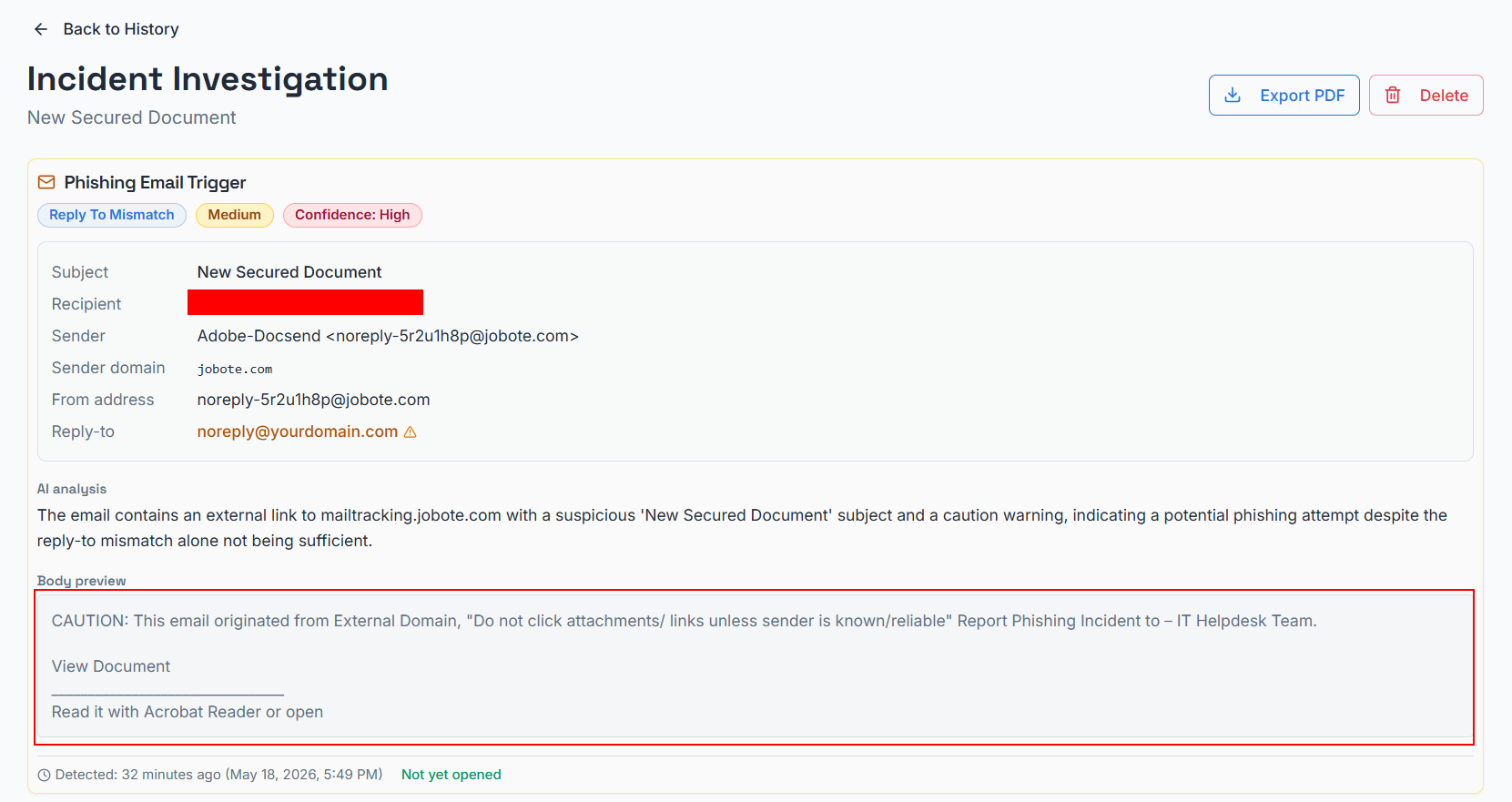
Two things are immediately abnormal:
- The display name "Adobe-Docsend" is not a real product. Adobe and DocSend are unrelated companies. DocSend is owned by Dropbox. The display name is a deliberately confusing brand mashup designed to evoke trust in two well-known document-sharing tools without exactly mimicking either.
- The sender domain is jobote.com, which is a Czech job-referral SaaS platform with no relationship to Adobe, DocSend, or document sharing.
These are the social-engineering tells available to a human reader. The interesting story is what happens at the protocol layer below them.
The Sending Pipeline: Everything Authenticates
Microsoft 365's authentication stamp on this message:
spf=softfailon the outer envelope (frombounces.jobote.com)dkim=pass(signature verified)header.d=jobote.comdmarc=pass action=none(alignment passes becauseheader.from=jobote.commatches the DKIMd=domain)compauth=pass reason=100
The customer's Cisco IronPort gateway, sitting upstream of Microsoft, stamped:
X-IronPort-SenderGroup: ACCEPTLISTX-IronPort-MailFlowPolicy: $ACCEPTEDX-ThreatScanner-Verdict: NegativeX-Spam-Status: No,X-Spam-Score: 0.0
The Received chain is the legitimate SparkPost outbound infrastructure: mta-211-43.sparkpostmail[.]com -> Cisco IronPort -> Microsoft Exchange Online. On every signal a perimeter gateway cares about, this is a clean transactional email from a real Czech company.
What We Can Say, and What We Can't
Here is the difficult part. The mail was sent through the legitimate SparkPost tenant for jobote.com. The DKIM key, the SPF record, the DMARC alignment, and the Return-Path all check out. What we cannot determine from the headers alone is exactly how the attacker got mail to leave that tenant.
We can confidently say:
- A phishing campaign is being sent through the jobote.com SparkPost tenant
- The content is malicious and inconsistent with Jobote's stated business
- The tenant authenticates under SparkPost subaccount
customer_id=107475(visible in theX-MSFBLheader)
We cannot yet say which of the following best explains it:
- Hypothesis A: Jobote's SparkPost account was compromised. The attacker obtained API keys or SMTP credentials and is sending through the legitimate tenant.
- Hypothesis B: A Jobote customer was compromised, and Jobote's referral feature is the delivery vector. If Jobote allows downstream customers to send mail through its infrastructure for the referral product, then a downstream customer's account is the breached entity, not Jobote or SparkPost.
- Hypothesis C: The entire tenant is operated by an attacker who acquired jobote.com or convinced SparkPost they were Jobote. Less likely given Jobote is a real indexed Czech company with real product history, but possible under an ownership change.
- Hypothesis D: An open SMTP relay or misconfigured submission endpoint at Jobote. Possible but uncommon for SparkPost-backed tenants, which are generally well-secured by default.
The most diagnostic complication is in the headers themselves. The message carries X-Mailer: Apple and X-Originating-IP: 17.57.144.82, an Apple iCloud Mail address. Legitimate API-based ESP traffic almost never carries those headers. They are either stripped or never set. This rules out the cleanest version of Hypothesis A: an API-based phishing-as-a-service operator would not produce X-Mailer: Apple.
That leaves two sub-possibilities to choose between:
- The attacker composed in Apple Mail and submitted via SparkPost SMTP (rather than API) using stolen SMTP submission credentials. SMTP submission preserves client headers, so an Apple Mail X-Mailer would survive.
- The attacker injected via API but deliberately forged
X-Mailer: AppleandX-Originating-IPas misdirection, to make the message look like it came from a human on a Mac.
Either is consistent with the rest of the headers. We do not have enough information to choose between them without telemetry from SparkPost.
What this means operationally: regardless of which hypothesis is correct, the path forward is identical. The jobote.com SparkPost tenant is sending malicious mail inconsistent with Jobote's stated business, and the right intervention is ESP abuse reporting. We have reported the abuse to SparkPost and asked them to investigate the tenant.
The Reply-To Fingerprint: [email protected]
The single most interesting header in the entire message:
Reply-To: <[email protected]>
The string yourdomain.com is not a real domain in this context. It is a generic developer placeholder, in the same family as example.com and lorem ipsum. It is what a developer writes when they mean "the customer will fill this in later." SparkPost sample templates, SendGrid sample templates, Mailgun sample templates, and a long catalog of phishing-as-a-service kits all ship with [email protected] as the default Reply-To.
When you see it in a live email, it means one specific thing: someone deployed a template without filling in the variable. It is the email equivalent of shipping a webpage with "Lorem ipsum" still in the H1.
This makes it a remarkably powerful campaign-wide hunting indicator. Attackers can and will rotate sending domains as they burn each compromised or acquired ESP tenant, but they are unlikely to fix the template default. If you grep your inbound mail for Reply-To: [email protected], you will find every email from this campaign operator, across every sending domain they have used or will use. We recommend adding it to your inbound mail hunt queries today.
The Click Chain
The body of the email contained a single View Document link. Microsoft's Defender for Office 365 safe-links wrapped it, but the underlying target is:
mailtracking.jobote[.]com/f/a/HjVmTYwoJpBu9S1XxWxHgA~~/...
That is the SparkPost-backed click-tracking redirector for the jobote.com tenant. The same redirector is used for legitimate Jobote mail. The attacker did not have to set up their own redirector; they got one for free, on a legitimate jobote.com hostname, by virtue of using the tenant.
The redirector forwards the victim to cherylbirch[.]com/verify.php?next=/screen/of/sc/, which presents a CAPTCHA wall.
![CAPTCHA wall on cherylbirch[.]com](/blog/screenconnect-phish-captcha.png)
After CAPTCHA completion, the victim is forwarded to cherylbirch[.]com/screen/of/sc/, which presents a "View Document" page styled to suggest a document-sharing platform.
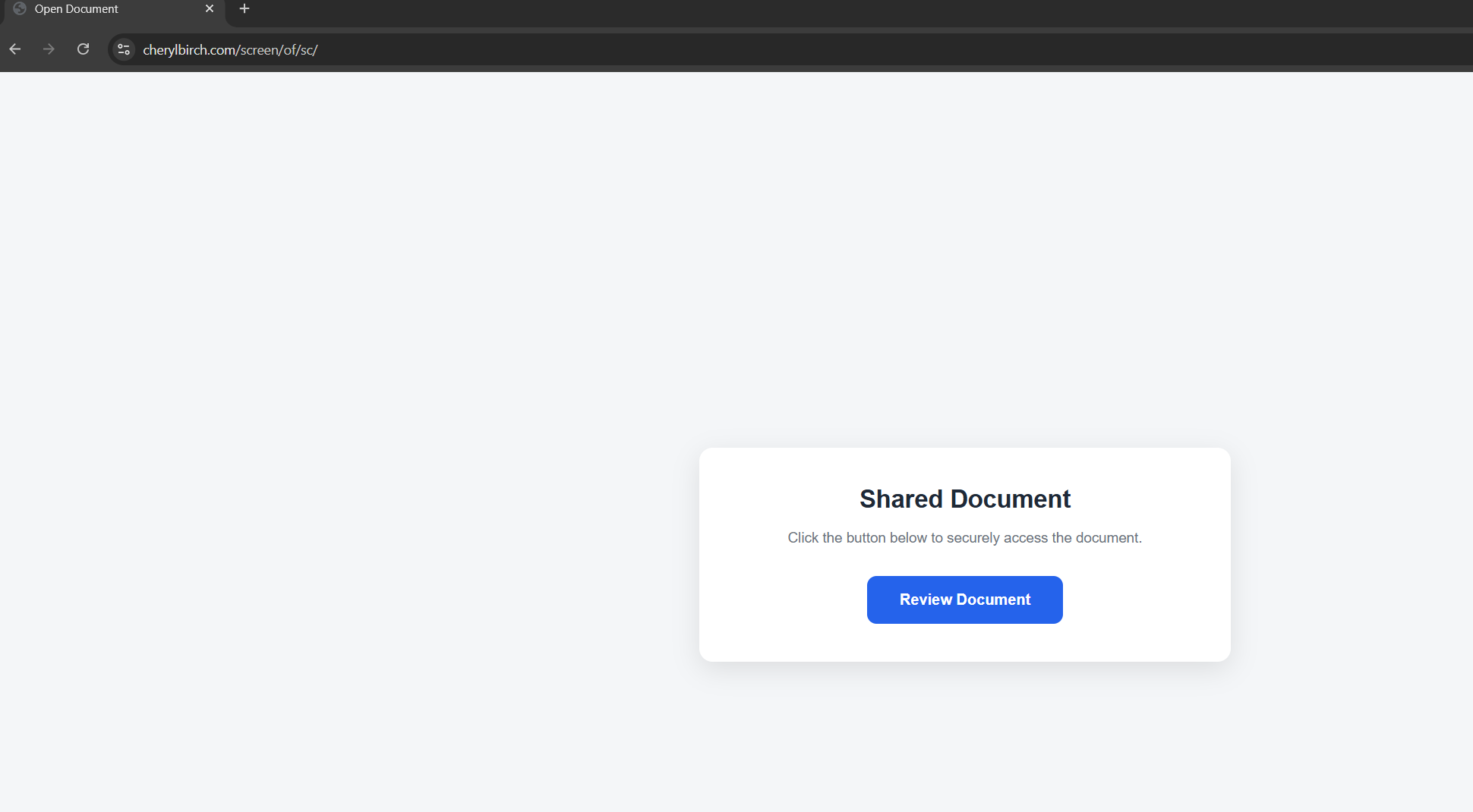
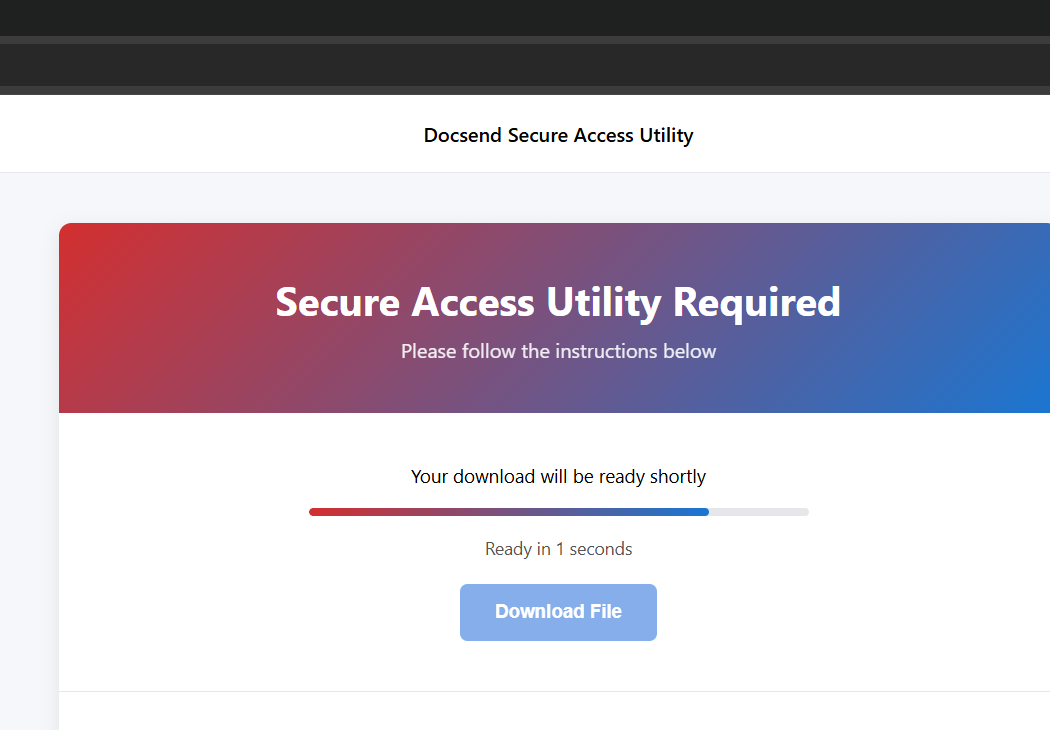
Clicking View Document redirects to cherylbirch[.]com/screen/of/sc/index2.html, which automatically initiates a download of screenConnect.ClientSetup.exe (ConnectWise ScreenConnect client version 26.1.24.9579).
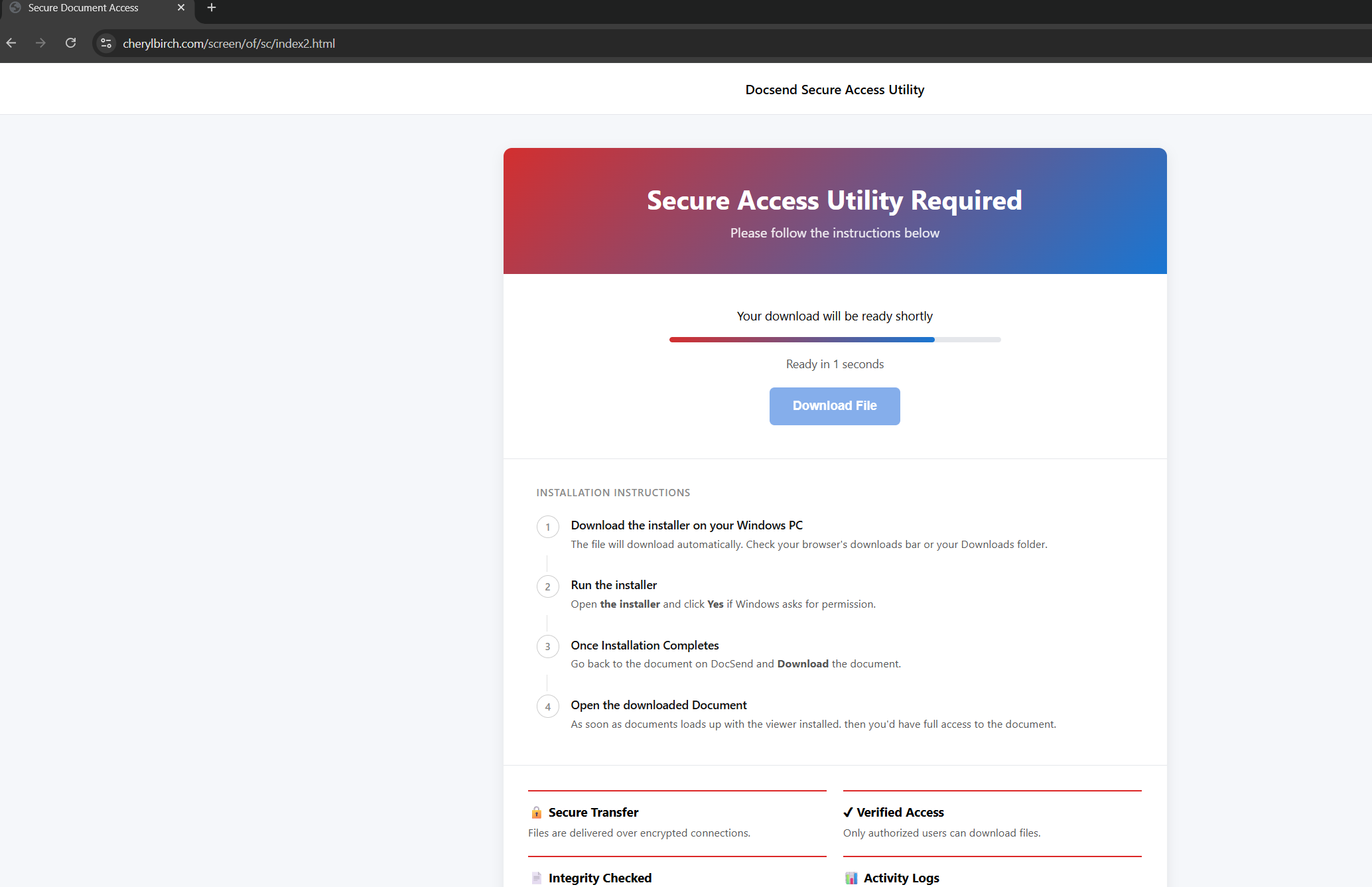
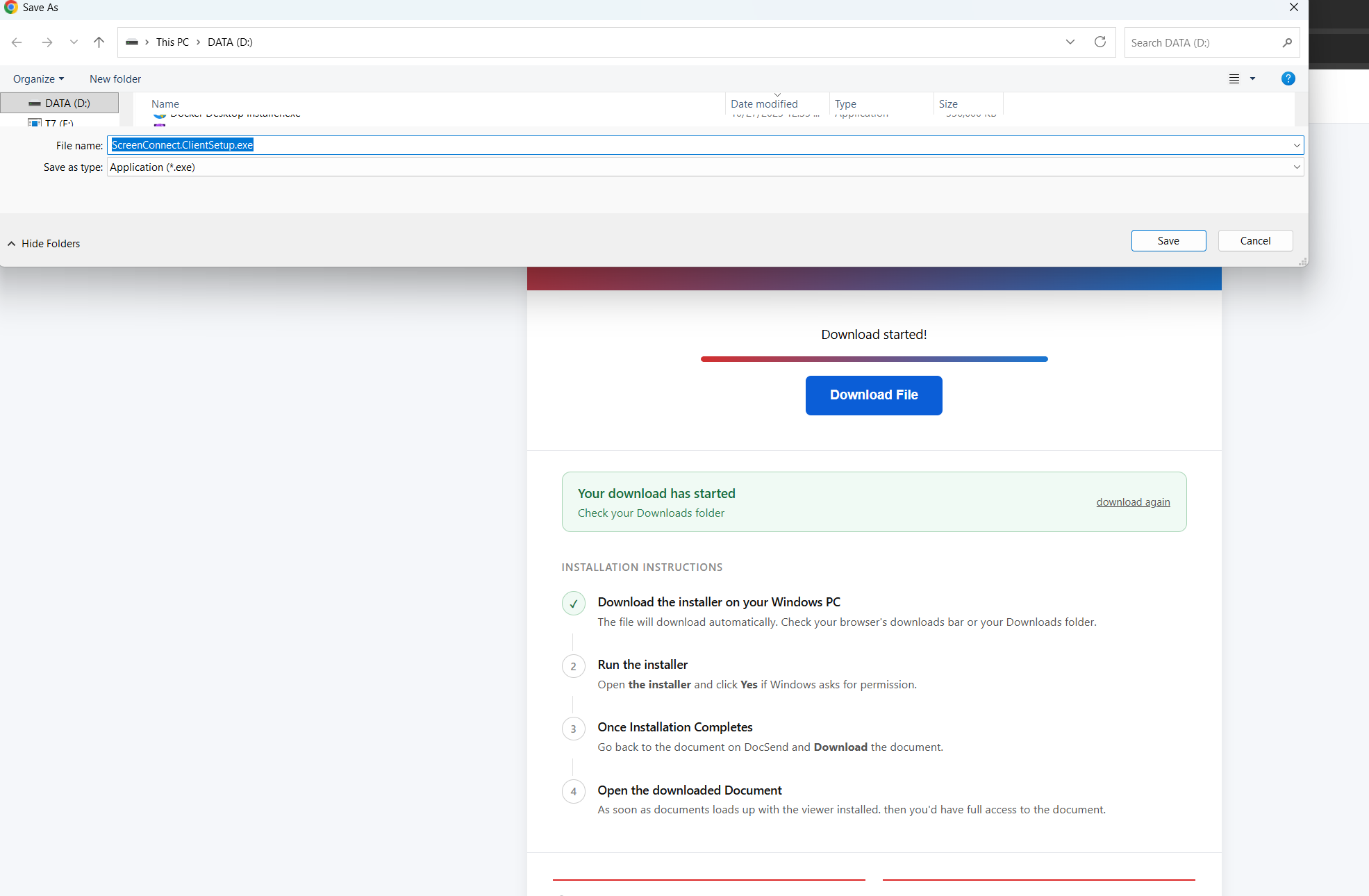
screenConnect.ClientSetup.exe (browser bar and Save As dialog views). The executable carries a genuine ConnectWise digital signature.The file is a legitimate, digitally-signed ConnectWise ScreenConnect client installer. It is not malware in any traditional sense. It is the real product, configured to connect to a relay the attacker controls.
The First Backdoor: ScreenConnect SaaS Relay
When executed, the installer establishes a session with instance-ik6wyx-relay.screenconnect[.]com, the ConnectWise SaaS relay infrastructure. The attacker is using a hosted ScreenConnect tenant they control under the official ConnectWise SaaS umbrella.
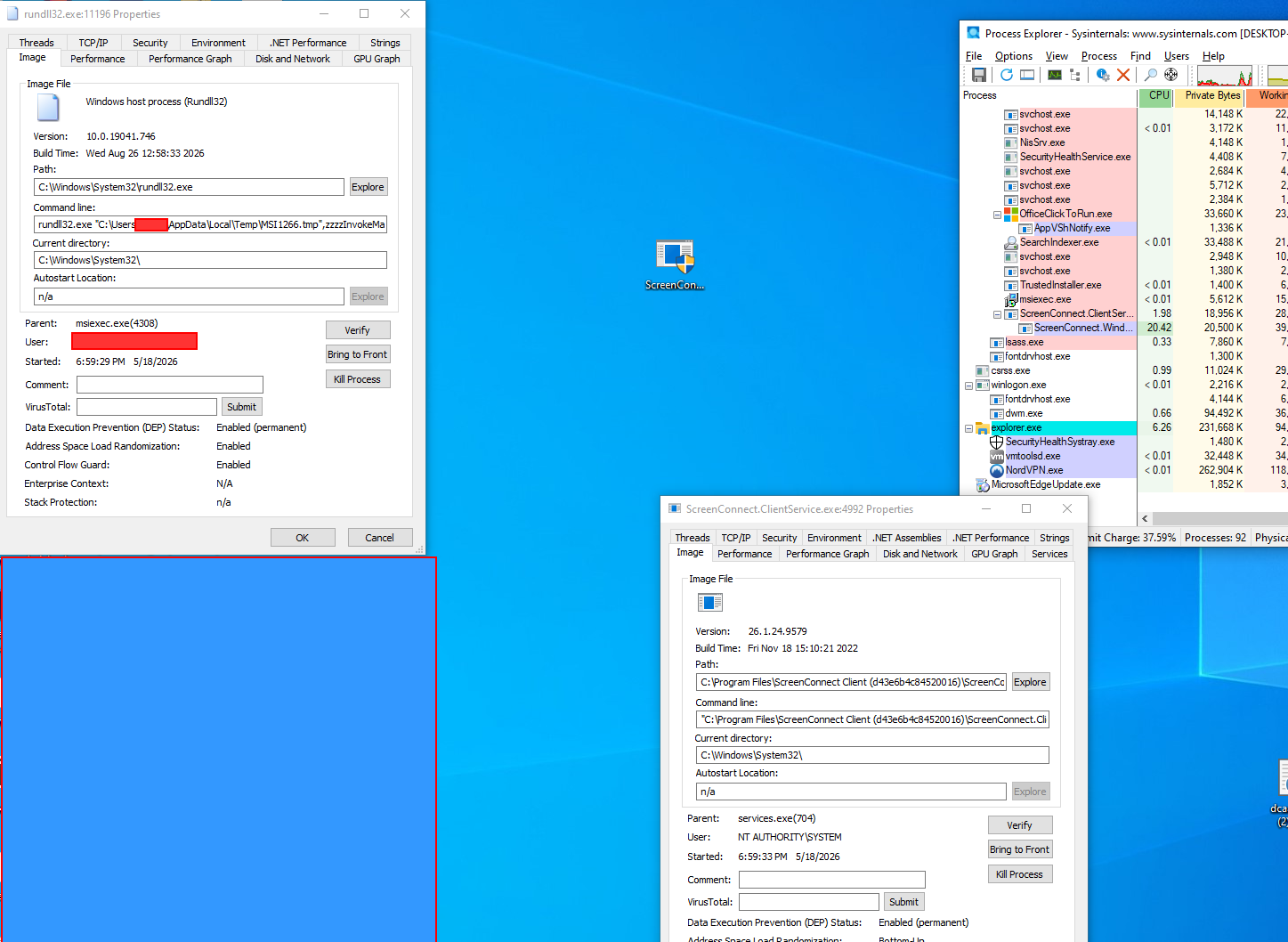
From the endpoint's perspective:
- The binary is digitally signed by ConnectWise
- The outbound traffic is TLS to
*.screenconnect.com - The user-agent and connection patterns match the legitimate ScreenConnect product because they are the legitimate ScreenConnect product
- EDR signatures keyed on "malware" will not fire. ScreenConnect is not malware.
This is the fundamental design strength of an RMM-delivery phishing campaign. The endpoint runs a tool that the IT industry has explicitly told it to trust.
The Quiet Handoff: Custom Relay, Second Backdoor
Approximately one hour after the initial ScreenConnect session, the attacker came back and used the existing session as a launchpad for a second backdoor. The second-stage payload contacts a custom relay:
relay.qrastlack[.]site (91.92.41[.]74)
This is no longer ConnectWise infrastructure. It is attacker-owned infrastructure dressed to look like a generic relay. The architecture choice is deliberate. ScreenConnect via the official SaaS relay is the foothold and the survivability layer. The custom relay is the operational channel that does not depend on ConnectWise's continued willingness to host the attacker's tenant.
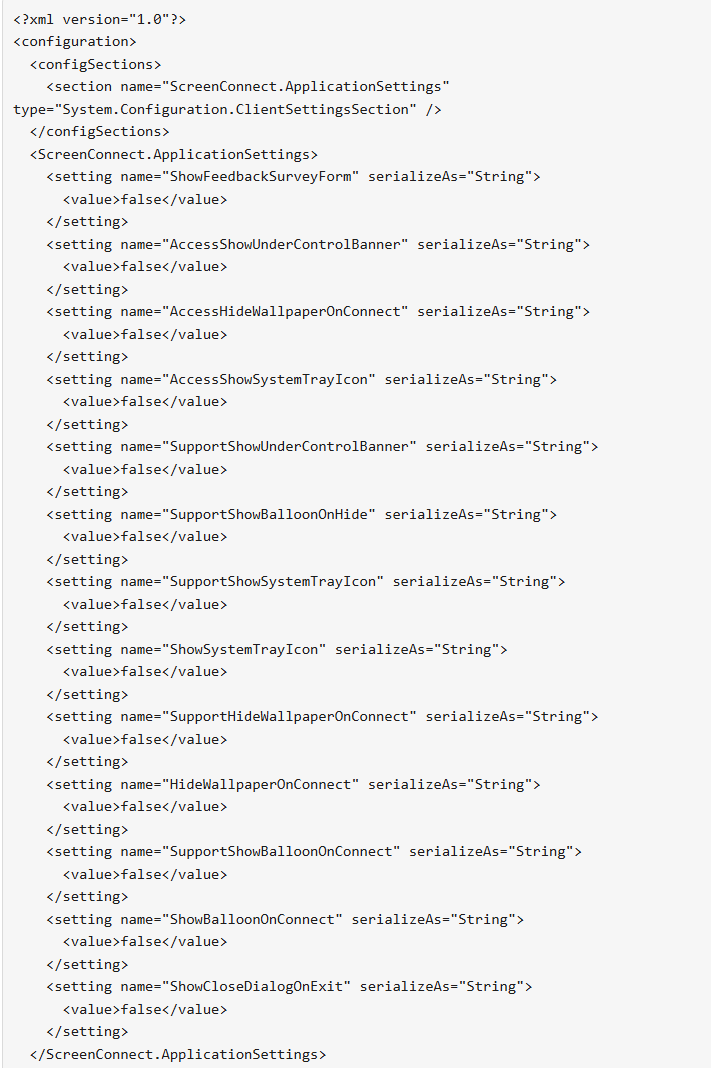
The second-stage client is also configured for full stealth. Its embedded .config file disables every user-facing notification ScreenConnect normally surfaces. ShowSystemTrayIcon, AccessShowSystemTrayIcon, SupportShowSystemTrayIcon, ShowBalloonOnConnect, AccessShowUnderControlBanner, SupportShowUnderControlBanner, and ShowCloseDialogOnExit are all set to false. A default ScreenConnect session shows a tray icon, a "session is in progress" banner, and notification balloons so users know their machine is being accessed. This client is the opposite: no tray icon, no banner, no balloon, no exit prompt. The session runs headless, with the attacker working in the background while the victim sees nothing.
The same dual-channel pattern appears in Securonix's VENOMOUS#HELPER writeup. They observed it as concurrent SimpleHelp 5.0.1 plus ScreenConnect. We observed it as sequential ScreenConnect SaaS first, then attacker-relay second. Different implementations, same architecture: independent C2 channels survive partial remediation. Burn one and the other still has the box.
Once both channels were in place, the attacker began collecting credentials from the victim's browser password store. We have not yet observed lateral movement past that stage in this incident; remediation began before further objectives were achieved.
Why Cisco IronPort Missed It
The customer is protected by Cisco IronPort, a category-leading secure email gateway. The gateway did not block the message. The IronPort headers show why:
- The sender IP belongs to a SparkPost range with positive reputation
- The DKIM signature for jobote.com is valid
- The sender domain DMARC policy aligns with the From header
- The sender hit the IronPort ACCEPTLIST sender group, which marks the message as
$ACCEPTEDbefore deeper content inspection - The X-ThreatScanner-Verdict was Negative; the X-Spam-Score was 0.0
This is not an IronPort failure. It is exactly the behavior an IronPort customer would specify and want. The mail authenticated as a real company. There is no signature on this campaign for an inbound gateway to match. The lure does not contain a malicious link to a known-bad domain: the link goes to mailtracking.jobote.com, which is on the legitimate Jobote tenant. The malicious behavior happens entirely after the click, on the endpoint, in CAPTCHA-gated infrastructure that the gateway sandbox cannot reach.
A gateway built around message-level inspection cannot stop a message that is correct at every message level.
Why Behavioral Detection Catches It
Where a perimeter gateway evaluates each message in isolation, ZeroBEC's AI-native detection engine watches for shifts in user and mailbox behavior across the whole tenant. A message that authenticates correctly at the protocol layer can still register as anomalous against the recipient organization's normal mail patterns, the sender's normal sending patterns, and the downstream activity we observe after delivery.
That combined visibility, before delivery, after delivery, and through the post-click endpoint, is what closes the gap between a clean SEG verdict and an attacker on the box. The campaign reads as anomalous in context even when each individual message reads as clean in isolation.
Coordinated Response
We reported the abuse to SparkPost ([email protected]) with the X-MSFBL header showing customer_id=107475, the IronPort message ID, and the full Received chain. ESP abuse desks generally respond within hours to confirmed phishing-from-tenant reports, and we have asked them to investigate the tenant and take appropriate action. We have not contacted Jobote directly. We recommend any other defenders who observe this campaign route the report through the affected SparkPost tenant; SparkPost is positioned to determine whether the tenant is compromised, misused by a downstream customer, or otherwise.
Hunting Queries for SOC Teams
If you believe you may have received related mail from this campaign operator, the three highest-signal pivots are:
Reply-To: [email protected]on any inbound mail. This is the highest-confidence campaign-wide fingerprint. Across rotating sending domains, the placeholder Reply-To is what the operator forgets to override.X-MSFBLheader containingcustomer_id=107475. Scoped to the same SparkPost tenant. Useful for sizing the Jobote-sourced wave.- Inbound URLs on
mailtracking.jobote[.]comthat are not part of a known Jobote business relationship.
Add all three to your inbound mail enrichment and pivot from any single hit to the other two.
Recommendations (Prioritised)
- Add the placeholder Reply-To pattern to your detection logic. Reply-To values matching
[email protected],@example.com, or@domain.comare operator-error template-default indicators and should be flagged as high-confidence phishing regardless of other authentication state. - Treat passing DKIM, SPF, and DMARC as necessary, not sufficient. They tell you the message is authentic to its sender. They do not tell you the sender is legitimate or that the sender's pipeline is operating as designed. A premium SEG that respects authentication state will accept correctly-authenticated malicious mail.
- Block or restrict RMM-tool downloads from unmanaged sources. Application-control policies should require explicit allowlisting for ConnectWise ScreenConnect, SimpleHelp, AnyDesk, TeamViewer, and similar installers. Browser-initiated downloads of these executables to user temp directories are not normal operational behavior and should alert the SOC.
- Monitor for outbound ScreenConnect SaaS relay connections. Endpoints making TLS connections to any subdomain ending in
-relay.screenconnect.comfrom non-IT user accounts are high-confidence indicators of either accidental click-through or active compromise. The-relaysuffix is what distinguishes the SaaS session relay subdomains from ConnectWise's marketing and login pages, so anchor your alerting on that. Inventory all legitimate ScreenConnect deployments in your environment and alert on connections that do not match. - Hunt for unknown relay subdomain patterns. Any new ScreenConnect SaaS endpoint of the form
instance-{id}-relay.screenconnect.comin your DNS or proxy logs without a corresponding ticket-tracked IT activity is worth manual review. The same hygiene applies to attacker-operated custom relays: connections from user endpoints to subdomains of the formrelay.{unfamiliar-domain}are a strong indicator of post-foothold C2, like therelay.qrastlack[.]sitesecond stage observed in this campaign. - Deploy ZeroBEC for behavioral analysis across your tenant. Behavioral detection on the mailbox and user principal catches authenticated-but-malicious traffic that perimeter gateways cannot.
Indicators of Compromise (Defanged)
Sending infrastructure:
- SparkPost subaccount:
customer_id=107475(visible inX-MSFBL) - SparkPost MTA:
mta-211-43.sparkpostmail[.]com(147.253.211.43) - Sender:
noreply-5r2u1h8p@jobote[.]com, display nameAdobe-Docsend - Reply-To placeholder:
noreply@yourdomain[.]com - Click tracking redirector:
mailtracking.jobote[.]com/f/a/*
Payload infrastructure:
- CAPTCHA + landing pages:
cherylbirch[.]com/verify.php?next=/screen/of/sc/,cherylbirch[.]com/screen/of/sc/,cherylbirch[.]com/screen/of/sc/index2.html - Executable:
screenConnect.ClientSetup.exe, ConnectWise ScreenConnect client version26.1.24.9579, legitimately signed
Command and control:
- First-stage SaaS relay:
instance-ik6wyx-relay.screenconnect[.]com(legitimate ConnectWise SaaS) - Second-stage custom relay:
relay.qrastlack[.]site(91.92.41[.]74) - Second-stage client stealth config: ScreenConnect
.configwithShowSystemTrayIcon,AccessShowSystemTrayIcon,SupportShowSystemTrayIcon,ShowBalloonOnConnect,AccessShowUnderControlBanner,SupportShowUnderControlBanner, andShowCloseDialogOnExitall set tofalse. The result is a complete suppression of every user-facing ScreenConnect notification
Lure characteristics:
- Subject:
New Secured Document - Display name:
Adobe-Docsend - Localpart pattern:
noreply-[8 lowercase alphanumeric characters]@jobote.com(example:noreply-5r2u1h8p) X-Mailer: AppleandX-Originating-IPin Apple's17.0.0.0/8range on a SparkPost-routed message
Bottom Line
The phishing trend that matters in 2026 is the pivot away from credential theft and toward direct delivery of legitimate RMM tools. The credential-theft model required attackers to also bypass MFA, hijack sessions, and avoid behavioral baselines after sign-in. The RMM model collapses all of those steps into a single signed, allowlist-friendly installer. The attacker arrives as a customer-trusted product and starts work.
In this campaign, the message authenticated. DKIM, SPF, and DMARC all passed. The Cisco IronPort gateway placed the sender on ACCEPTLIST. Nothing at the message level was wrong. The malicious behavior happened after delivery, behind a CAPTCHA, on infrastructure that mixes legitimate ConnectWise SaaS and attacker-controlled custom relays.
Behavioral detection on the message recipient, on the mailbox population, and on the endpoint is what closes that gap. ZeroBEC's AI-native platform watches the layers a gateway cannot. Ready to see how that works against authenticated-but-malicious mail? Start free or contact us.