Threat Research
Sneaky 2FA Returns: Trusted Sender Abuse, Route Polymorphism, and Microsoft 365 Replay Against Enterprise IT
A compromised trusted SaaS sender delivered a Microsoft security lure to enterprise IT users and routed victims into a session-polymorphic Sneaky/WikiKit kit with identity checks, tenant-branded rendering, signed resource access, credential replay, and MFA collection paths.
By ZeroBEC Team · June 30, 2026 · 14 min read
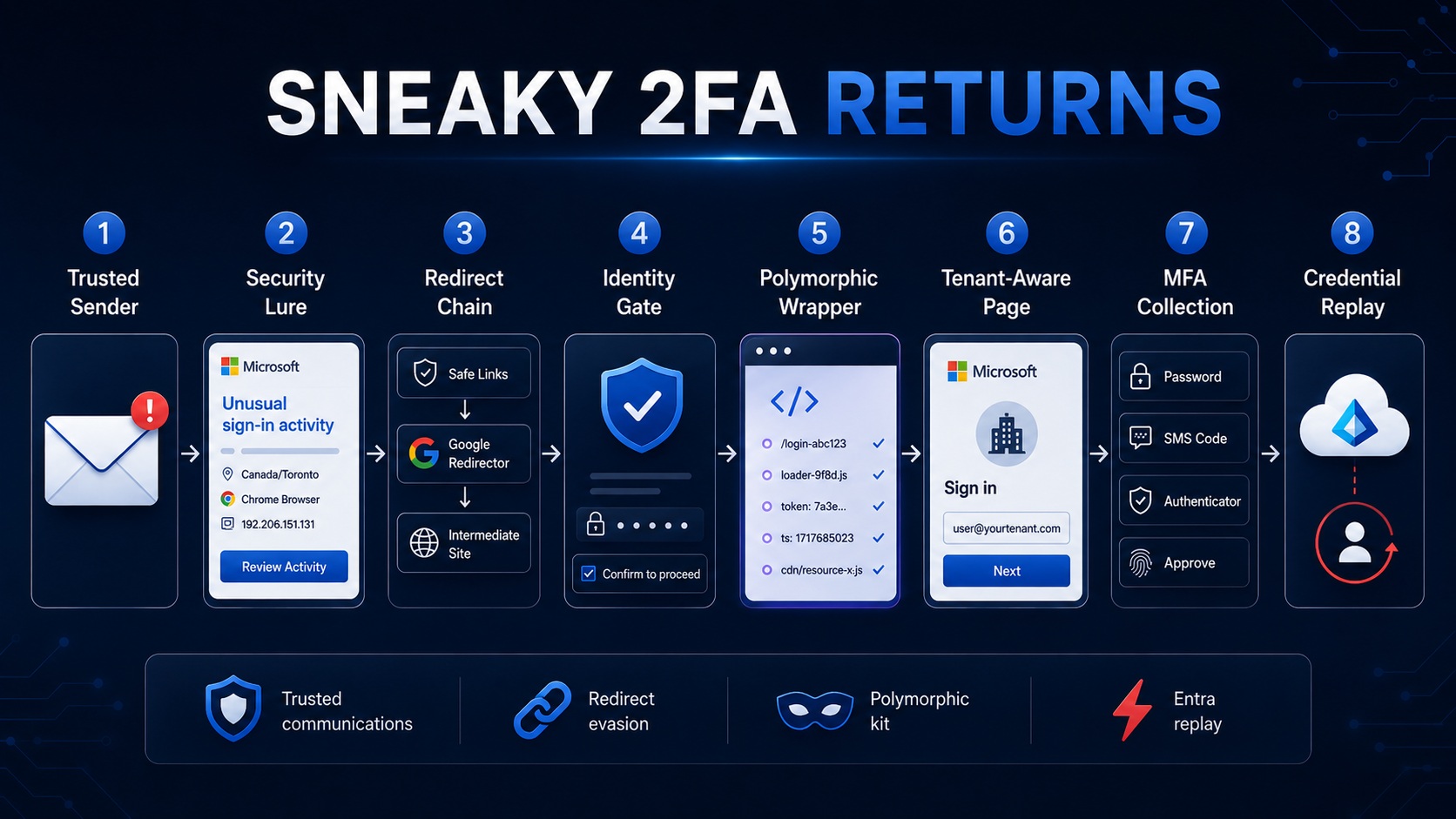
ZeroBEC prevented a targeted Microsoft 365 phishing campaign that combined compromised sender trust with a Sneaky 2FA-style phishing kit. The message was sent from a compromised third-party SaaS sender account that had previously been trusted by the recipient environment and was aimed at enterprise IT recipients rather than a broad consumer audience.
Executive summary
The phishing infrastructure shows clear evolution of the Sneaky 2FA / WikiKit-style framework. It mutates the session wrapper across visits, including route namespaces, loader names, identity-binding handlers, validation slugs, security tokens, decoy destinations, timestamps, and resource URLs. The core JavaScript modules remain stable, but the loader and session surface change enough to weaken filename, hash-only, and page-title detections.
The kit is not a static Microsoft clone. It performs identity-driven rendering, pre-fills the target identity, supports tenant-branded Microsoft sign-in pages, includes an organization sign-in transition, and exposes password, verification-code, SMS, Authenticator approval, number matching, method-selection, and final redirect paths.
Controlled testing with non-valid credentials produced Microsoft Entra ID sign-in events within minutes. The attempts targeted OfficeHome through a browser client and used a Windows and Edge user agent. This confirms near-real-time credential replay against Microsoft Entra ID.
Campaign correlation: why Sneaky 2FA is a strong match
Sekoia described Sneaky 2FA as an AiTM phishing kit targeting Microsoft 365 accounts and distributed through the Sneaky Log Phishing-as-a-Service ecosystem. Sekoia's original Sneaky 2FA analysis also documented autograb behavior, generated phishing paths, server-side Microsoft authentication handling, and detection opportunities around user-agent shifts.
NJCCIC later highlighted Sneaky Log Phishing-as-a-Service, providing additional public context for Sneaky Log as a phishing service operation. eSentire and Menlo Security also documented Sneaky2FA / Sneaky-style campaigns using CAPTCHA or browser-gating behavior and Microsoft 365 themed pages. Their case notes and defensive funnel analyses provide useful ecosystem context.
The observed asset set, MFA workflow, href[.]li decoy behavior, and Sneaky/WikiKit-style page structure make Sneaky 2FA a strong match for this case. This campaign shows the framework moving beyond a recognizable landing page into an end-to-end phishing system: mutable session wrapper, signed resource access, tenant branding, and replay telemetry that connect the email stage, browser stage, and Entra stage into a single intrusion path.
Initial access: trusted sender abuse against enterprise IT
The email was not sent from a disposable domain. It came from a compromised third-party SaaS sender account that had previously been trusted by the recipient environment. That trusted relationship changed the economics of the attack: the sender looked familiar enough to enter the mail flow, while the message content drove the victim toward a Microsoft account-security action.
The visible lure was a Microsoft "Unusual Sign-in activity" alert. It warned that the account would be temporarily locked unless the recipient reviewed the activity within 24 hours. The fake sign-in details used Canada/Toronto, a Chrome browser, and a lure IP. That IP appears in the message body as social-engineering content and should not be treated as confirmed attacker infrastructure by itself.
Below the Microsoft security lure, the email contained a business-thread chain. That thread camouflage made the message look less like a standalone phish and more like a forwarded operational discussion. This matters because IT and security recipients see many messy internal and vendor-driven threads. The attacker used that reality against them.
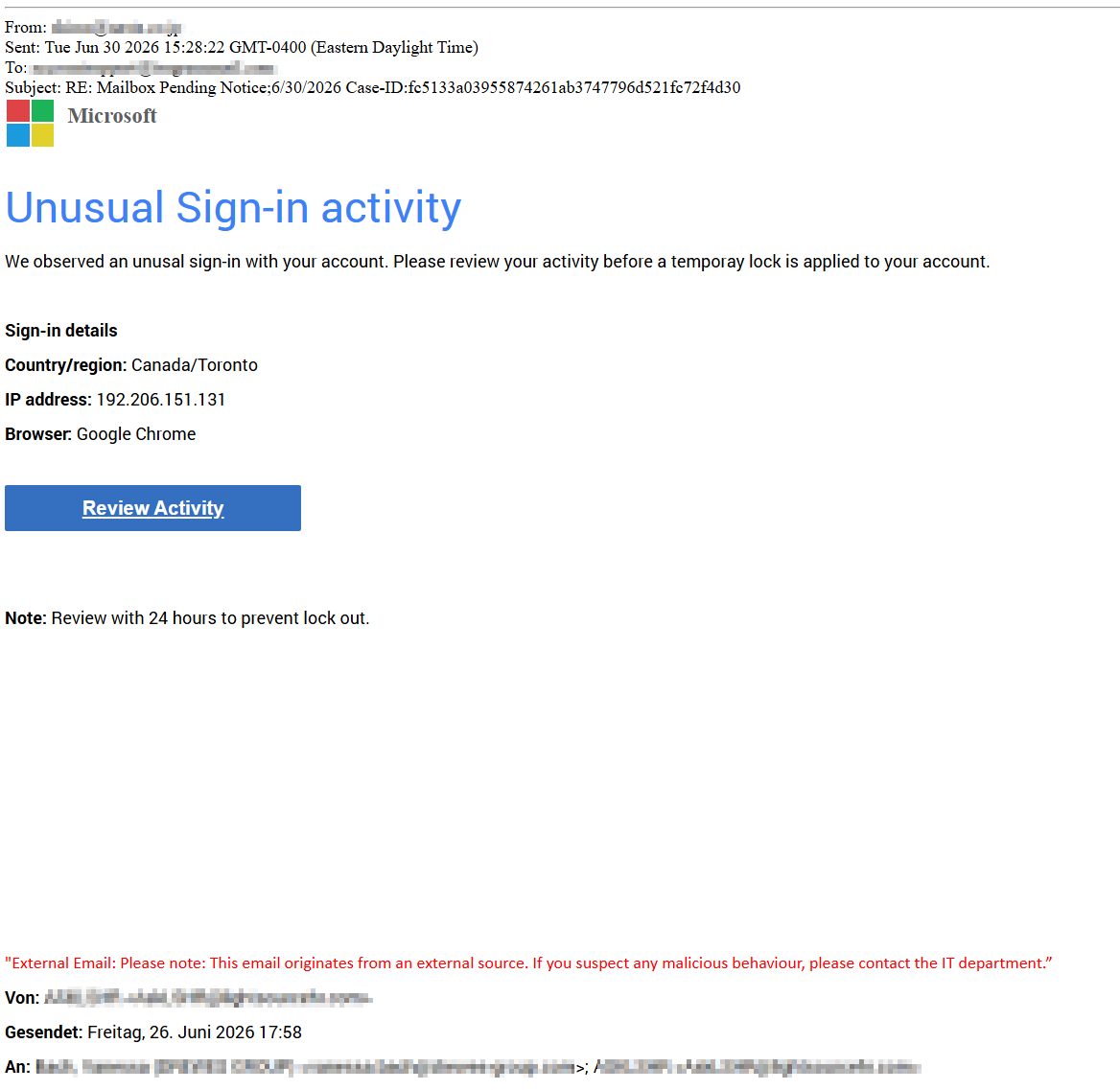 Figure 2: Microsoft sign-in activity lure inserted above a business-thread chain. Customer and recipient identifiers are redacted.
Email authentication and delivery context
The delivery chain showed partial legitimacy rather than clean authentication alignment. The message passed through legitimate cloud-sending infrastructure, with SPF and DKIM passing for the cloud sender, while DMARC was not aligned for the visible sender domain. Microsoft headers also showed tenant-side handling that is consistent with a previously trusted sender path, including low friction treatment in the mail flow.
The important point is not that Amazon SES was malicious. It was not. The important point is that sender trust and cloud-sending legitimacy can blind reputation-only decisions when the actual account behind the SaaS sender is compromised.
A chain within the chain: redirect laundering and session setup
The phishing URL did not expose the final kit immediately. The click moved through multiple trusted redirect services, then an intermediate site, and only then reached the final phishing host. Those trusted redirectors should not be treated as standalone blocklist indicators. They are pivots. The malicious signal appears when the chain resolves into the final host, long route namespace, identity-binding route, session-specific loader, and kit assets.
Safe Links wrapper
  → trusted Google redirect services
  → ad click redirect service
  → intermediate site
  → final phishing host
  → long session route namespace
  → base64 identity-binding handler
  → signed resource URL
  → Microsoft-styled phishing page
This layered chain reduces the value of single-point URL inspection. Each hop can look reasonable in isolation. The full path reveals the intent.
Identity check gate before the Microsoft page
Before the Microsoft credential page is exposed, the victim sees a lightweight identity-check page. The page uses normal security-check language such as "One more step," "Almost there," and "Confirm to proceed." The gate normalizes friction, delays exposure of the credential page, and filters automated scanners that do not complete the browser flow.
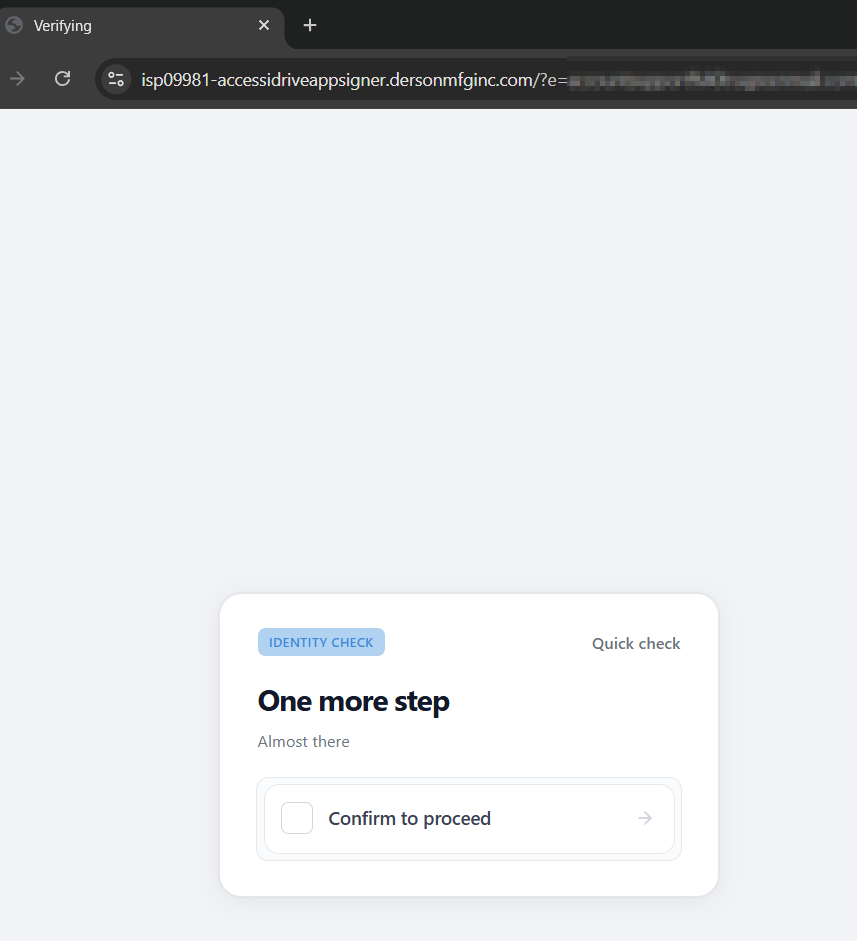 Figure 3: Lightweight identity-check gate shown before the Microsoft sign-in page.
Tenant and federation-aware rendering
The kit is not a single static Microsoft clone. During controlled testing with a synthetic address from a large branded Microsoft 365 tenant, the page rendered a tenant-branded Microsoft-style sign-in screen and loaded the tenant illustration from Microsoft AAD CDN infrastructure. That behavior shows identity-driven tenant discovery or tenant branding retrieval before the password step.
The observed branding path followed this pattern:
hxxps://aadcdn[.]msauthimages[.]net/.../logintenantbranding/0/illustration?ts=<timestamp>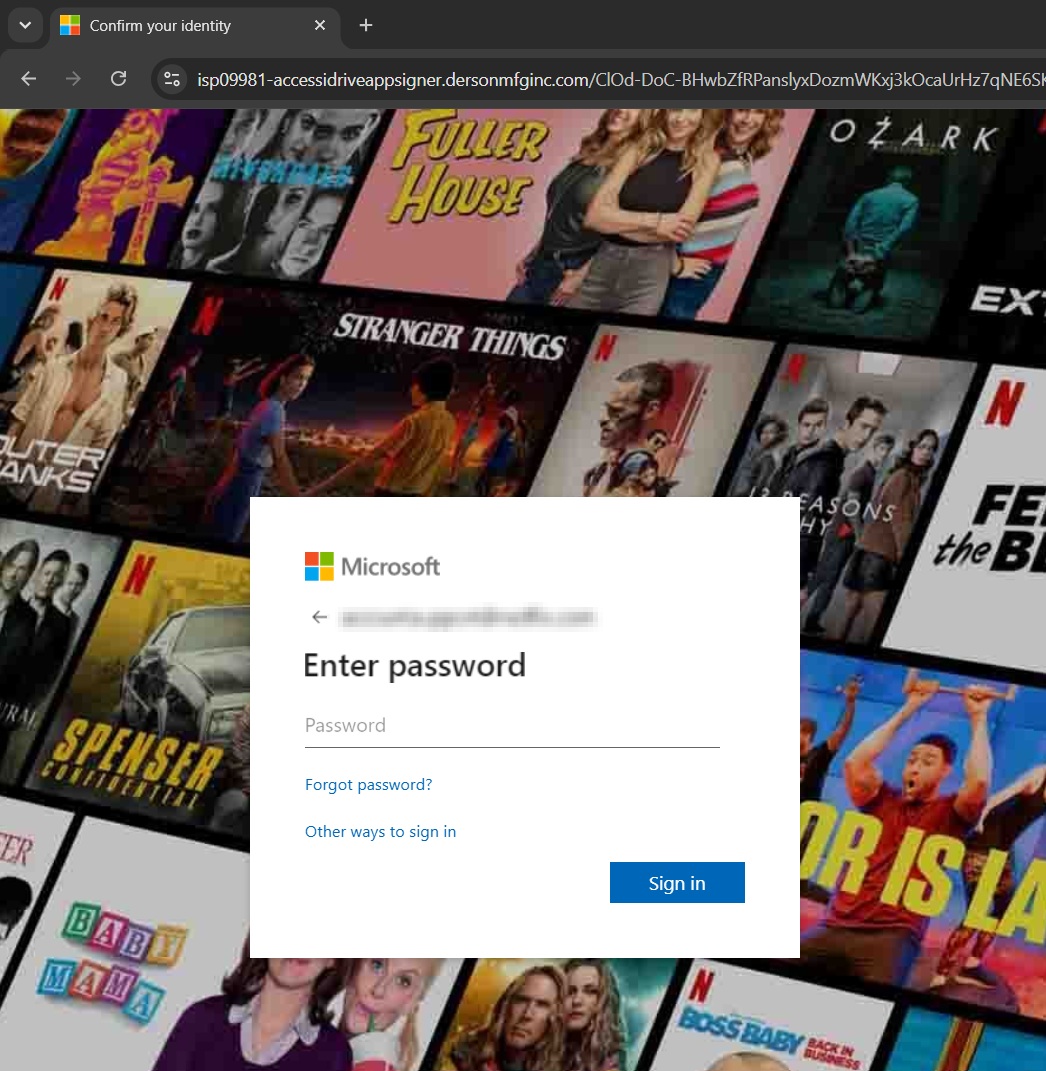 Figure 4: Synthetic branded-tenant test showing tenant-specific Microsoft-style background rendering.
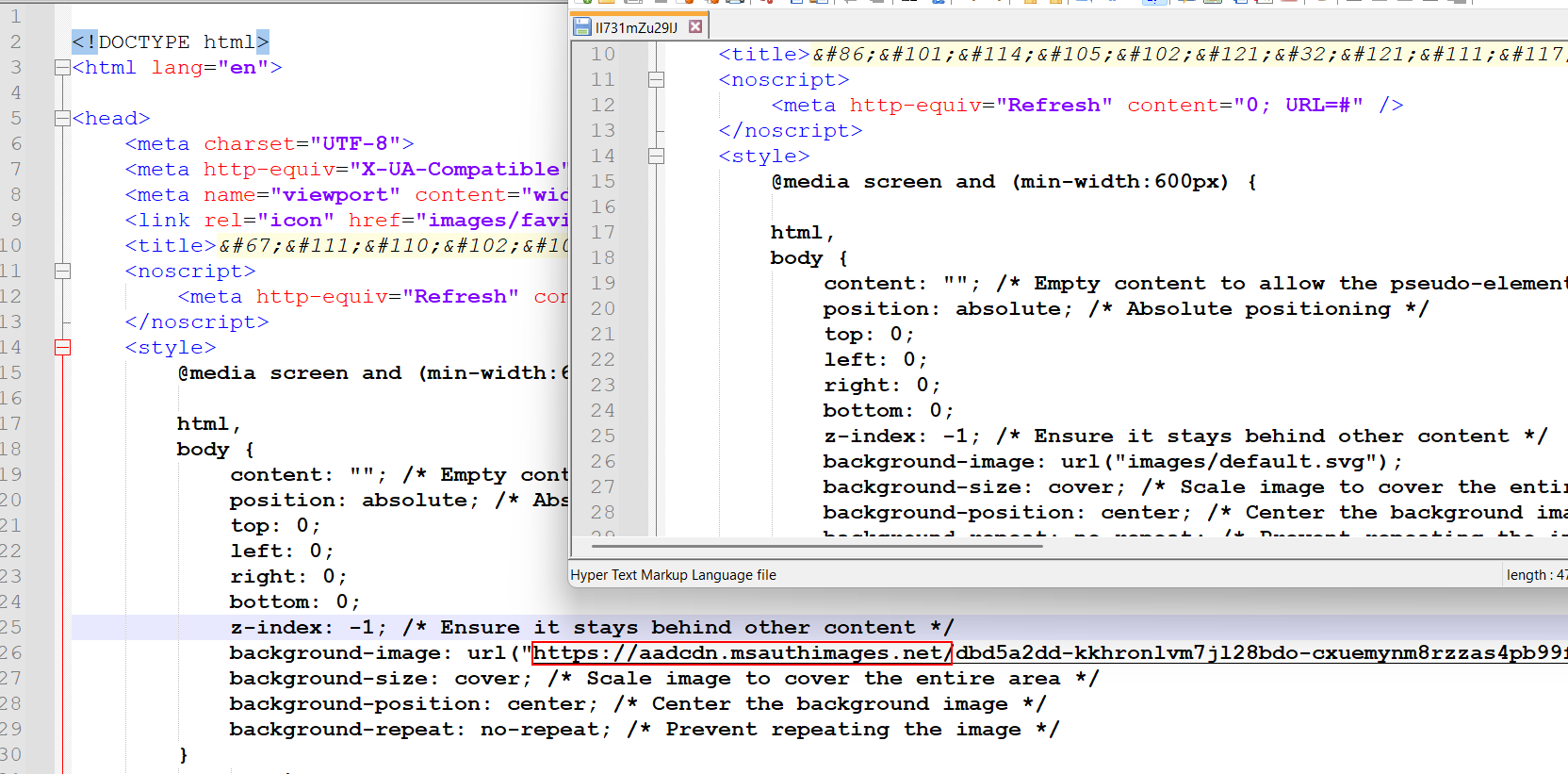 Figure 5: HTML snapshot showing tenant branding loaded from aadcdn[.]msauthimages[.]net.
The HTML snapshots also include an organization sign-in transition. In practice, the kit has UI support for managed and federated-looking account experiences. Combined with the Entra replay evidence, this makes the page much closer to an authentication workflow emulator than a static credential form.
Framework evolution: session-polymorphic wrapper around stable core modules
Repeated snapshots showed a consistent pattern: the core obfuscated modules were reused, but the surrounding session wrapper changed. This is the most important evolution point for detections. The operator does not need to rebuild the entire kit on every visit. It can preserve the tested core workflow while mutating the external surface that defenders are most likely to key on.
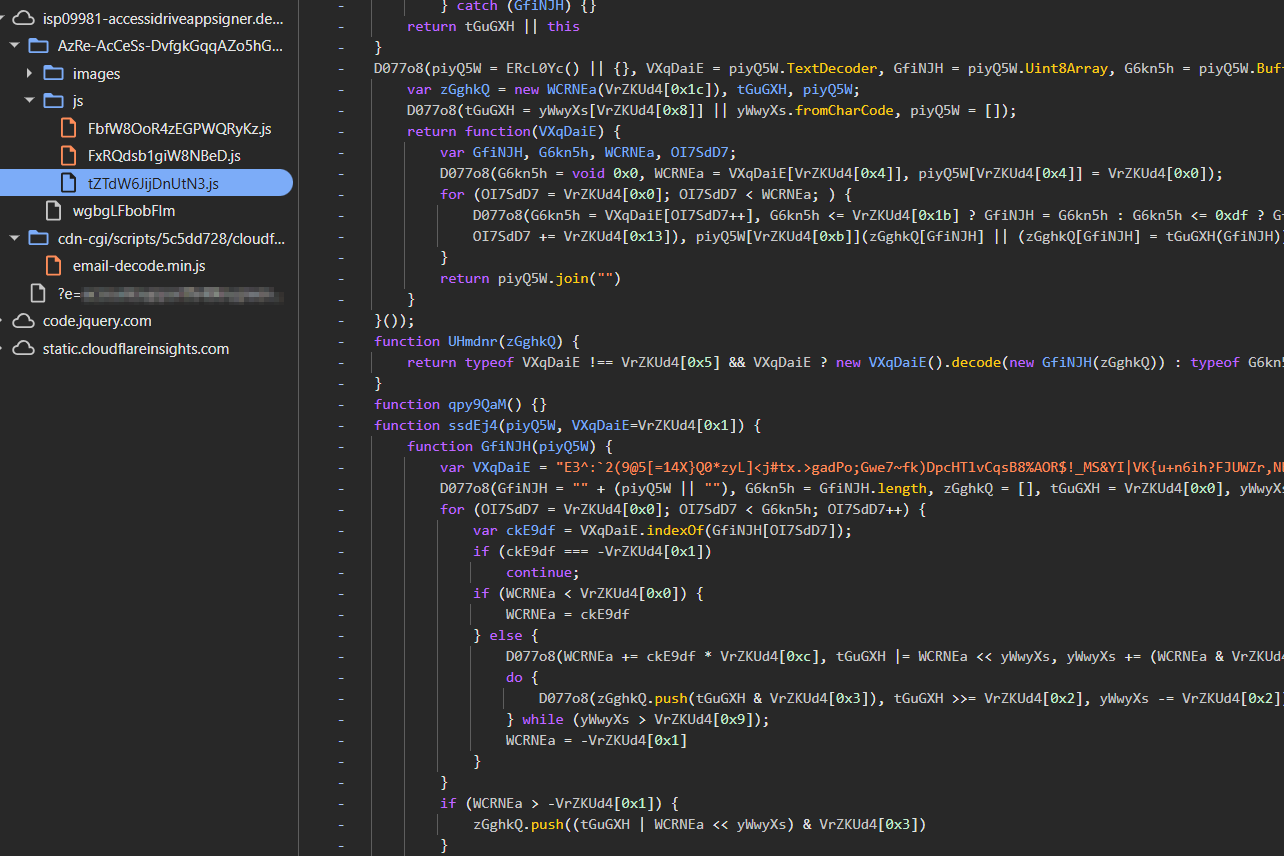 Figure 6: Regenerated loader filenames served under the same phishing host across sessions. The wrapper mutates while the core module hashes stay stable.
| Logical module | Observed regenerated loader names | Stable SHA-256 |
|---|---|---|
| Config module | WXHsGjbUAfdNVqS.js, OTevt8PWqcLiSqt.js, tmdiW6MSCrIgxKp.js | 22b383bee9018beb60be59df9dc5693b710b4fbb460c4ee72249eb6bbb15340b |
| Validator / anti-analysis module | NqrY4TUYVCu5jYbX.js, BJTxtkeT893By8ch.js, zurPmQVUyt3WiHHI.js | 5e8a39a157dfd13b51b0df79db2c846a9fbe59a31ec7cfd93fcfa66999150b9f |
| Phishing workflow module | JrsOsXSqVBa29h3tHGQ.js, bE1j4K896379lrfNGXW.js, LyliOheDGRJmPJdPZA4.js | 8ab710d7d1e89f5f91a71585eb37ab543883ee75fdd21f36aadde931b308e3e5 |
The mutable wrapper included:
- JavaScript loader filenames
- Long route namespace
- Identity-binding handler below the session route
- Validation endpoint slug
- Security token and timestamp values
- Page title and decoy destination
- Query parameter schema
- Target identity and tenant branding URL
- Signed resource URL with hashed IP and user-agent values
The stable core included:
- Microsoft sign-in template and page states
- Password and MFA state machine
- Image-based error and MFA assets
- Browser validation and anti-analysis layer
- Final redirect logic
- Decoded logical workflow actions such as password validation, code validation, SMS validation, and Authenticator polling
Detection impact: filename-only, hash-only, and page-title detections will miss the broader campaign. Durable detection should focus on the combination of route behavior, identity binding, signed resource tokens, decoded workflow strings, kit assets, tenant-branding retrieval, and Entra replay telemetry.
Reversed capabilities supported by the kit
The reversed page exposes a complete Microsoft authentication workflow. The JavaScript function names are randomized, but the logical roles remain visible through the HTML configuration, state maps, asset usage, and runtime behavior.
| Capability | Observed behavior | Detection value |
|---|---|---|
| Password collection | Password-first page with the target identity prefilled. | Look for identity prefill plus Microsoft-themed password step on a non-Microsoft host. |
| Verification code collection | Dedicated one-time code page and invalid-code error asset. | Useful for MFA collection detection. |
| SMS code collection | SMS page with masked phone text and invalid-sms / empty-sms assets. | Useful for method-specific MFA detection. |
| Authenticator approval | Authenticator approval prompt and fallback text. | Shows readiness for push-based MFA collection. |
| Number matching | Text instructing the user to enter the number shown in the Authenticator app. | Important for modern MFA prompt capture. |
| 2FA method selection | Page offers Authenticator, verification code, and SMS choices. | Confirms multi-path MFA handling. |
| Organization sign-in transition | UI path for taking the user to the organization sign-in page. | Supports federation-aware page behavior. |
| Final redirect | Post-flow redirect to Outlook-style destination. | Helps make the flow feel legitimate after credential capture. |
Anti-analysis and browser-gating features
The kit includes a browser validation layer that goes beyond simple obfuscation. The goal is to decide whether the visitor behaves like a real user before exposing or progressing the phishing flow.
- Noscript refresh and fallback behavior
- Honeypot field checks
- Disabled text selection and right-click resistance
- Strict-mode PageValidator-style configuration
- Mouse movement variability and timing checks
- Click and keypress timing checks
- Canvas fingerprint collection
- WebGL and browser capability checks
- Automation and headless-browser checks, including
webdriverartifacts - Console and debugging detection
- Decoy or redirect behavior when validation fails
Session-bound routing and signed resource access
The URL sequence shows that the kit creates a long route namespace for the session and uses additional short handlers below that namespace. The target identity is bound in multiple places: query string email, base64 identity route, HTML state, and signed resource access.
Observed identity-binding route:
/<session-namespace>/YaR1zYfaCliK5?a=YWNjb3VudHN1cHBvcnRAbmV0ZmxpeC5jb20=Decoded value: accountsupport@[synthetic branded tenant]
The signed resource token contained hashed IP and user-agent values, an expiration value, and an image selector. This design protects resources from simple replay and makes scanner reuse of captured URLs less reliable.
Decoded signed resource token payload:
{
  "ip":  "236fb946557b271893ce8f39188aea859093b9fb68f5a34c988baf8af9a1ca7b",
  "ua":  "f9d9e5fc7a9e5166686bdd114f1297037eeccac3a3d2e78979e5f727bf4bb895",
  "exp": 1782872370,
  "img": 3
}
Credential replay confirmed in Microsoft Entra ID
The strongest proof came from controlled testing with non-valid credentials. Shortly after submission, Microsoft Entra ID recorded failed sign-in attempts against the targeted account. The attempts targeted OfficeHome through a browser client, used a Windows and Edge user agent, and failed with Entra error 50126. This confirms live replay of submitted credentials to Microsoft Entra ID.
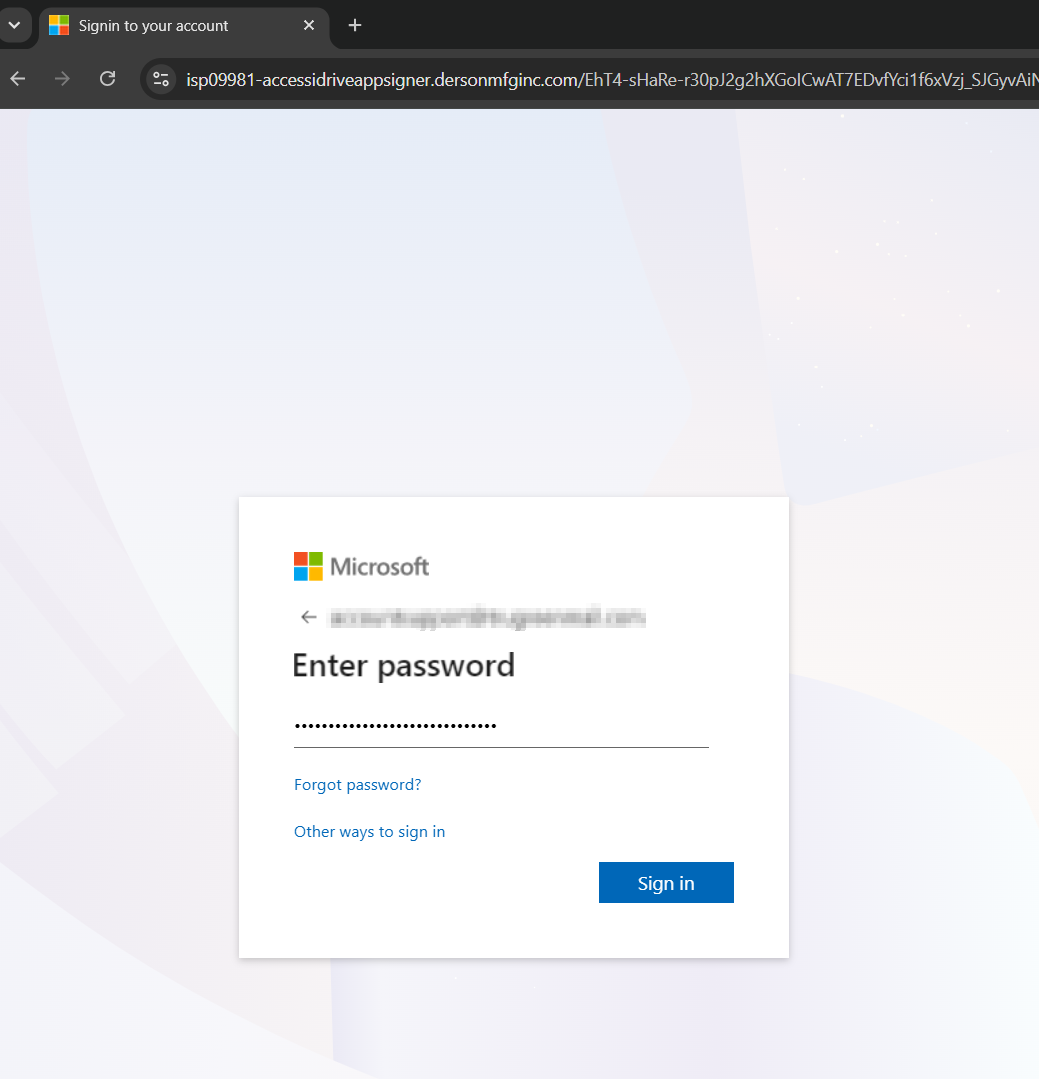 Figure 7: Controlled test showing password entry before Entra recorded failed replay attempts.
| Field | Observed value |
|---|---|
| Application | OfficeHome |
| Client app | Browser |
| Status | Failure |
| Error code | 50126 |
| Failure reason | Invalid username or password |
| Replay timing | Two attempts within one second of the controlled submission |
| Replay IPs | 2a13:9241:b54b:cafb:a8c7:a8fd:554d[:]ec58; 2a13:9246:aa74:e116:5346:5d5d:61fb[:]fb93 |
| ASN | 216157 |
| User agent | Windows 10, Edge 136 style browser user-agent |
Detection and hunting opportunities
Hunting should not chase trusted redirectors by themselves. Microsoft and Google redirect services appear in many legitimate workflows. In this campaign, they matter only when the chain resolves into the final phishing host, session route namespace, identity-binding handler, and kit assets.
Recommended web and URL hunting should focus on the final host and the kit-specific path behavior:
// Web/proxy concept, pseudocode
where Url has "accessidriveappsigner[.]dersonmfginc[.]com"
   or Url has "dersonmfginc[.]com"
   or Url matches "[?&]e=.*@"
   or Url matches "/[A-Za-z0-9_-]{80,}/js/[A-Za-z0-9]{10,}\.js"
   or Url has "verify_app[.]png"
   or Url has "verifnotif2[.]png"
   or Url has "appnotif2[.]png"
Recommended Entra hunting should focus on replay telemetry from the observed replay infrastructure and behavior:
SigninLogs
| where AppDisplayName == "OfficeHome"
| where ResultType == 50126
| where ClientAppUsed == "Browser"
| where IPAddress in~ (
    "2a13:9241:b54b:cafb:a8c7:a8fd:554d[:]ec58",
    "2a13:9246:aa74:e116:5346:5d5d:61fb[:]fb93"
  )
  or AutonomousSystemNumber == 216157
| project TimeGenerated, UserPrincipalName, IPAddress, AutonomousSystemNumber,
          UserAgent, AppDisplayName, ResultType, ResultDescription
Recommended email hunting should focus on the lure and trust-abuse pattern, not broad blocking of the cloud sender:
Email events or message trace concept
where Subject has "Mailbox Pending Notice"
   or Subject has "Unusual Sign-in activity"
   or Subject has "Case-ID:"
where Sender is a previously trusted third-party SaaS sender
where DKIM domain differs from the visible sender brand
where body contains "Review Activity" and a Microsoft security-alert lure
Indicators of compromise and hunting context
All displayed network indicators are defanged. Items marked as "context only" are useful for correlation but should not be blocked globally without additional evidence.
Web and session indicators
| Category | Indicator | Type | Use |
|---|---|---|---|
| Final phishing host | isp09981-accessidriveappsigner[.]dersonmfginc[.]com | Domain | High-confidence campaign IOC. |
| Root domain | dersonmfginc[.]com | Domain | Use with host and path context. |
| Phishing URL pattern | hxxps://isp09981-accessidriveappsigner[.]dersonmfginc[.]com/?e=<email>&utm_*=&campaign=&mid=&eid= | URL pattern | Detect identity-bound entry URLs. |
| Session route | /<long random route namespace>/ | Path pattern | Detect session namespace behavior. |
| Identity binding | /<session-namespace>/<handler>?a=<base64 email> | Path pattern | Detect base64 target identity binding. |
| Signed resource | /<numeric resource>?t=<base64-json>.<signature> | Path pattern | Detect signed resource URLs. |
| Decoy behavior | href[.]li/?<benign Microsoft-themed content> | URL pattern | Correlation with Sneaky/WikiKit-style decoy behavior. |
Replay indicators
| Category | Indicator | Type | Use |
|---|---|---|---|
| Replay IP | 2a13:9241:b54b:cafb:a8c7:a8fd:554d[:]ec58 | IPv6 | Observed credential-replay infrastructure. |
| Replay IP | 2a13:9246:aa74:e116:5346:5d5d:61fb[:]fb93 | IPv6 | Observed credential-replay infrastructure. |
| Replay ASN | 216157 | ASN | Hunting enrichment for replay telemetry. |
| Replay app | OfficeHome | Entra application | Credential replay target. |
| Replay result | 50126 | Entra error code | Invalid credentials after replay. |
| Replay user-agent | Windows 10 / Edge 136 style browser user-agent | User-agent | Observed replay client fingerprint. |
Kit asset indicators
| Asset group | Observed assets | Use |
|---|---|---|
| Microsoft template | microsoft[.]svg, logo[.]png, sign[.]png, favicon[.]ico | Microsoft page impersonation assets. |
| Navigation and prompts | emailphone[.]png, question[.]png, key[.]png, back[.]png, enter[.]png, push[.]png, info[.]png | Support sign-in and method-selection UI. |
| MFA pages | verifnotif2[.]png, appnotif2[.]png, verify[.]png, verify_app[.]png, verify_code[.]png, verify_sms[.]png | High-value indicators for MFA collection paths. |
| Error rendering | invalid-pw[.]png, invalid-code[.]png, invalid-sms[.]png, empty-sms[.]png | Image-based error handling. |
Email indicators and context
| Field | Observed or recommended representation | Use |
|---|---|---|
| Sender account | Compromised third-party SaaS sender account, redacted | Do not publish exact customer or sender identity. |
| Recipient focus | Enterprise IT and security recipients | Targeting context. |
| Subject pattern | RE: Mailbox Pending Notice;6/30/2026 Case-ID:<long hex> | Lure and thread camouflage pattern. |
| Message-ID domain | us-west-2[.]amazonses[.]com | Delivery context, not a blocking IOC. |
| Visible lure | Microsoft "Unusual Sign-in activity" alert | Primary social-engineering content. |
| CTA text | Review Activity | Useful for body hunting. |
| Fake lure IP | 192[.]206[.]151[.]131 | Appears in lure body only, not confirmed infrastructure. |
| Authentication context | SPF and DKIM pass for cloud sender; DMARC not aligned with visible sender brand | Explains sender trust abuse. |
ZeroBEC conclusions: why this attack matters
This case shows Sneaky 2FA-style evolution across the full attack chain. The campaign did not rely on one trick. It combined a compromised trusted sender, enterprise IT targeting, business-thread camouflage, trusted redirect laundering, an identity-check gate, a session-polymorphic loader, tenant-branded rendering, signed resource access, live Entra credential replay, and MFA collection paths.
The most important finding is the cross-stage nature of the attack. No single layer carried the full signal. The sender looked trusted. The redirectors looked legitimate in isolation. The Microsoft page rendered tenant-aware branding. The replay only appeared in Entra after the controlled credential submission. Traditional SEG logic that stops at sender reputation, single URL reputation, or static body analysis will miss too much of the chain.
In the observed environment, secure email gateways and native cloud controls were bypassed or neutralized before ZeroBEC intervention. The attacker abused trust that already existed in the mail flow and then shifted the decisive evidence into the browser and identity layers.
ZeroBEC is needed because BEC and ATO defense has to correlate the entire user journey: sender trust, historical sender behavior, message intent, redirect behavior, browser-stage kit signals, tenant-aware rendering, credential replay telemetry, and MFA follow-on risk. This is the layer where this campaign becomes visible.
For defenders, the practical takeaway is clear: do not treat "trusted sender" as safe, do not treat trusted redirectors as harmless when they lead into a session-gated phishing host, and do not rely on static page or filename indicators for Sneaky 2FA-style infrastructure. The detection strategy has to follow the attack across email, web, and identity.