Threat Research
Voicemail Quishing: From Inbox to Mobile AiTM
A voicemail-themed phishing email delivered a DOCX containing a QR code, designed to push the victim onto a less-defended mobile phone for an AiTM credential harvest.
By ZeroBEC Team · May 21, 2026 · 7 min read
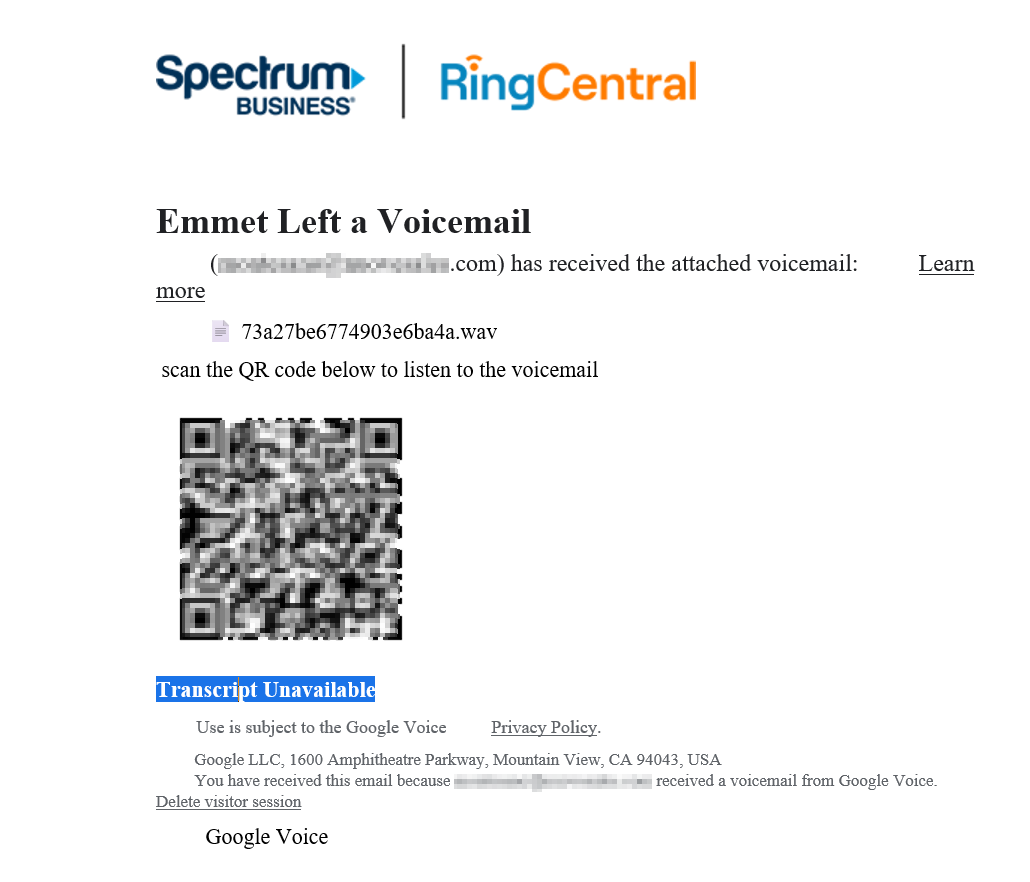
On May 20, 2026, ZeroBEC's detection engine flagged a phishing campaign targeting one of our customers with a missed-voicemail lure. The attached Word document contained no link, no macro, and no script. It contained a QR code.
The attacker's goal was to get the victim off their managed work device and onto a personal mobile phone, where there is no managed-device EDR, no Defender for Office 365 SafeLinks rewriting, and no SOC visibility. From there, an Adversary-in-the-Middle proxy of the real Microsoft sign-in flow captures both the credentials and the MFA-completed session token.
QR-code phishing, or quishing, is now standard tradecraft for moving the credential-harvesting step away from the email-protected device. The technique itself is well documented. What makes this particular campaign worth a walkthrough is the full kill chain we observed, including one user who scanned, authenticated, and handed over a session.
The Voicemail Lure
The inbound message is themed as a missed-voicemail notification with an urgency hook tied to a past-due payment:
- Subject pattern:
Caller left (1) Voicemail For Past due Pym to <recipient>@<customer>.com Duration-01:21:21 <20-char hex> - Sender: spoofed to mimic an internal voice/PBX system notification
Two things to note about the subject line. First, the recipient's own local-part appears in the subject. This is a personalization detail that bypasses generic-bulk-email heuristics and increases the appearance of legitimacy. Second, every recipient's message carries a unique 20-character hex token at the end of the subject. The token has no operational purpose for the victim. It exists to defeat signature-based detection: every message is structurally identical, but no two are bit-identical.
The DOCX Attachment and Its QR Code
The email's only attachment is a Word document, named to match the lure:
- Attachment name pattern:
play_audio.<20-char hex>.docx
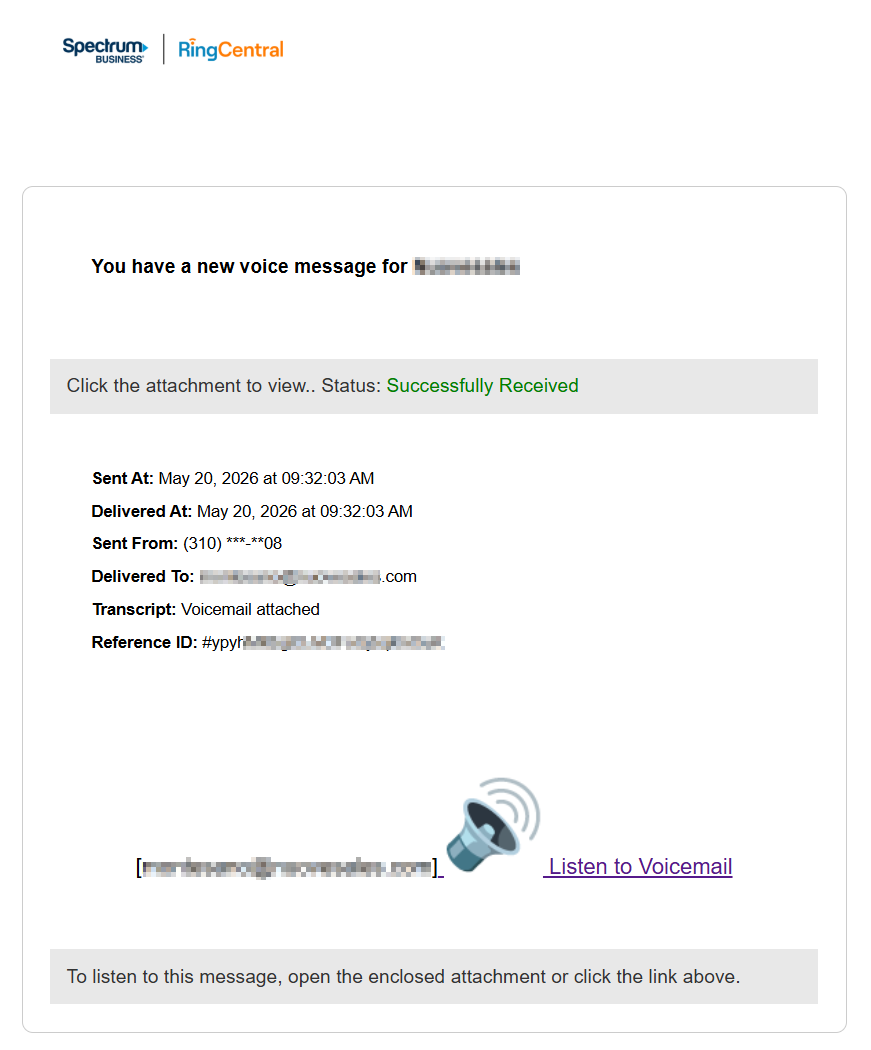
Opening the document shows a forged Spectrum Business and RingCentral brand banner, a heading announcing a voicemail, a placeholder .wav filename, and instructions to scan a QR code to listen to the message.
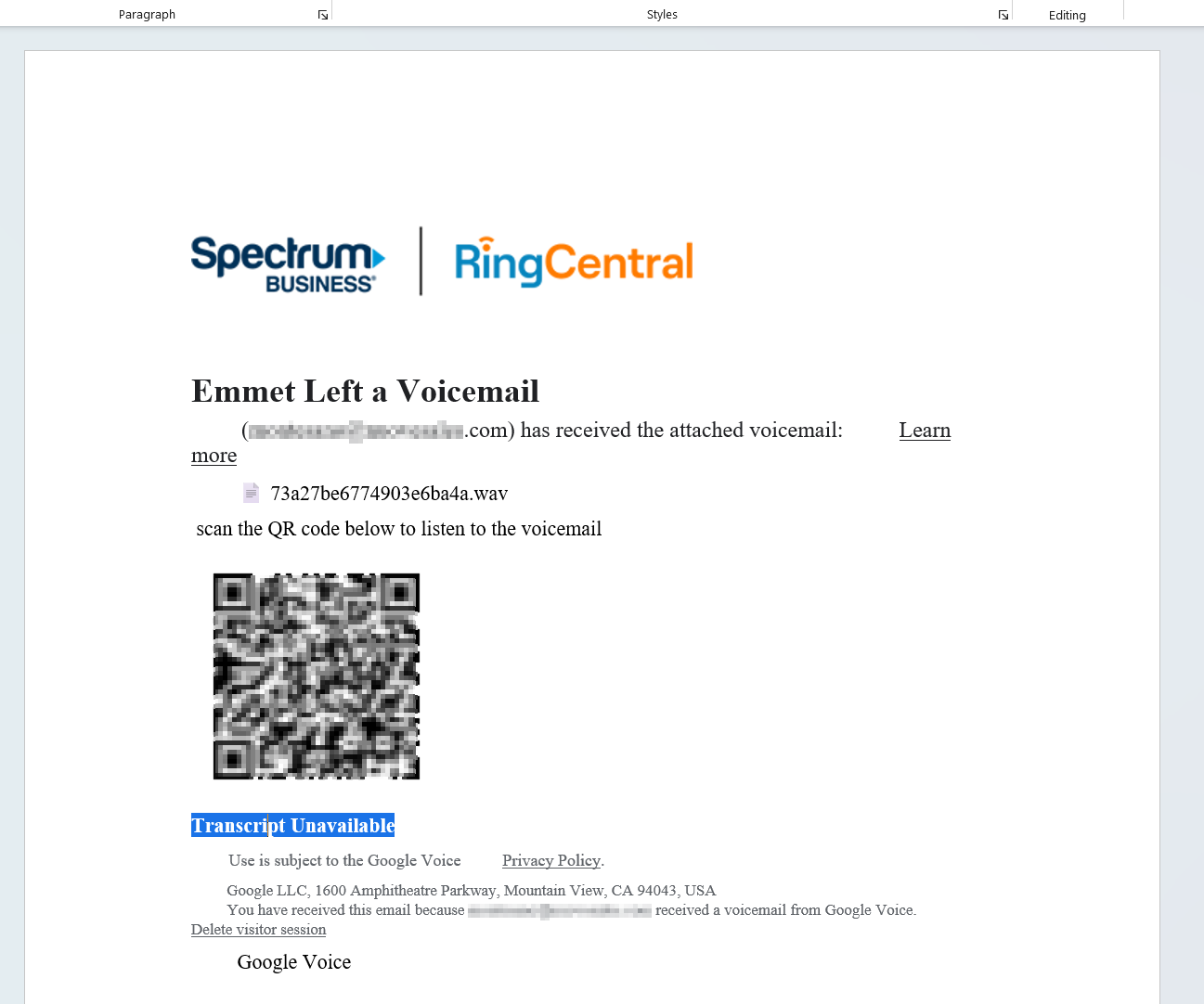
There is no clickable link in the document. There is no embedded macro. The QR code is a static image. A traditional attachment scanner finds nothing to flag: no payload to detonate, no URL to inspect, no executable to evaluate. The document is, technically, harmless to a scanner.
The Mobile Pivot: Why a QR Is the Whole Point
The choice of a QR code over a clickable link is the deliberate architectural pivot at the heart of this attack. A QR code in a Word document, viewed on a work laptop, is unactionable. The user cannot click it. To follow the lure, the user must pick up a personal mobile phone, open the camera app, scan the code, and tap the URL preview.
The moment the user does that, the attacker has moved the credential-harvesting step onto a device with very different defensive posture:
- No managed-device EDR. Personal phones are typically not enrolled in the organization's EDR or MDM.
- No Defender for Office 365 SafeLinks rewriting. The QR URL was never in the email body, so it was never rewritten or scanned by the email security stack.
- No corporate proxy or DNS filtering. The phone is on the cellular or home network, not the corporate network.
- No SOC visibility. The browser session lives entirely on personal infrastructure. The SOC does not see the click, the CAPTCHA solve, or the credential entry.
The work laptop, the email gateway, the EDR, and the proxy stack are all bypassed by a single change of device. The user performs the bypass for the attacker.
The CAPTCHA Gate
The QR target URL has the form https://kameazi[.]com/LS@<random>/lt;recipient>@<customer>.com. The recipient's email is encoded directly into the URL path. This is convenient for the attacker (the next page knows whose credentials to harvest before the user types them) and a useful campaign fingerprint for defenders.
Tapping the URL lands the victim on a CAPTCHA challenge:
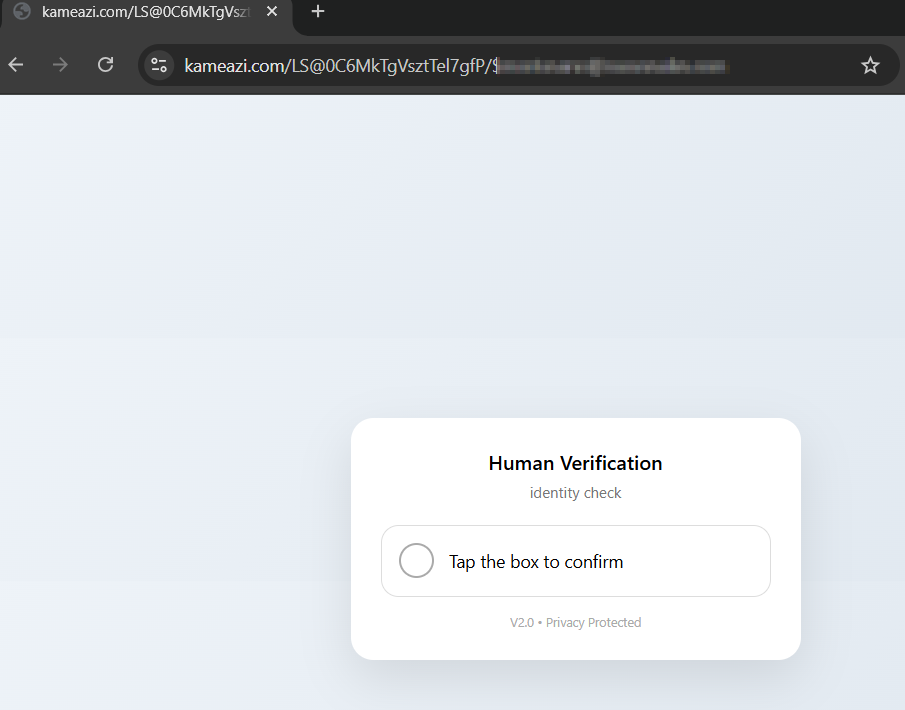
CAPTCHA gating is now standard tradecraft. Email security vendors that detonate URLs in sandboxes cannot solve CAPTCHAs at scale, so the gate forces the malicious page to be reached only by a real human.
The AiTM Credential Harvest
After CAPTCHA completion, the victim lands on a credential-harvesting page that imitates the real Microsoft sign-in flow:
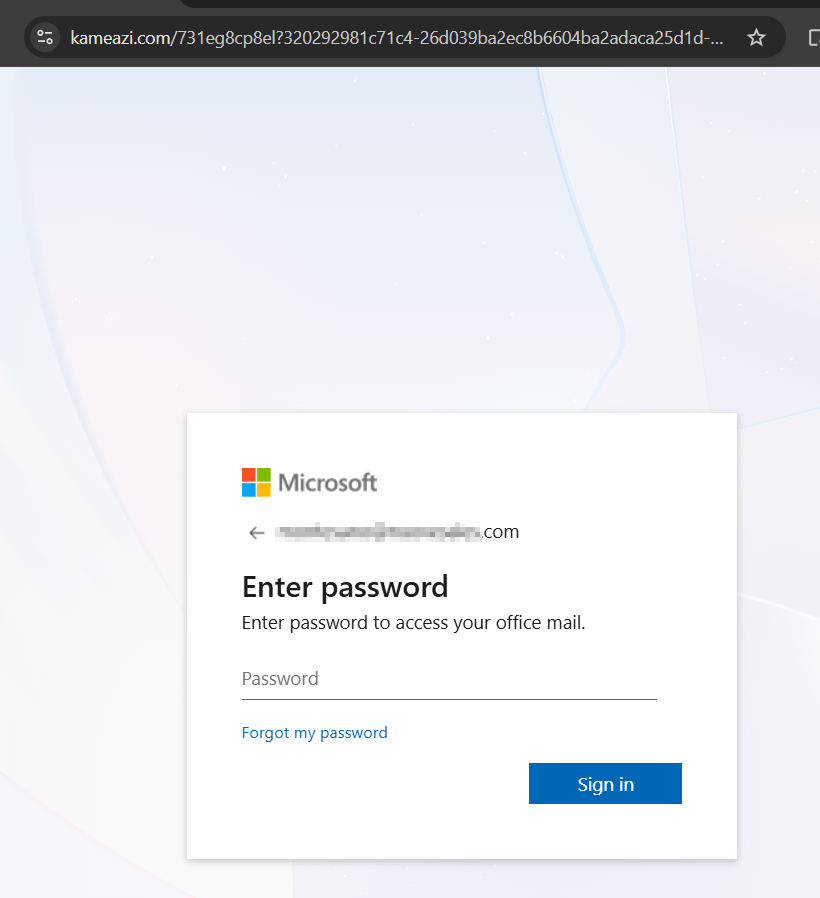
The page is an Adversary-in-the-Middle (AiTM) proxy. Credentials entered flow through the attacker's backend to the real Microsoft login. MFA is satisfied by the victim on their own device. The authenticated session token is captured. MFA is not bypassed. It is proxied.
In this campaign, one targeted user scanned the QR with their phone, completed the CAPTCHA, and entered their credentials on the AiTM page. The session was captured. The standard post-AiTM playbook applies: refresh-token issuance, mailbox enumeration, possible MFA-method enrollment for persistence, and possible inbox-rule creation to hide the attacker's mailbox activity from the user.
Why Behavioral Detection Catches It
Where a perimeter gateway evaluates each message in isolation, ZeroBEC's AI-native detection engine watches for shifts in user and mailbox behavior across the whole tenant. A QR code in a DOCX attachment, a voicemail-pretext subject line targeting payments, an external sender unfamiliar to the recipient: each one individually is suggestive, none is conclusive. Behavioral analysis correlates them with downstream user activity, multi-mailbox patterns, and post-click authentication signals.
That combined visibility, before delivery, after delivery, and through the post-click authentication, is what closes the gap between a clean email-gateway verdict and an attacker with a valid session token.
Recommendations (Prioritised)
- Treat QR codes in inbound attachments as a high-confidence phishing indicator. No legitimate business workflow ships a QR code embedded in a Word document attached to an email asking the user to scan it. Add inbound-attachment QR detection to your mail flow rules and route to manual review.
- Deploy phishing-resistant MFA (FIDO2 / passkeys) across all M365 accounts. AiTM works because the second factor is proxied. FIDO2 binds the authentication to the origin, so the proxy cannot replay the challenge.
- Enforce Conditional Access policies that require a managed device. The whole point of the QR pivot is to get authentication off the managed laptop. Conditional Access policies that require a compliant, managed device for M365 sign-in eliminate the mobile-pivot bypass at the authentication layer.
- Alert on MFA-method registration events as high-severity. A new authenticator registered within minutes of a sign-in from an unfamiliar IP or device is a near-certain attacker-persistence indicator. Remediation must include auditing and removing every MFA method registered during the attacker window.
- Educate users specifically about voicemail-pretext lures and the QR-on-personal-phone funnel. This is the attacker pattern that bypasses the enterprise stack. Users do not need to memorize the specifics. They need to know that "scan this QR with your phone to listen to the voicemail" is a phishing pattern, not a normal workflow.
- Deploy ZeroBEC for behavioral analysis across your tenant. Behavioral detection on the mailbox and user principal catches inbound attachment-only attacks that perimeter gateways cannot signature.
Indicators of Compromise (Defanged)
Mail characteristics:
- Subject pattern:
Caller left (1) Voicemail For Past due Pym to <recipient>@<domain> Duration-<HH:MM:SS> <20-char hex> - Attachment filename pattern:
play_audio.<20-char hex>.docx - Brand impersonation inside the document: Spectrum Business, RingCentral, Google Voice
Payload infrastructure:
- QR target domain:
kameazi[.]com - QR URL pattern:
https://kameazi[.]com/LS@<token>/lt;recipient-email> - The recipient's own email address is encoded directly into the URL path
Behavioral pivots for SOC hunting:
- A 20-character lowercase hex token at the tail of an inbound subject line, with no legitimate business explanation
- DOCX attachments matching the filename pattern
play_audio\.[0-9a-f]{20}\.docx - Outbound network traffic to
kameazi[.]comfrom any host on the corporate network
Bottom Line
A QR code in a Word document is a simple-looking lure that gets a lot done. It is not a clickable link, so the email security stack has nothing to inspect. It is not a macro, so the document scanner has nothing to detonate. It is a graphical pointer the attacker hands to the victim, asking them to follow it on a device the organization does not protect.
The fix is not at the email gateway. The fix is at the authentication layer (FIDO2, Conditional Access requiring managed devices) and at the behavioral-detection layer that watches for the multi-mailbox pattern and the post-click session anomalies. ZeroBEC's AI-native platform closes that gap. Ready to see how it works against quishing campaigns? Start free or contact us.